FontGenerator

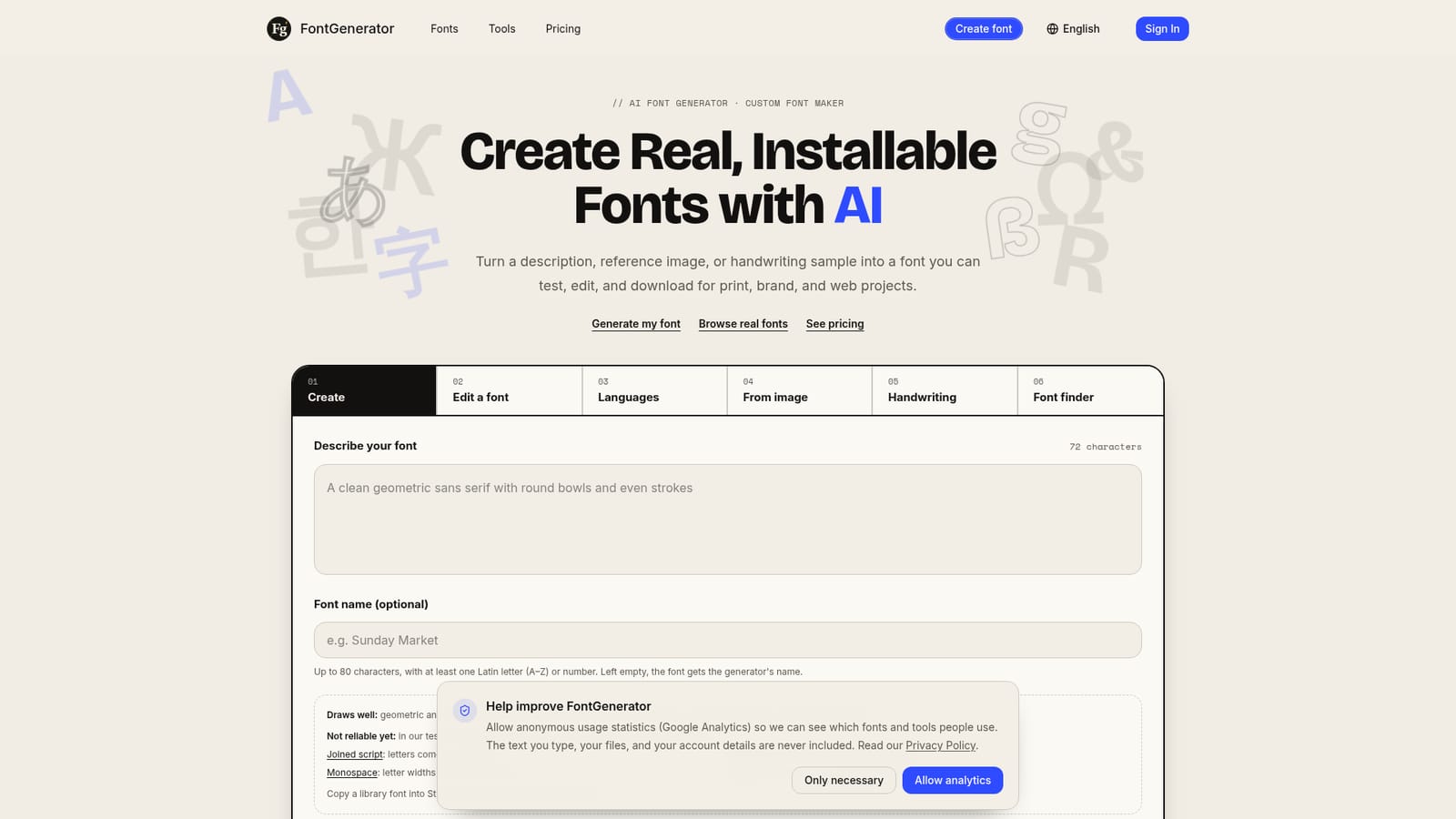
Describe a style, upload an image or handwriting, and export a real installable font.

Beginner
Screenshot of FontGenerator, Describe a style, upload an image or handwriting, and export a real installable font

What is FontGenerator?

FontGenerator converts a text description, image, or handwriting sample into an installable TTF, OTF, WOFF, or WOFF2 font, with in-browser testing and a glyph-level Studio editor for refinement.

FontGenerator turns a written description, a reference image, or a handwritten alphabet into a working font file rather than a static preview graphic. The system interprets stroke weight, contrast, letter shape, and intended use, then builds a full character set that can be tested with real words before anything is downloaded. Finished fonts export as TTF, OTF, WOFF, and WOFF2, so the same file can move from a desktop design tool to a packaging mockup to a live website. The tool is built for people who need a specific typeface and cannot find it in a stock library: brand and packaging designers matching a logo's lettering, template and worksheet creators who need a consistent custom look, and anyone turning their own handwriting into a reusable digital font. A Studio editor lets a user redraw individual glyphs, swap in a hand-drawn replacement, or adjust spacing and width without rebuilding the whole family, and language coverage can be extended afterward into Cyrillic, Greek, Hebrew, Thai, Arabic, Hindi, kana, or Korean. In practice, the workflow runs through three stages: pick a starting point (description, image, handwriting sample, or an existing permitted font), review the generated character set against real text and flagged glyphs, then refine and export. The homepage is direct about current limits: joined scripts, blackletter, monospace, and stencil styles are not generated reliably and are better started from the built-in font library, which also offers personal-use downloads and a font finder for identifying a type direction from a photo. Compared with searching a conventional font marketplace, FontGenerator fits projects where the exact letterforms do not already exist anywhere, trading the certainty of a professionally hand-cut typeface for speed and customization. It sits alongside the library and free tools (font finder, language checker) as part of one connected workflow rather than a single-purpose generator.

How do you use FontGenerator?

  1. 1Choose a starting point
    Write a short description of the letter shapes and mood, upload a cropped image of lettering you like, or write out the alphabet by hand on screen for a handwriting-based font.
    FontGenerator — Choose a starting point
  2. 2Select characters and quality
    Choose English basics or full Latin with accents, and pick a quality tier such as Standard for trying an idea or Refined for a font meant for real use.
  3. 3Generate and test the character set
    Review the complete set of letters, type real words and numbers in the preview, and check any glyphs flagged during generation.
  4. 4Refine glyphs in Studio
    Open the font in Studio to redraw a specific letter, upload a replacement shape, or adjust spacing and width, then rebuild and retest.
    FontGenerator — Refine glyphs in Studio
  5. 5Add extra language coverage
    Extend a finished font with Cyrillic, Greek, Hebrew, Thai, Arabic, Hindi, kana, or Korean characters built in the same style.
  6. 6Download the finished font
    Export the file as TTF, OTF, WOFF, or WOFF2 once the character coverage report and specimen look correct.

Pros and cons

Pros

  • Exports real installable font files (TTF, OTF, WOFF, WOFF2), not just preview imagesAI
  • Studio editor allows redrawing individual glyphs and adjusting spacing without starting overAI
  • Can extend a font into additional languages and scripts like Cyrillic, Greek, Arabic, or KoreanAI
  • Includes a free font library and tools like a font finder and language checker alongside the generatorAI
  • Credits are returned automatically if a font generation failsAI

Cons

  • Joined script, blackletter, monospace, and stencil styles are explicitly unreliable with the generatorAI
  • Fonts made on the free plan become public and may be added to the library after reviewAI
  • Generation is credit-based, so experimenting with multiple styles consumes paid creditsAI
  • No mention of API access, team collaboration, or offline desktop app for professional type studiosAI
  • Homepage does not disclose exact subscription prices or credit costsAI

How much does FontGenerator cost?

Pricing

FontGenerator uses a freemium, credit-based model: creating a font costs credits (100 credits for a base font), with free-plan fonts made public and paid plans keeping fonts private. Exact subscription tiers and credit prices are listed on the pricing page.

Learn more

Features

Generates installable fonts from text descriptions, reference images, or handwriting samples; supports in-browser testing, a Studio glyph editor, multi-language extension (Latin, Cyrillic, Greek, Hebrew, Thai, Arabic, Hindi, kana, Korean), a font library, and free tools like a font finder and language checker.

Learn more

Frequently asked questions about FontGenerator

  • How much does FontGenerator cost?
    FontGenerator uses a freemium, credit-based model: creating a font costs credits (100 credits for a base font), with free-plan fonts made public and paid plans keeping fonts private. Exact subscription tiers and credit prices are listed on the pricing page.
  • How do you use FontGenerator?
    The walkthrough on this page covers 6 steps: 1. Choose a starting point 2. Select characters and quality 3. Generate and test the character set 4. Refine glyphs in Studio 5. Add extra language coverage 6. Download the finished font.
  • What platforms does FontGenerator support?
    FontGenerator is available on Web App.
  • What are the limitations of FontGenerator?
    Joined script, blackletter, monospace, and stencil styles are explicitly unreliable with the generator. Fonts made on the free plan become public and may be added to the library after review. Generation is credit-based, so experimenting with multiple styles consumes paid credits.

Status

StatusActive
Views0
Outbound clicks0
Added10/13/2026

Platforms

Web App

Pricing

FreemiumPaid