Pricing
Priced per visual set, not per user. Basic (2D and 3D) is $25, Plus with a 360 tour is $45, Max Render with white label and renderings is $69, and Multi Set Pro adds three styles in one order. A money back guarantee is advertised.
Learn moreTurn a basic 2D floor plan into 3D renders, 360 tours and FBX models
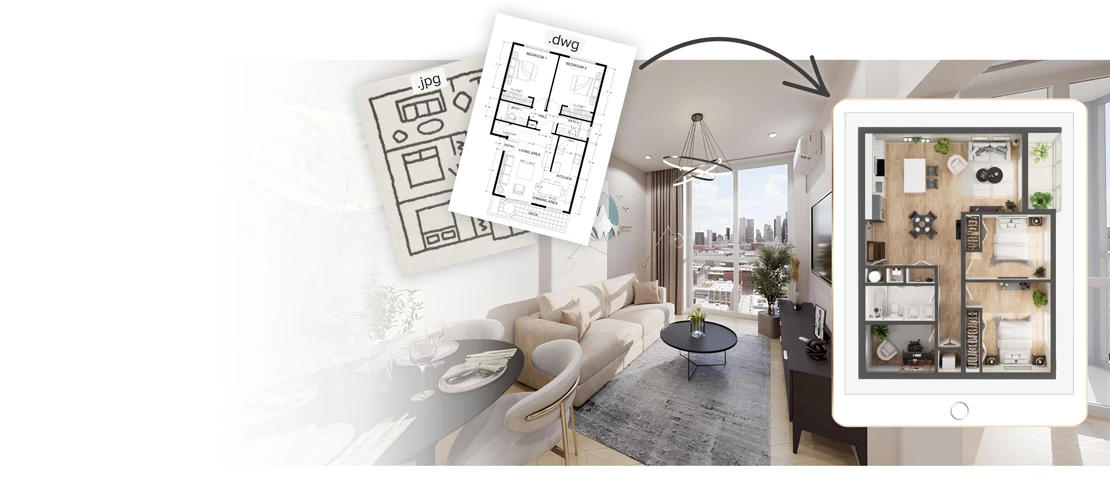
Getfloorplan is a building elevation tool that turns a basic 2D floor plan into 3D renders, 360 tours and FBX models. A floor plan to 3D service that converts uploaded 2D layouts into colored plans, furnished 3D renders, 360 virtual tours and editable FBX models, typically within 24 hours.
Getfloorplan is a service that accepts a 2D floor plan and returns a bundle of property visuals: colored 2D plans, 3D renders with furniture, a 360 degree virtual tour and, at higher tiers, an editable 3D model in FBX format. Uploads are accepted as dwg, jpg, png and similar formats, so the input can be a clean CAD export or a scanned sketch. The stated turnaround is 24 hours, and the site positions the work as requiring no special skills from the person placing the order. The product sits between a rendering studio and a self-serve tool. Much of the pipeline runs on AI, but the site repeatedly references a human factor (one reviewer asks for results faster "without the human factor"), so buyers should expect a partly assisted process rather than instant output. Orders are configured in two steps: the visual bundle is chosen first, then interior style (Modern, Scandy, Boho, England, Neutral, Japandi, Elegance, American, Contemporary) and window view (city, sandy shore, garden, village, pool, town, mountains or a custom view). Step two also offers a choice between panoramic and standard windows. Three audiences are named explicitly. Development and construction companies use the visuals in marketing to attract buyers. Real estate managers use 2D and 3D output for listings, banners and ads. 3D digital agencies treat it as a production assistant for designers, generating FBX models and tours in bulk, with the site citing 15 or more apartments in 24 hours and large production cost reductions. Against hiring a visualization studio or doing the work in Blender or 3ds Max, the appeal is price and speed; against pure AI render apps, the appeal is the full bundle plus editable geometry and white label output. Pricing is per set rather than per seat. The Basic set at $25 covers 2D and 3D, Plus at $45 adds a 360 tour, Max Render at $69 adds white label and renderings, and Multi Set Pro bundles three styles in one order. A money back guarantee applies if the result does not satisfy. Support is advertised 24/7 through chat, messenger or email, and Trustpilot and G2 reviews are displayed on the homepage.
Priced per visual set, not per user. Basic (2D and 3D) is $25, Plus with a 360 tour is $45, Max Render with white label and renderings is $69, and Multi Set Pro adds three styles in one order. A money back guarantee is advertised.
Learn moreThe homepage advertises 24/7 contact through chat, messenger or email, and shows a money back guarantee if the delivered visuals do not satisfy.
Converts an uploaded 2D floor plan (dwg, jpg, png and similar) into colored 2D plans, furnished 3D renders, 360 degree virtual tours and editable 3D models in FBX for agency work. Orders are configured with an interior style from nine presets and a window view, including custom views and panoramic or standard window options. Turnaround is advertised at 24 hours.
 AI Angels400+ customizable AI girlfriends for NSFW chat, voice calls, and roleplay
 Candy AIExperience the future of companionship with AI friends who chat, role-play, and connect with you on a human level.
 ourdream.aiA vast AI roleplay platform with millions of characters for chat, images, video and voiceAI Angels400+ customizable AI girlfriends for NSFW chat, voice calls, and roleplayCandy AIExperience the future of companionship with AI friends who chat, role-play, and connect with you on a human level.ourdream.aiA vast AI roleplay platform with millions of characters for chat, images, video and voice