GitLoop

A Git-connected AI assistant that answers questions about your codebase.

Intermediate
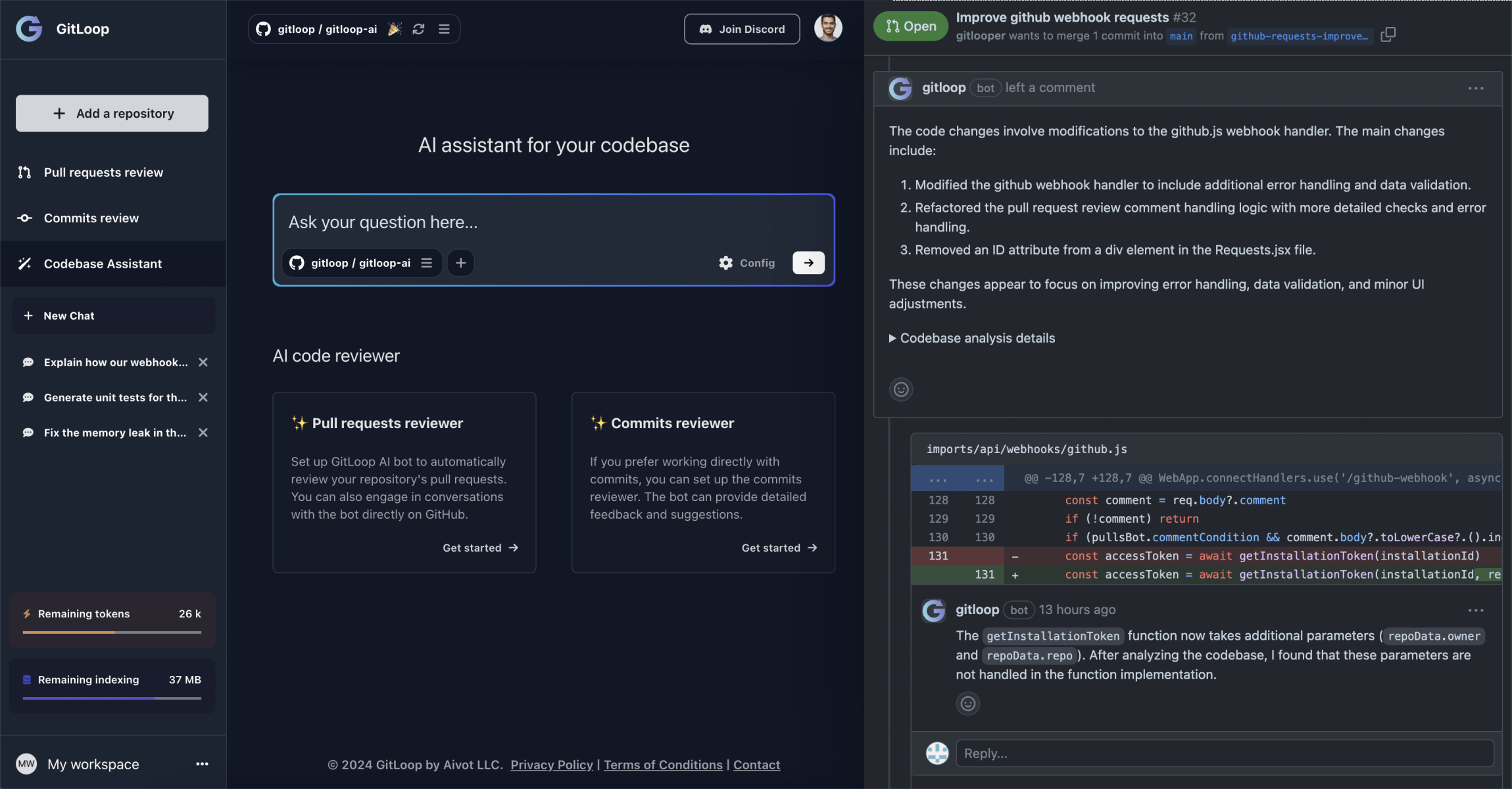
Screenshot of GitLoop, A Git-connected AI assistant that answers questions about your codebase

What is GitLoop?

GitLoop is a developer tool. GitLoop connects to Git repositories and lets teams query their code in natural language, review pull requests and commits, and generate documentation and unit tests. It is aimed at developers who need faster codebase understanding and automated review inside their existing Git workflow.

GitLoop is a context-aware AI assistant that connects directly to Git repositories and answers questions about the code inside them. Instead of pasting snippets into a general chatbot, you point GitLoop at a repository and query it in natural language. The tool indexes the codebase and uses retrieval to ground its replies, so answers reflect the actual structure, syntax and patterns of your project. It supports repositories hosted on major Git providers, with GitLab authentication and repository integration added alongside the original GitHub flow. The product extends past question answering. A review layer examines pull requests and commits, flagging potential bugs and vulnerabilities before they reach a main branch. The assistant can also draft unit tests and generate documentation that describes functions, modules and classes. Because the assistant engages in review comments and replies to them, it behaves closer to a teammate than a one-shot lookup box. Teams use it for onboarding: a new hire can ask how a process works and get an explanation tied to real files, which shortens the period of reading code cold. GitLoop is built for software engineers, tech leads and engineering managers who work in repositories daily. It suits teams maintaining large or unfamiliar codebases where navigation costs time, and smaller groups that want review coverage without adding process. The workflow is web based: connect a repository, ask questions or trigger a review, then act on the output inside your normal Git workflow. It competes with general chat assistants and AI-native editors, and its differentiator is repository grounding rather than code generation in an IDE. Potential buyers should note that the homepage presents GitLoop as an assistant layered on top of Git, not a replacement for an editor or a full CI pipeline. Review quality still depends on the model and on how well the repository is prepared, and the homepage does not detail language support or self-hosted deployment. The free tier covers basic use, with premium plans aimed at larger teams and higher processing volume.

How do you use GitLoop?

  1. 1Create a GitLoop account
    Open the GitLoop app and sign up. The app is the entry point for connecting repositories and running the assistant.
  2. 2Connect a Git repository
    Authorize GitLoop against your Git provider and select the repository you want the assistant to work with. GitLab authentication is supported alongside the original integration.
  3. 3Ask a question about the codebase
    Use the chat interface to ask where a feature lives, how a process works, or what a module does. GitLoop searches the repository and returns an explanation grounded in the code.
  4. 4Trigger a review on a pull request
    Point GitLoop at a pull request or commit and let the review agent scan the changes for potential bugs and vulnerabilities. It posts comments and can reply to follow-up discussion.
  5. 5Generate documentation or unit tests
    From the assistant, request documentation for a module or scaffold unit tests for a function. Review the output before committing it to the repository.
  6. 6Read real-world use cases
    The use case page shows how teams apply GitLoop to codebase insights, automatic review, onboarding and documentation, which helps in scoping a rollout.

Pros and cons

Pros

  • Answers are grounded in the actual repository rather than pasted snippets, so responses reflect real project structure.AI
  • Combines codebase Q&A with PR and commit review, documentation and unit test generation in one tool.AI
  • The review agent replies in comments, which fits existing pull request workflows instead of forcing a separate dashboard.AI
  • Useful for onboarding: new team members can ask about architecture and processes and get answers tied to files.AI
  • GitLab authentication and repository integration extend coverage beyond GitHub.AI

Cons

  • The homepage gives few technical specifics: language coverage, indexing limits and model choices are not spelled out.AI
  • No self-hosted or on-premise option is mentioned, which matters for teams with strict code residency rules.AI
  • The comparison table uses a single headline price, so plan tiers and usage limits are hard to evaluate before signing up.AI
  • Review and Q&A quality depend on the underlying models; the site does not publish accuracy benchmarks.AI
  • It is a web layer over Git, so it does not replace an AI-native editor for inline coding.AI

How much does GitLoop cost?

Pricing

GitLoop offers a free plan covering basic features for small projects, plus premium subscriptions for advanced features, higher processing volume and dedicated support. The homepage comparison table lists GitLoop at 15 dollars per month against ChatGPT and Cursor at 20 dollars, though full tier details are not shown.

Learn more

Support

Support is reachable by email at support@gitloop.com. The homepage FAQ also covers repository security, pricing, answer precision and handling of large repositories.

Integrations

GitLoop connects to Git repositories, with GitLab authentication and repository integration documented alongside the original GitHub support. No other integrations are listed on the homepage.

Learn more

Features

Natural language search and navigation across a connected codebase, a context-aware chat assistant for questions, code generation, unit tests and documentation, and AI review of pull requests and commits with comments and replies. Also covers code, feature and process explanations for onboarding, plus codebase insights that flag complexity and possible bugs.

Learn more

Frequently asked questions about GitLoop

  • How much does GitLoop cost?
    GitLoop offers a free plan covering basic features for small projects, plus premium subscriptions for advanced features, higher processing volume and dedicated support. The homepage comparison table lists GitLoop at 15 dollars per month against ChatGPT and Cursor at 20 dollars, though full tier details are not shown.
  • How do you use GitLoop?
    The walkthrough on this page covers 6 steps: 1. Create a GitLoop account 2. Connect a Git repository 3. Ask a question about the codebase 4. Trigger a review on a pull request 5. Generate documentation or unit tests 6. Read real-world use cases.
  • What platforms does GitLoop support?
    GitLoop is available on Web App.
  • What does GitLoop integrate with?
    GitLoop connects to Git repositories, with GitLab authentication and repository integration documented alongside the original GitHub support. No other integrations are listed on the homepage.
  • What are the limitations of GitLoop?
    The homepage gives few technical specifics: language coverage, indexing limits and model choices are not spelled out. No self-hosted or on-premise option is mentioned, which matters for teams with strict code residency rules. The comparison table uses a single headline price, so plan tiers and usage limits are hard to evaluate before signing up.

Status

StatusActive
Views0
Outbound clicks0
Added10/21/2026

Platforms

Web App

Pricing

FreemiumSubscription