Free trial
The homepage invites visitors to start free through the signup page. No trial length or which features sit behind a paid plan is stated.
Learn moreNote-taking app built around handwriting, PDFs, and shared work
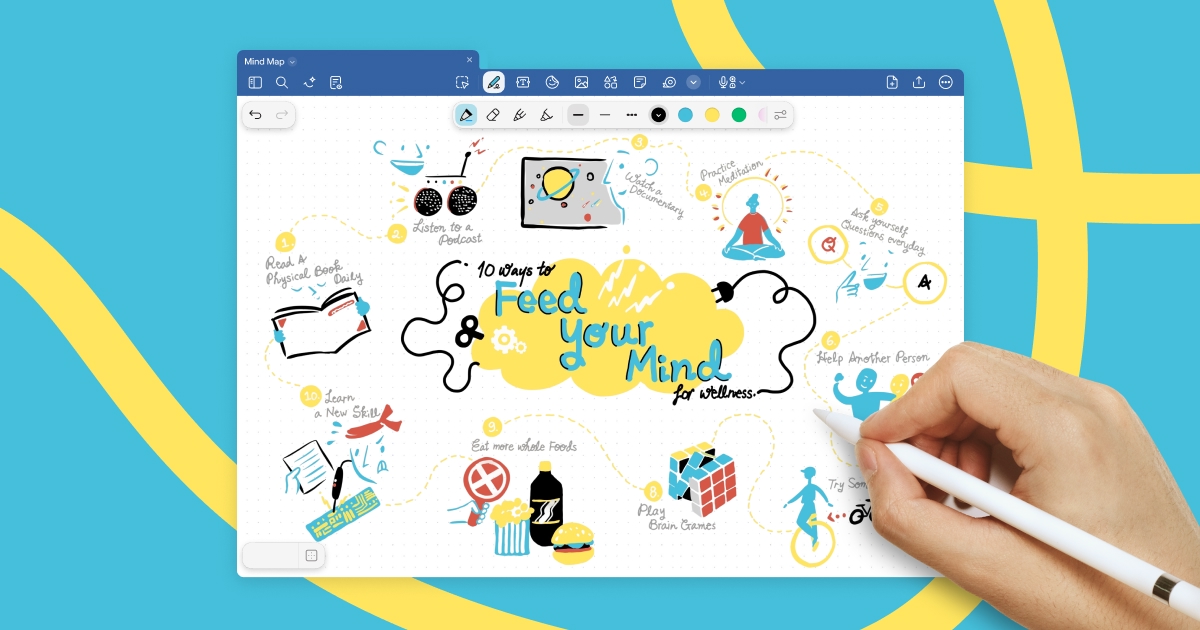
Goodnotes is a change handwriting tool. Tablet-first note-taking app that combines handwriting, typing, sketches, audio, and PDF markup in one workspace, with live collaboration and AI search and summarization across handwritten and typed content.
Goodnotes is a note-taking application designed around the tablet, though its work syncs across phone and laptop so a document started in one place can be finished in another. The core of the product is input flexibility: handwriting with a resting palm, typing, sketching, images, audio, or speech all land in the same page. Handwriting gets converted to text, crossings out erase, and the writing feel is tuned for stylus hardware. The result sits closer to a paper notebook than to a text editor. Beyond blank pages, Goodnotes handles document work. PDFs can be marked up like printouts, with searchable annotations, team collaboration, and export when a clean copy is needed. Whiteboards support freeform work with any input type. Live collaboration runs across notebooks, documents, and whiteboards at once, which removes the version shuffle of emailing files back and forth. Meeting notes and shared knowledge bases extend the same idea to team material: capture during the session, organize it immediately, and keep reference content in one place. Goodnotes AI adds a layer on top of captured content. Search reaches handwritten notes and sketches as well as typed text, so an idea buried in a scanned page is still findable. Notes can be reshaped into mind maps to show how ideas connect, and meeting minutes can be converted into project plans with action items. That puts the product in the same conversation as AI notepad tools, though its roots in ink and PDF markup make it a different proposition for anyone who still thinks on paper. Security is pitched at organizations: admin controls, encryption, and a privacy-first design, with a compliance portal for the details. Teams in construction, healthcare, consulting, and engineering appear among its references, which fits a tool that bridges analog sketching and digital records. Individuals who simply want a fast handwriting app will find plenty here too, provided they accept the tablet-first orientation and the paid tier for the full feature set.
The homepage invites visitors to start free through the signup page. No trial length or which features sit behind a paid plan is stated.
Learn moreHandwriting, typing, sketching, audio, and speech capture in one page; PDF annotation with searchable markup and export; freeform whiteboards; real-time collaboration across notebooks, documents, and whiteboards; meeting notes and shared knowledge bases; AI search across handwriting and sketches, mind map generation, and meeting minutes to project plans; admin controls, encryption, and compliance tooling.
Learn more AI Angels400+ customizable AI girlfriends for NSFW chat, voice calls, and roleplay
 Candy AIExperience the future of companionship with AI friends who chat, role-play, and connect with you on a human level.
 ourdream.aiA vast AI roleplay platform with millions of characters for chat, images, video and voiceAI Angels400+ customizable AI girlfriends for NSFW chat, voice calls, and roleplayCandy AIExperience the future of companionship with AI friends who chat, role-play, and connect with you on a human level.ourdream.aiA vast AI roleplay platform with millions of characters for chat, images, video and voice