editaimg.com

Prompt-based AI photo editor with credit packs and a free start

Beginner
Screenshot of editaimg.com, Prompt-based AI photo editor with credit packs and a free start

What is editaimg.com?

editaimg.com is an image editing tool. Editaimg is a web-based AI image editor driven by text prompts. It handles object removal, background changes, upscaling, text replacement and translation, and portrait fixes, sold through non-expiring one-time credit packs instead of a subscription.

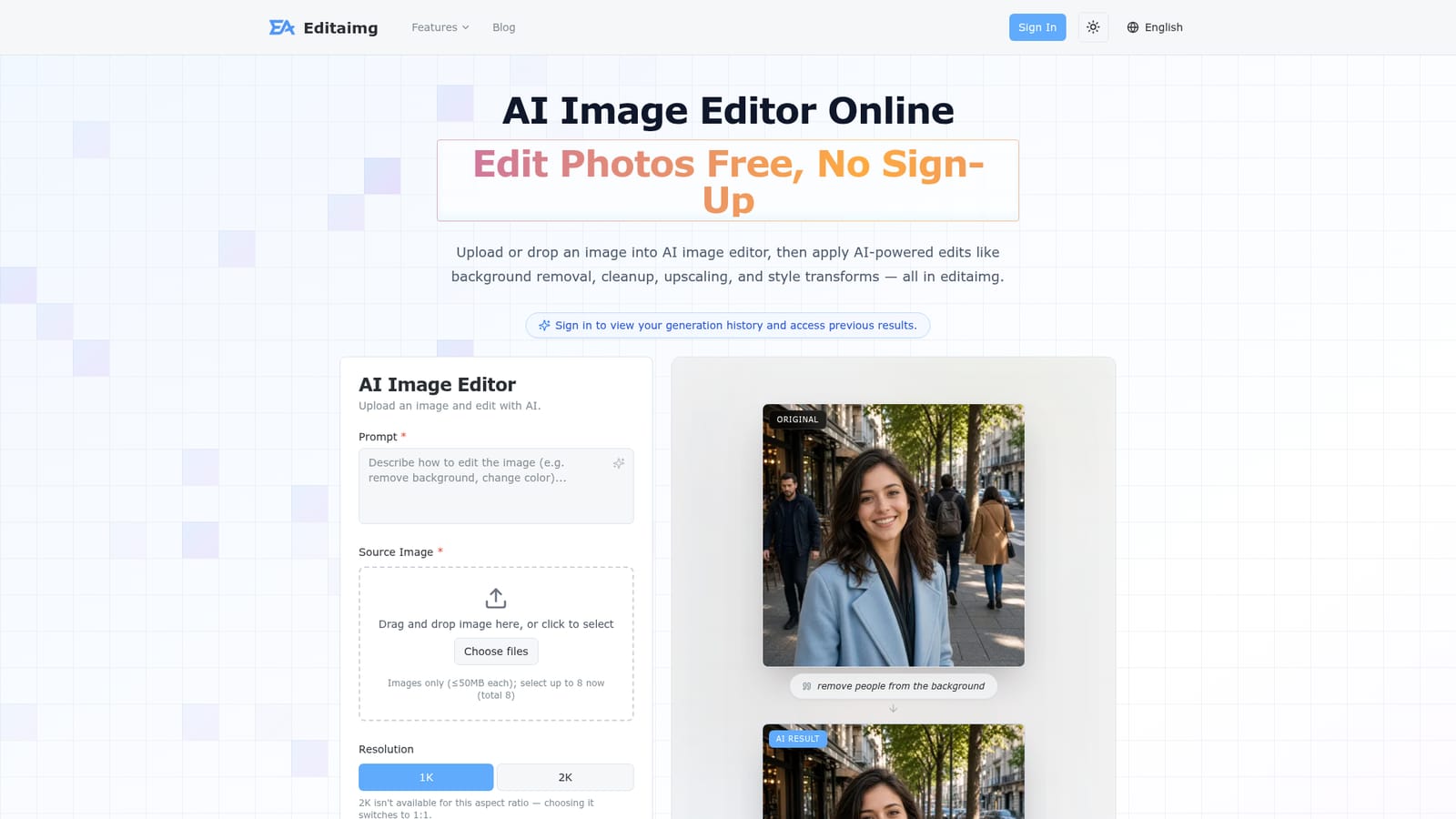
Editaimg is a browser-based AI image editor built around a single prompt box. A user uploads one or more images (up to eight at a time, each up to 50MB), types what should change, picks a resolution and aspect ratio, and generates the result. Typical jobs shown on the site include removing people from a background, placing a product into a realistic scene, replacing text inside an image, recoloring objects, and upscaling a photo. Beyond the general editor, the site splits common jobs into dedicated feature pages. These cover product photography scenes, jewellery retouching onto white backgrounds, text editing and translation inside images (over 130 languages), teeth and closed-eye fixes in portraits, hair and color previews, adding a person to a photo, a Gemini watermark remover that runs in the browser, and seasonal effects such as snowfall. Each page targets one narrow task, which makes the tool easier to approach for people who know the outcome they want but not the right prompt wording. A blog adds prompt examples, such as LinkedIn headshot prompts and guidance for translating Amazon listing images. The target audience is casual users who need quick touch-ups and small sellers who need cleaner product or listing images. The homepage states that no professional editing skills are required and that trying it does not require sign-up, though signing in unlocks generation history. The workflow is four steps: import, describe, choose settings, generate and download. Pricing is credit based rather than subscription based. Three one-time packs (160, 800 and 4000 credits) are offered, credits do not expire, and every pack includes a priority generation queue. That model suits occasional use better than a monthly plan would. Compared with full editors such as Photoshop or with general image generators, Editaimg trades manual control for speed and simplicity: edits are driven by text instructions rather than layers and brushes. It sits closest to other prompt-driven editing and background-removal web apps, with a stronger emphasis on task-specific landing pages for e-commerce and portrait fixes.
How do you use editaimg.com?

  1. 1Open the editor and upload images
    Go to the homepage and drag an image into the editor, or click to select files. Up to eight images can be added per request.
    editaimg.com — Open the editor and upload images
  2. 2Write a plain-language prompt
    Describe the change you want, such as removing people from the background or replacing text. Specific wording gives more predictable results.
  3. 3Set resolution and aspect ratio
    Choose 1K or 2K and an aspect ratio, or leave it on auto. Note that 2K switches to 1:1 for ratios that do not support it.
  4. 4Generate and download the result
    Press Generate Edit, review the result in the preview grid, then download or share it. Sign in to keep a history of past generations.
  5. 5Try a task-specific tool
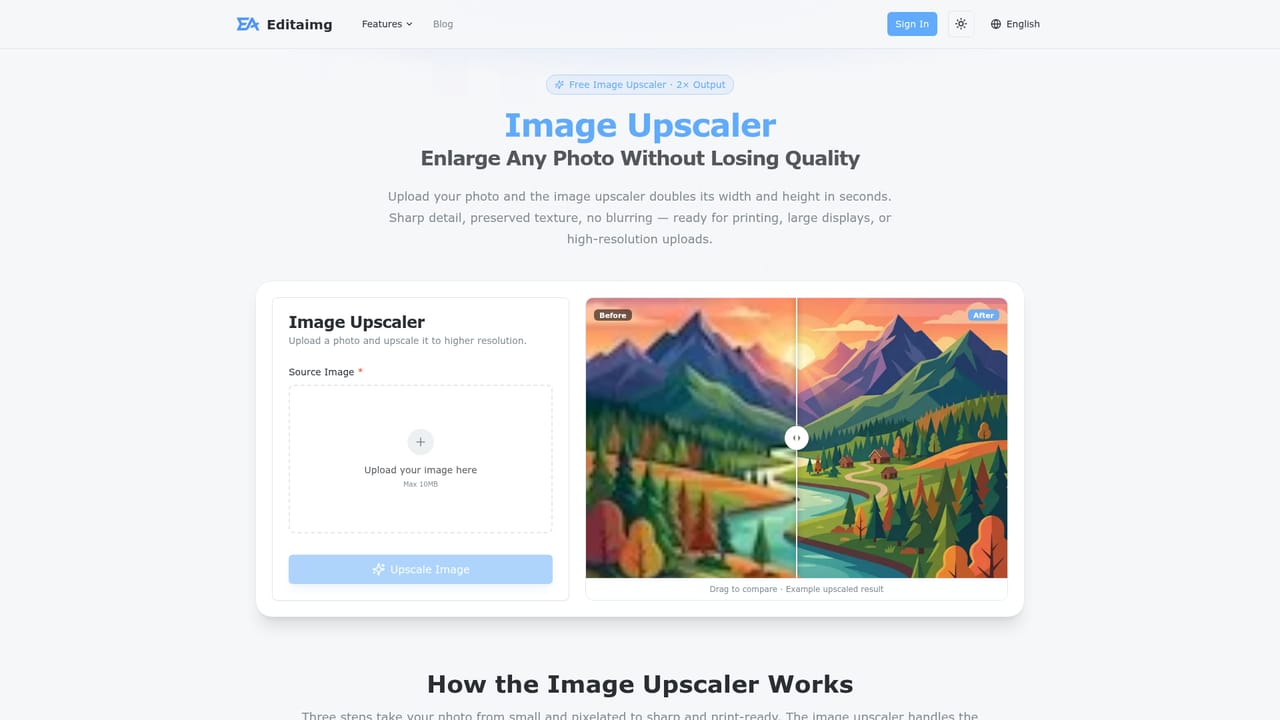
    For a focused job like upscaling, open the matching feature page, which is tuned to that single task.
    editaimg.com — Try a task-specific tool

Pros and cons

Pros

  • Single prompt box handles removal, background swaps, recoloring and restyling without manual maskingAI
  • Dedicated task pages (jewellery retouch, image translator, teeth fixer) lower the prompt-writing barrierAI
  • Credits are one-time purchases that never expire, with no subscription requiredAI
  • Accepts up to eight source images per request, useful for compositing and multi-image editsAI
  • Text-in-image editing and translation to over 130 languages helps sellers localize listingsAI

Cons

  • Output depends on prompt wording, so results can need several paid retries to look rightAI
  • Resolution choices on the editor are limited to 1K and 2K, and 2K is unavailable for some aspect ratiosAI
  • No layers, brushes or manual masks, so precise control is weaker than in traditional editorsAI
  • Credit cost per edit is not explained on the homepage, making real per-image cost hard to estimateAI
  • Face and portrait features (eyes, teeth, kiss generator) raise authenticity and consent concernsAI

How much does editaimg.com cost?

Free trial

The site advertises free editing with no sign-up needed to start. Details of the free allowance are not stated on the homepage.

Learn more

Pricing

Three one-time credit packs: Basic $9.9 for 160 credits, Standard $29.9 for 800 credits (marked down from $49.9), and Pro $49.9 for 4000 credits (marked down from $249). Credits do not expire, include a priority queue, and need no subscription.

Learn more

Features

Prompt-based editing with multi-image upload, 1K/2K output and several aspect ratios. Covers object removal, background changes, upscaling, recoloring, text editing and translation, product photography, portrait fixes, watermark removal and style transforms.

Learn more

Frequently asked questions about editaimg.com

  • How much does editaimg.com cost?
    Three one-time credit packs: Basic $9.9 for 160 credits, Standard $29.9 for 800 credits (marked down from $49.9), and Pro $49.9 for 4000 credits (marked down from $249). Credits do not expire, include a priority queue, and need no subscription.
  • Does editaimg.com offer a free trial?
    The site advertises free editing with no sign-up needed to start. Details of the free allowance are not stated on the homepage.
  • How do you use editaimg.com?
    The walkthrough on this page covers 5 steps: 1. Open the editor and upload images 2. Write a plain-language prompt 3. Set resolution and aspect ratio 4. Generate and download the result 5. Try a task-specific tool.
  • What platforms does editaimg.com support?
    editaimg.com is available on Web App.
  • What are the limitations of editaimg.com?
    Output depends on prompt wording, so results can need several paid retries to look right. Resolution choices on the editor are limited to 1K and 2K, and 2K is unavailable for some aspect ratios. No layers, brushes or manual masks, so precise control is weaker than in traditional editors.

Status

StatusActive
Views0
Outbound clicks0
Added10/18/2026

Platforms

Web App

Pricing

FreemiumPaid