Pricing
Generation runs on credits, and the amount charged depends on the model and the output settings chosen. The studio shows the cost before you generate. Current plans and credit allowances are listed on the plans and pricing page.
Learn moreOne AI studio for video, images and audio, with leading models under one roof.
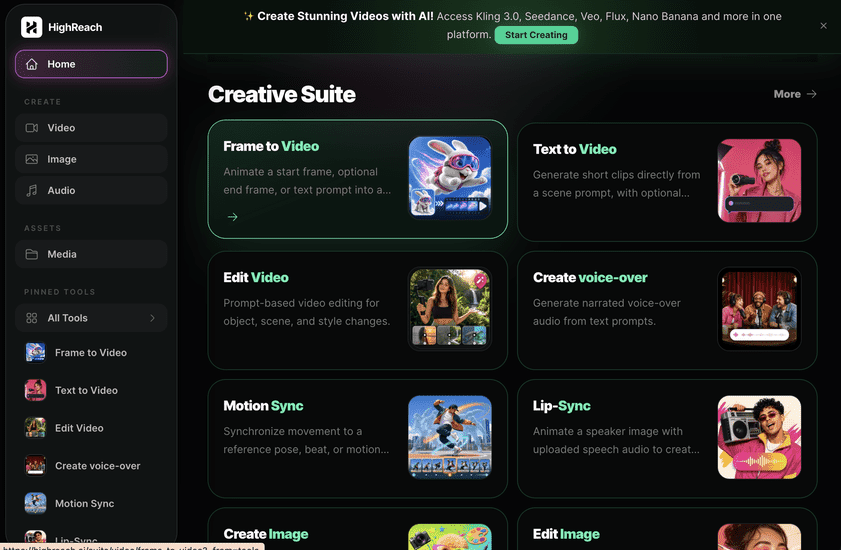
HighReach is a generative image tool. A web based AI creator studio that puts leading video, image and audio models (Kling, Veo, Seedance, Nano Banana, GPT Image and others) in one workspace. Built for advertising and social content, with prompt briefs and a library of inspirations to start from.
HighReach is a web based AI creator studio that bundles video, image and audio generation in a single workspace. Rather than subscribing to a separate tool for every format, you pick a canvas at the start and move between them as a project takes shape. Video work covers text to video, image to video and lip sync. Image work spans generation, editing and upscaling, including edits that start from your own uploaded photos. Audio covers voiceovers, music and sound effects, so the soundtrack for a clip can be made in the same place as the clip itself. The model roster is the core of the pitch. HighReach routes requests to third party engines such as Kling, Veo, Seedance, Nano Banana, GPT Image, MiniMax and FLUX, and the homepage lists individual versions with notes on what each does best: Seedance 2.5 for cinematic frames with native audio, Kling 3.0 for detailed motion and stable identity, FLUX 3 for high fidelity output with synchronized sound. For people who already know which engine suits a job, that avoids maintaining accounts in several places. For newcomers, the labels do some of the choosing for them. The product is aimed at marketers, small creative teams and solo creators producing advertising and social content. The homepage leans hard on commercial use cases: product ads, UGC style ads, brand films, explainers and short films, with a sample brief for a perfume bottle shot on peach travertine that opens pre-filled in the studio. A library of numbered inspirations (retro fashion editorial, luxury skincare splash ad, streetwear campaign and similar) lets you load a prompt and its settings, adjust the wording, and generate your own version. The workflow is deliberately plain: choose video, image or audio, describe the subject, style and mood in ordinary language, then iterate on variations and download. No prompt syntax is required, though reference image support and upload limits vary by model. Competition comes from two directions: single-model specialists that go deeper on one engine, and larger design suites that wrap generation inside a full editing canvas. HighReach sits between them as a fast, format agnostic front end to the major models, which suits teams that value breadth over depth in any one engine.
Generation runs on credits, and the amount charged depends on the model and the output settings chosen. The studio shows the cost before you generate. Current plans and credit allowances are listed on the plans and pricing page.
Learn moreText to video, image to video and lip sync for clips; image generation, editing and upscaling from prompts or your own uploads; voiceovers, music and sound effects. Models include Kling 3.0, Veo, Seedance 2.5, Nano Banana, GPT Image, MiniMax H3 Max and FLUX 3, with per model notes and a library of inspiration prompts.
Learn more AI Angels400+ customizable AI girlfriends for NSFW chat, voice calls, and roleplay
 Candy AIExperience the future of companionship with AI friends who chat, role-play, and connect with you on a human level.
 ourdream.aiA vast AI roleplay platform with millions of characters for chat, images, video and voiceAI Angels400+ customizable AI girlfriends for NSFW chat, voice calls, and roleplayCandy AIExperience the future of companionship with AI friends who chat, role-play, and connect with you on a human level.ourdream.aiA vast AI roleplay platform with millions of characters for chat, images, video and voice






