Free trial
New users get complimentary credits to try public video transcription before buying more.
Learn moreTurn public Instagram Reels into searchable transcripts and subtitles.
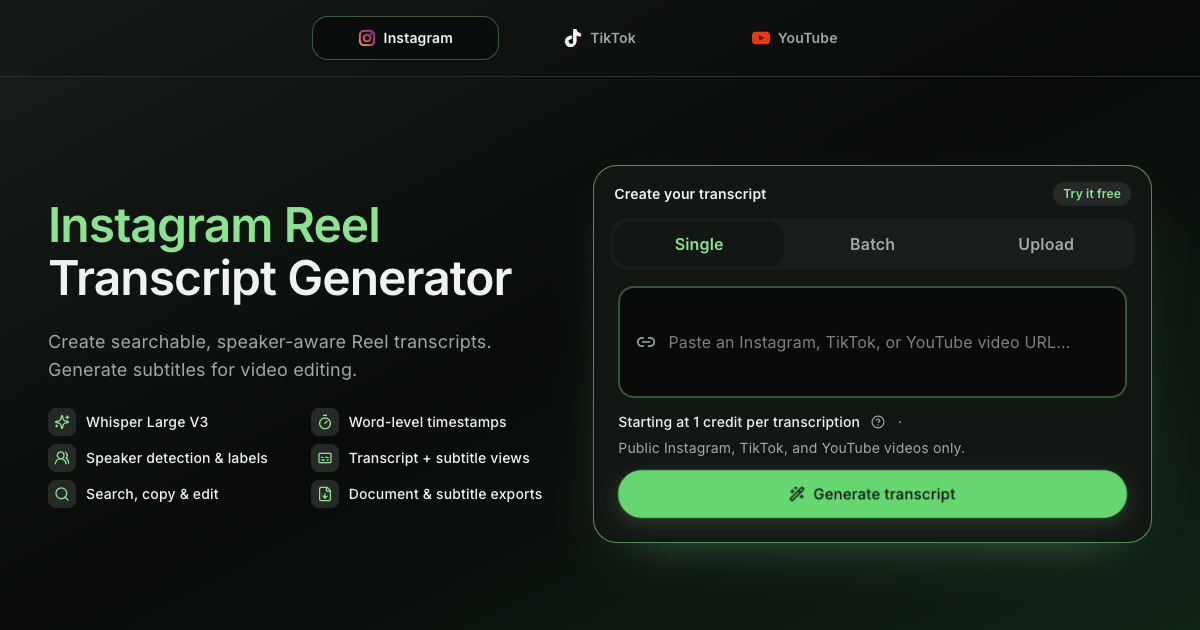
HiTranscript is an instagram video transcript tool that turns public Instagram Reels into searchable transcripts and subtitles. HiTranscript converts public Instagram Reels, TikTok and YouTube videos into searchable transcripts and timed subtitles using Whisper Large V3.
HiTranscript is a web-based transcription workspace built around a narrow, practical job: converting public short-form videos into text you can search, edit, and export. Paste a public Instagram Reel URL (or a TikTok or YouTube link) and the tool returns both a readable transcript and timed subtitles in a single pass. Under the hood it runs Whisper Large V3, which the site says covers 99 languages, and it uses word-level timestamps to build readable paragraphs and subtitle cues automatically. The workspace separates two views of the same file. Transcript view is for reading and research: organized paragraphs with optional timestamps and, when the model detects multiple voices, speaker labels you can rename or merge. Subtitle view is for editing: Standard or Social cue styles, with word-level timing precise enough to align captions to speech. Both views live side by side, so a researcher and a video editor can work from the same source without exporting twice. Exports are where HiTranscript is more flexible than most single-purpose transcriber tools. Individual transcripts can be saved as TXT, DOCX, or PDF, with toggles for timestamps and speaker labels. Subtitles go out as SRT or WebVTT. Batch jobs add combined TXT, CSV, and XLSX for transcripts and a ZIP containing every subtitle mode for each task. The site also accepts supported local file uploads, so the workflow is not strictly limited to public URLs. That URL-first design is also the main constraint. The tool is aimed at public videos up to one hour long, which points to social media researchers, podcast and Reels editors, and content teams that need captions without a full editing suite. Against general-purpose transcription services, HiTranscript trades breadth (no apparent meeting integrations, no live recording) for a focused pipeline from public link to document and subtitle file. New users get complimentary credits to test the flow before buying more.
New users get complimentary credits to try public video transcription before buying more.
Learn moreCredit-based pricing starting at 1 credit per transcription. New users receive complimentary credits, and additional credits are purchased. The homepage does not list full plan tiers or per-credit rates.
Learn moreThe homepage references a Privacy Policy in the footer and account settings for deletion. No help centre, email support or documentation page is listed.
Whisper Large V3 transcription in 99 languages, word-level timestamps, automatic speaker detection, transcript and subtitle views, single and batch processing, local file upload, and exports to TXT, DOCX, PDF, SRT, WebVTT, plus CSV and XLSX in batch.
 AI Angels400+ customizable AI girlfriends for NSFW chat, voice calls, and roleplay
 Candy AIExperience the future of companionship with AI friends who chat, role-play, and connect with you on a human level.
 ourdream.aiA vast AI roleplay platform with millions of characters for chat, images, video and voiceAI Angels400+ customizable AI girlfriends for NSFW chat, voice calls, and roleplayCandy AIExperience the future of companionship with AI friends who chat, role-play, and connect with you on a human level.ourdream.aiA vast AI roleplay platform with millions of characters for chat, images, video and voice