Free trial
Every new account gets a 14-day free trial of Premium. After the trial, the account stays on the free plan with dual subtitles and a monthly lookup cap.
Learn moreDual subtitles and a pop-up dictionary inside Netflix and YouTube.
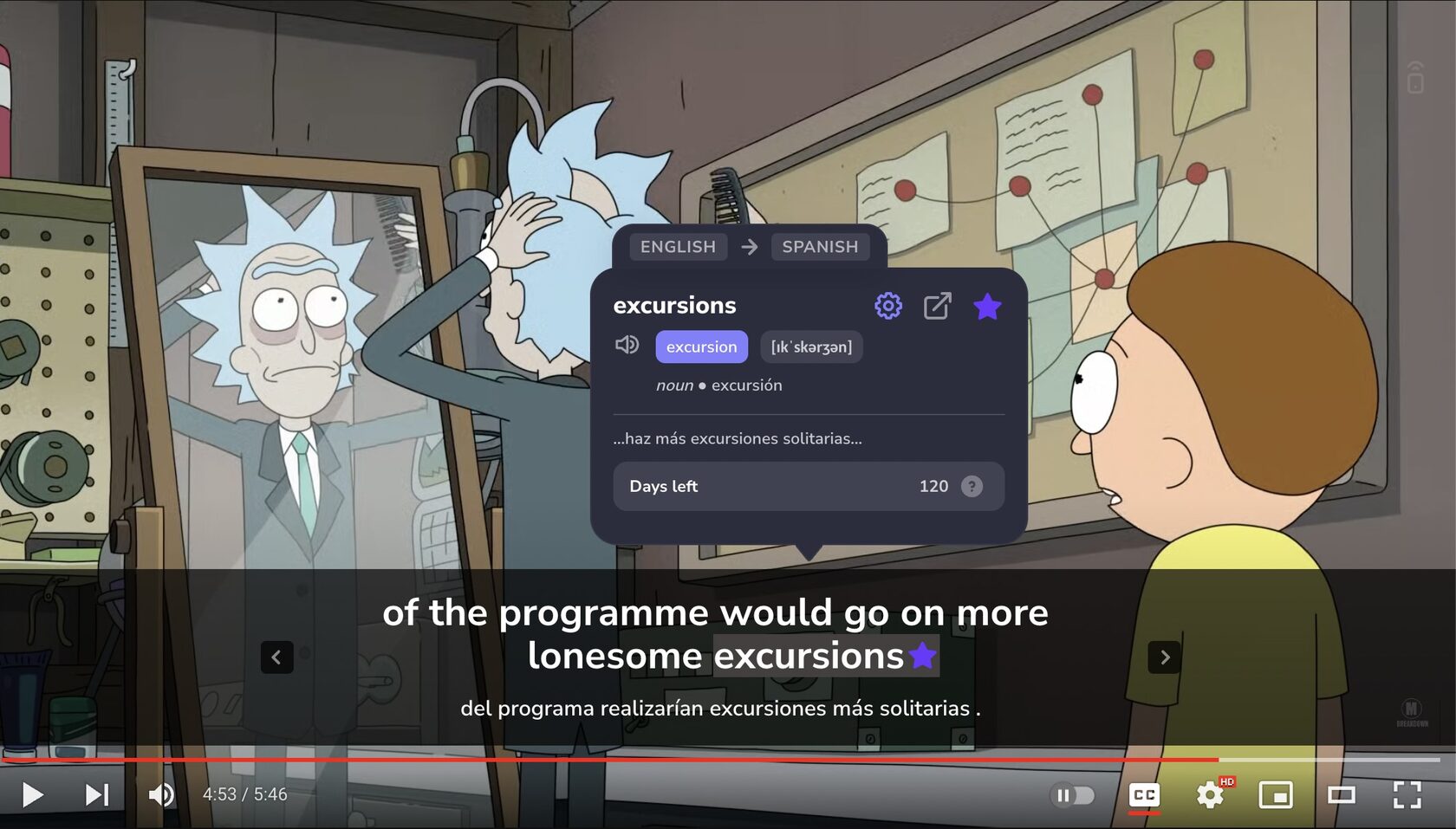
InterSub is a browser extension for Chrome, Edge and Firefox that adds dual subtitles and a hover dictionary to Netflix, YouTube, Prime Video and course platforms, saving looked-up words to a Wordbook with Anki and Telegram practice.
InterSub is a browser extension that overlays two subtitle tracks on streaming video and course platforms: the original language and a translation into the viewer's native tongue. It works on Netflix, YouTube, Prime Video, HBO Max, Crunchyroll, Bilibili.tv, TED, Coursera, Udemy, LinkedIn Learning, Domestika, DW Learn German, Learn.cantrill.io and Shahid. The premise is simple: instead of carving out separate study time, learners pick up vocabulary while watching the shows and lectures they already consume. The core interaction is the pop-up dictionary. Hovering any word in the subtitle pauses the video and opens a card with an AI-generated definition and a context translation for the surrounding phrase, so idioms and phrasal verbs are explained as whole units rather than word by word. Every lookup is filed into a Wordbook with the original sentence, and that list can be exported to Excel or synced with Anki. A Telegram bot adds spaced repetition practice, resurfacing saved words just before they would be forgotten. An AI Language Buddy, built on ChatGPT, answers questions about grammar or cultural references without leaving the episode. InterSub is aimed at intermediate learners who can follow a plot but stall on slang, and at beginners who want the safety net of a native-language line. It also suits heritage speakers and mixed-language households. The feature set goes beyond translation: subtitles can be hidden during playback and shown only on pause, shadowing mode stops after each line for repetition, and hotkeys resize or reposition the text. A Remote Control feature turns a phone into a playback and lookup remote via a QR code, though the product itself remains a desktop extension. Among alternatives, InterSub sits closest to Language Reactor and Immersive Translate, but its emphasis is on the loop from watching to saving to drilling, rather than on subtitle display alone. AI subtitle translation is reserved for paid plans; the free tier keeps dual subtitles with a monthly cap on lookups.
Every new account gets a 14-day free trial of Premium. After the trial, the account stays on the free plan with dual subtitles and a monthly lookup cap.
Learn moreDual subtitles are free with a monthly limit on word lookups. Pay-as-you-go and Premium plans add more lookups and AI subtitle translation. Prices are not listed on the homepage; see the plans and prices page for current rates.
Learn moreHelp is provided through an FAQ on the homepage and a how-to page covering platform support and setup. No dedicated support portal or email is listed on the homepage.
Works with Netflix, YouTube, Prime Video, HBO Max, Crunchyroll, Bilibili.tv, TED, Coursera, Udemy, LinkedIn Learning, Domestika, DW Learn German, Learn.cantrill.io and Shahid. Saved words sync with Anki and can be practiced in the InterSub Telegram bot or exported to Excel.
Dual subtitles on Netflix, YouTube, Prime Video, HBO Max, Crunchyroll, Bilibili.tv, TED and course platforms; hover pop-up dictionary with AI definitions and context translation; automatic Wordbook with Anki sync and Excel export; AI subtitle translation for missing tracks; AI Language Buddy for grammar and cultural questions; shadowing mode, pause-only subtitles and hotkey controls; phone Remote Control via QR code.
 AI Angels400+ customizable AI girlfriends for NSFW chat, voice calls, and roleplay
 Candy AIExperience the future of companionship with AI friends who chat, role-play, and connect with you on a human level.
 ourdream.aiA vast AI roleplay platform with millions of characters for chat, images, video and voiceAI Angels400+ customizable AI girlfriends for NSFW chat, voice calls, and roleplayCandy AIExperience the future of companionship with AI friends who chat, role-play, and connect with you on a human level.ourdream.aiA vast AI roleplay platform with millions of characters for chat, images, video and voice


