Free trial
A free starting point is available: you can begin writing at no cost via the registration page, though the homepage does not specify how long the free access lasts or what limits apply.
Learn moreAI research assistant that writes with traceable citations from your sources.

Jenni is an AI academic writing assistant that helps students and researchers write with traceable citations. It combines a source library, AI autocomplete grounded in your papers, and citation tools with over 10,000 styles. The workspace supports literature reviews, PDF chat, and collaboration.
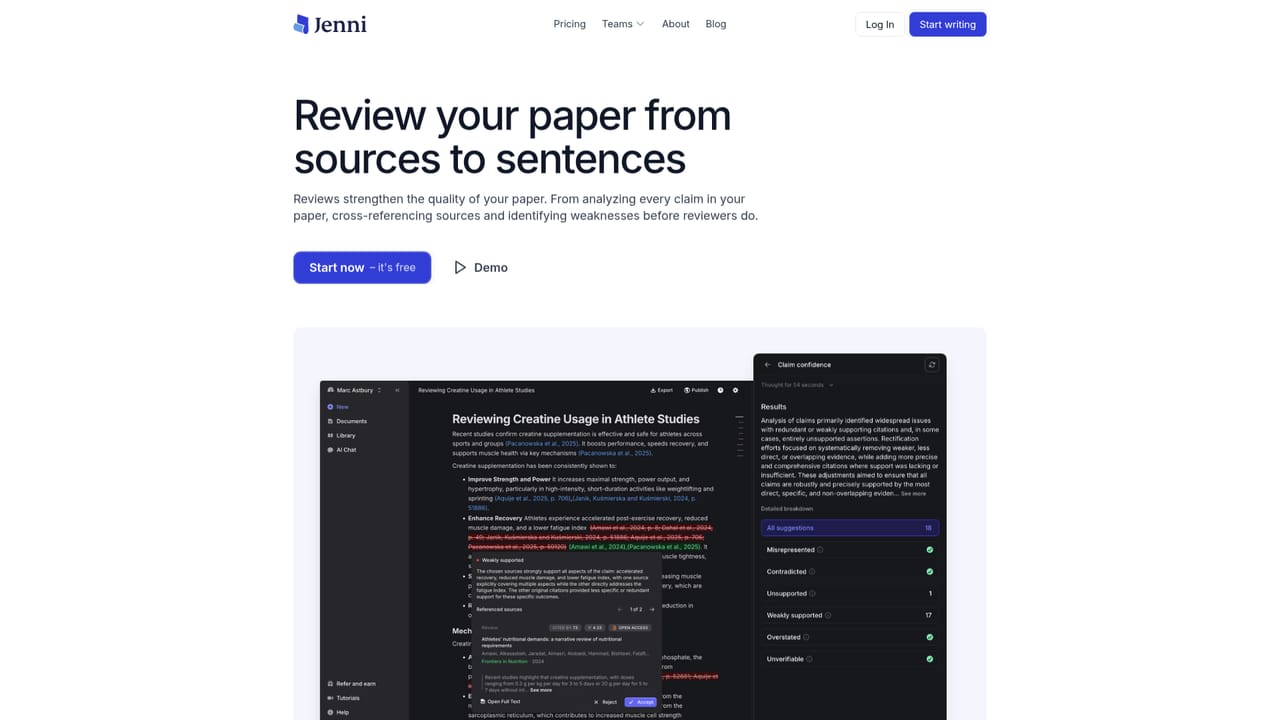
Jenni is an AI writing environment built specifically for academic and research writing. Unlike general-purpose chatbots, it grounds every suggestion in your own uploaded sources, making it possible to trace each claim back to the exact page and paragraph of a PDF. The workspace combines a library, a document editor, and an AI chat that can query across all your papers, so you can move from reading to writing without switching tools. The core workflow starts with building a library: drag in PDFs, import collections from Zotero or Mendeley, or search a vast index of over 200 million papers and add sources directly. Then, as you write, Jenni's autocomplete suggests sentences drawn from your selected sources, inserting inline citations in one of more than 10,000 styles. You can control which sources inform each section, so the literature review reflects your own judgment rather than generic training data. The AI chat can answer questions like "What methods does Lemos et al. use?" and provide cited responses, helping you understand methods sections or compare findings across papers. Jenni is designed for students, researchers, and academics who need to produce rigorous, well-cited documents. It is particularly useful for literature reviews, research papers, and essays where source accuracy is critical. The tool also includes a Reviews feature that analyzes claims against your sources and flags issues such as unsupported or overstated statements, helping catch weaknesses before peer review. Collaboration is supported with real-time co-authoring, comments, and sharing, so teams can work together without emailing Word files. Export options include .docx, LaTeX, and HTML, fitting into existing academic workflows. Compared to alternatives like ChatGPT, Jenni emphasizes traceability and source-grounded writing, making it a stronger fit for formal academic work where citations must be verifiable. It is not a substitute for critical thinking or domain expertise, but it reduces the mechanical burden of citation management and literature synthesis. The platform is web-based and offers a free starting point, with paid tiers likely for advanced features (though pricing details are not specified on the homepage). Overall, Jenni positions itself as a focused research assistant rather than a general writing tool, and its growing adoption by universities and publishers suggests it meets a real need in scholarly writing.
A free starting point is available: you can begin writing at no cost via the registration page, though the homepage does not specify how long the free access lasts or what limits apply.
Learn moreIntegrates with Zotero and Mendeley for importing references and collections, and supports export to .docx, LaTeX, and HTML formats.
Jenni offers source-grounded AI writing with traceable citations to exact PDF locations, a library that supports PDF uploads and Zotero/Mendeley imports, and AI chat that answers questions across your sources. It includes search over 200M+ papers, over 10,000 citation styles, a Reviews feature for claim analysis and proofreading, real-time collaboration, and exports to .docx, LaTeX, and HTML.
 AI Angels400+ customizable AI girlfriends for NSFW chat, voice calls, and roleplay
 Candy AIExperience the future of companionship with AI friends who chat, role-play, and connect with you on a human level.
 ourdream.aiA vast AI roleplay platform with millions of characters for chat, images, video and voiceAI Angels400+ customizable AI girlfriends for NSFW chat, voice calls, and roleplayCandy AIExperience the future of companionship with AI friends who chat, role-play, and connect with you on a human level.ourdream.aiA vast AI roleplay platform with millions of characters for chat, images, video and voice


