Pricing
Free plan with downloads limited to 720px. VIP raises the available size limit to 4000px on the current service and is described as helping cover GPU processing costs. No per tier price figures are stated on the homepage.
Learn morePaint over what you want gone and let AI rebuild the detail
jpgRM is a browser based object eraser and AI photo cleanup tool. Brush over unwanted objects, people or backgrounds and AI inpainting rebuilds the surrounding detail. Free downloads are capped at 720px, with a VIP plan raising the limit to 4000px.
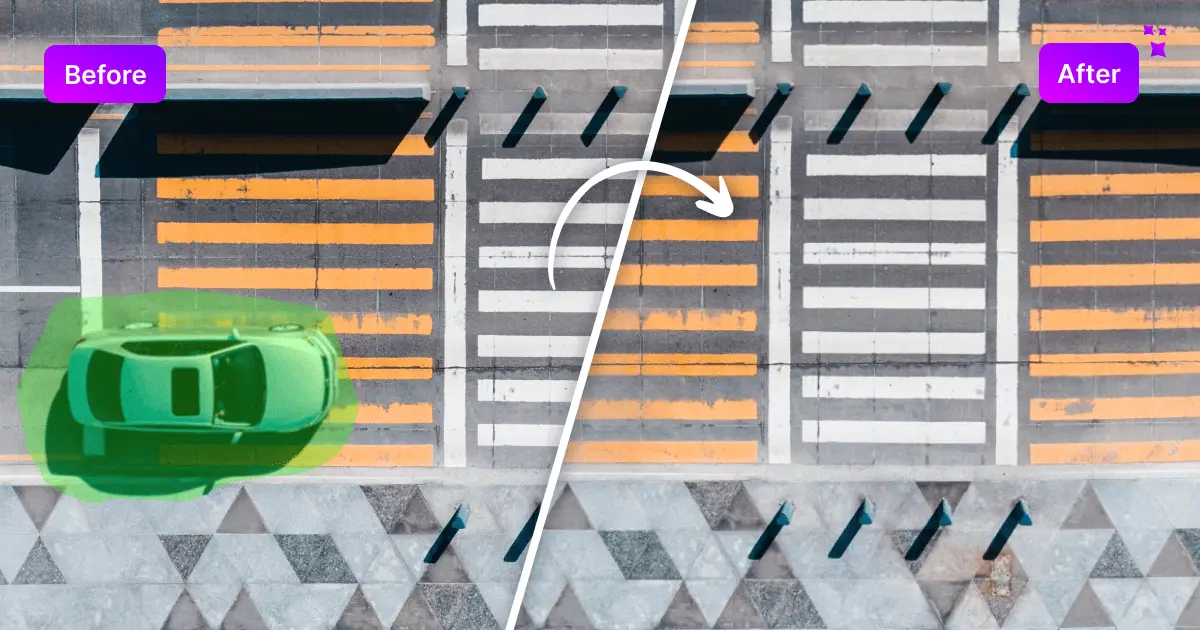
jpgRM is a browser based object eraser built around AI inpainting. You upload a photo, brush over the thing you want removed (a passerby, a stray object, a cluttered background element), and the service analyzes the pixels around the marked area and reconstructs the space so the edit blends into the scene. The same pipeline handles background removal, so a product shot can be cleaned up and isolated without jumping between separate tools. The workflow is deliberately narrow. There is no layer system, no adjustment panel, no asset library: a brush with an adjustable size, a clear selection control, fit to screen, and a before and after comparison view. That is the whole interface, and it is the reason the tool suits people who need one job done rather than a Photoshop replacement. Someone cleaning a marketplace listing photo, a real estate image, a holiday snapshot with strangers in it, or a social post background can finish in a couple of passes without learning a timeline or a masking stack. Results depend on technique. The site advises painting over the entire object, including edges and shadow where relevant, and working in smaller sections on complicated areas rather than one broad stroke. Processing time scales with image dimensions and server load, so large files are slower. Images stay in the browser until you submit them, at which point the file and the edit mask go to the processing endpoint; the finished image comes straight back and nothing is stored in a public gallery or history. The free tier caps downloads at 720px, which is fine for drafts, previews and quick social edits. VIP lifts the limit to 4000px on the current service and is positioned as covering GPU processing costs. The tool runs in a modern mobile browser too, with touch brushing, so phone edits are viable. It sits in the same bracket as other single purpose cleanup services rather than full editors, and competing on simplicity is clearly the point.
Free plan with downloads limited to 720px. VIP raises the available size limit to 4000px on the current service and is described as helping cover GPU processing costs. No per tier price figures are stated on the homepage.
Learn moreQuestions go to help@jpgrm.com. The site FAQ covers how the tool works, tips for better results, mobile support, image handling, processing time, the paid plan and image rights.
AI inpainting based object eraser with an adjustable brush, clear selection control, fit to screen viewing, before and after comparison, and download. Background removal is also supported. The demo examples cover removing an object from a landscape, cleaning a product photo, removing people from a crowded background and removing a background.
 AI Angels400+ customizable AI girlfriends for NSFW chat, voice calls, and roleplay
 Candy AIExperience the future of companionship with AI friends who chat, role-play, and connect with you on a human level.
 ourdream.aiA vast AI roleplay platform with millions of characters for chat, images, video and voiceAI Angels400+ customizable AI girlfriends for NSFW chat, voice calls, and roleplayCandy AIExperience the future of companionship with AI friends who chat, role-play, and connect with you on a human level.ourdream.aiA vast AI roleplay platform with millions of characters for chat, images, video and voice