Free trial
No trial is needed because the core tool is free to use without signup. The free tier is limited to low resolution downloads with a logo and single image edits; Pro features require a paid subscription.
Learn moreBrush over anything unwanted and let AI fill the gap
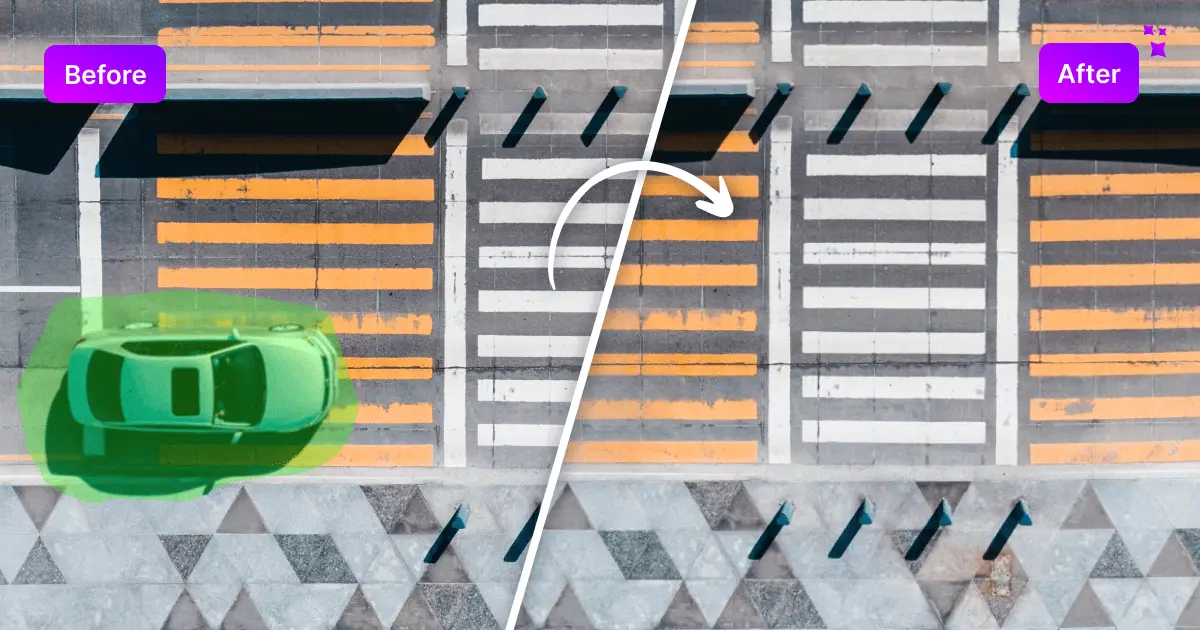
Magic Eraser is a content aware fill tool. An AI object removal tool for photos: paint over people, text, blemishes or clutter with a brush and the area is rebuilt automatically. Runs in the browser with no signup, no resolution cap and a free ad supported tier alongside a low cost Pro plan for high resolution and bulk edits.
Magic Eraser is a browser based object removal tool from Magic Studio. The concept is deliberately narrow: you upload a picture, paint over the thing you want gone with a brush, and the AI reconstructs the space behind it. That covers people in the background of a holiday photo, text overlays, blemishes, power lines, furniture in a property listing, or a car parked in front of a house. Supported input formats include JPG, PNG, AVIF, WEBP, HEIC and TIFF, and the page states there is no resolution limit on uploads. The workflow is four steps and takes seconds. Drag a file in or click to select it, size the brush with a slider and zoom in for precision, hit erase, then download in a format suited to the edit. Nothing is locked behind an account: the free tier works without signup, and the page explicitly invites repeated attempts, so a weak result can be re-erased on the same area rather than undone and restarted. The site publishes four working tips that materially affect quality, including covering an object's shadow in the same stroke and erasing long thin objects in short sections across several passes. Magic Studio positions the tool across real estate, photography, fashion, auto listings, e-commerce, social media and comics. Bulk Edit, which processes up to 50 pictures in one go, is the feature that pushes it from casual use toward catalog and listing work, though it sits behind the paid tier. Desktop editors like Photoshop remain more capable for masked, layered retouching, but the pitch here is speed and zero learning curve for people who would otherwise farm out small cleanup jobs. The free tier is ad supported, stamps a Magic Studio logo on output, caps downloads at low resolution and limits you to one picture at a time. Pro at US$4.99 per month (US$59.99 billed yearly) removes the logo, unlocks high resolution downloads, enables bulk editing and opens the rest of the Magic Studio toolset, including the separate headshot generator. The tool runs in the browser and requires no installation, which makes it practical on shared or borrowed machines.
No trial is needed because the core tool is free to use without signup. The free tier is limited to low resolution downloads with a logo and single image edits; Pro features require a paid subscription.
Learn moreFree tier at US$0 is ad supported, adds a Magic Studio logo, downloads at low resolution and allows one picture at a time. Pro costs US$4.99 per month, or US$59.99 billed yearly (listed as 67% savings), and adds logo free high resolution downloads, bulk editing and access to all Magic Studio editing tools.
Learn moreBrush based AI object removal for people, text, blemishes and clutter, with adjustable brush size and zoom for precise selection. Accepts JPG, PNG, AVIF, WEBP, HEIC and TIFF with no stated resolution cap. Bulk Edit handles up to 50 images at once on Pro. Includes undo, repeat erasing on a problem area, and download in a suitable format. Pro unlocks high resolution, logo free output and the wider Magic Studio toolset.
 AI Angels400+ customizable AI girlfriends for NSFW chat, voice calls, and roleplay
 Candy AIExperience the future of companionship with AI friends who chat, role-play, and connect with you on a human level.
 ourdream.aiA vast AI roleplay platform with millions of characters for chat, images, video and voiceAI Angels400+ customizable AI girlfriends for NSFW chat, voice calls, and roleplayCandy AIExperience the future of companionship with AI friends who chat, role-play, and connect with you on a human level.ourdream.aiA vast AI roleplay platform with millions of characters for chat, images, video and voice