Kippy

AI conversation partner for spoken language practice

Intermediate
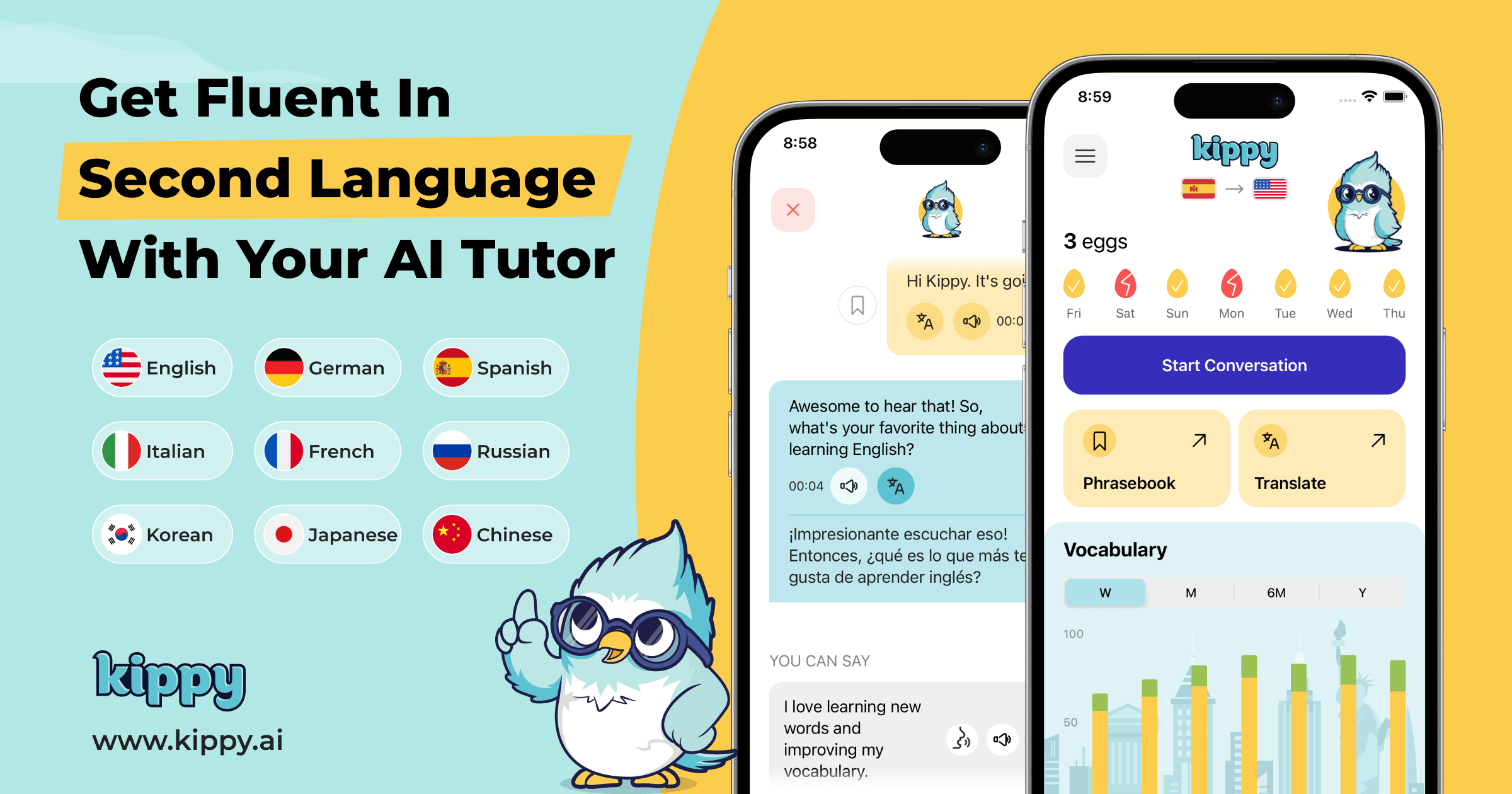
Screenshot of Kippy, AI conversation partner for spoken language practice

What is Kippy?

Kippy is an AI language tutor focused on spoken conversation. Learners talk with a budgie character across ten languages, get pronunciation and grammar feedback, rehearse real life scenarios, and save new vocabulary. It works best as a daily speaking supplement for people who already know some grammar.

Kippy is an AI language tutor built around one activity: speaking. Instead of drilling grammar rules or chasing streaks, learners hold conversations with Kippy, a chatty budgie character who discusses topics such as art, books, business, sports, science and travel. The product is aimed at people who already have some foundation in a language, whether from an app like Duolingo, a class, a private tutor, or books, podcasts and videos, and who freeze when it comes time to talk out loud. In practice, a session is a spoken dialogue. Kippy opens with daily conversation topics or a guided conversation, and learners reply by voice. When a sentence will not come, suggested responses and instant translation keep the exchange moving rather than stalling it. After speaking, the pronunciation checker rates output and the grammar checker flags mistakes, so feedback arrives alongside the conversation instead of in a separate lesson. Real life scenarios let learners rehearse situations they expect to face, and a personal phrasebook plus vocabulary report capture words from the dialogue for later review. Progress tracking and a fluency assessment give a longer view of how speaking is developing. Kippy is available for English, German, Spanish, Italian, French, Russian, Korean, Japanese, Chinese and Portuguese, with a two way translator for moving between the target language and a native one. The homepage positions it as a supplement rather than a replacement: Duolingo for grammar basics, a tutor for nuance, a class for structure, and Kippy for the daily speaking reps those routes rarely provide. Reviewers describe it as unsuitable for absolute beginners and note that the conversation pace and vocabulary can run ahead of a learner's level, which matches the stated assumption that users arrive with prior study behind them. The app has been downloaded more than 8.8 million times and carries over 47,000 five star ratings, with the company claiming more than 80,000 daily speaking practitioners. The interface character and scenario framing distinguish it from generic chatbot practice, where a learner must invent prompts and structure alone.

How do you use Kippy?

  1. 1Install Kippy and pick your languages
    Download the app from the App Store link on the homepage, then choose the language you want to speak and the language you think in. Kippy supports English, German, Spanish, Italian, French, Russian, Korean, Japanese, Chinese and Portuguese.
  2. 2Start with a guided conversation
    Use guided conversations or daily conversation topics for the first sessions. Kippy leads the dialogue, so there is no need to invent a prompt or decide what to talk about.
  3. 3Turn on translation and suggested replies
    If the opening exchange moves too fast, enable instant translation and response suggestions. Both keep the conversation flowing while you build the habit of speaking aloud.
  4. 4Review pronunciation and grammar feedback
    After speaking, read the pronunciation rating word by word and check the grammar notes. Repeat the same lines until the flagged sounds and structures come out cleanly.
  5. 5Rehearse a real life scenario
    Pick a situation you expect to face, such as ordering food or a work introduction, and practice it until the phrases feel automatic. This is where the app prepares you for conversations outside it.
  6. 6Save words and track progress
    Add unfamiliar words from the dialogue to your personal phrasebook, then revisit the vocabulary report and progress tracking weekly to see which areas still need speaking practice.

Pros and cons

Pros

  • Conversation first design removes the blank page problem that generic chatbots create for speaking practiceAI
  • Pronunciation and grammar checks deliver feedback inside the session rather than as a separate exerciseAI
  • Ten target languages plus a two way translator cover both practice and real world communicationAI
  • Vocabulary report and personal phrasebook turn spoken conversations into review materialAI
  • Large install base with more than 47,000 five star ratings signals a well tested core experienceAI

Cons

  • Not suitable for absolute beginners, as the app itself and several reviewers acknowledgeAI
  • Conversation speed and vocabulary can exceed the learner's level even with translation switched onAI
  • No pricing information appears on the homepage, so cost has to be confirmed inside the appAI
  • The homepage only links to the App Store, leaving desktop and Android availability unclearAI
  • Feedback quality depends entirely on automated checks, with no human tutor review of errorsAI

How much does Kippy cost?

Features

Spoken conversation practice with an AI tutor character across ten languages, supported by guided conversations, daily topics and real life scenarios. Feedback tools include a pronunciation checker, grammar checker and fluency assessment. A personal phrasebook, vocabulary report and progress tracking handle review, while instant translation and a two way translator support learners who need a bridge to their native language.

Learn more

Frequently asked questions about Kippy

  • How do you use Kippy?
    The walkthrough on this page covers 6 steps: 1. Install Kippy and pick your languages 2. Start with a guided conversation 3. Turn on translation and suggested replies 4. Review pronunciation and grammar feedback 5. Rehearse a real life scenario 6. Save words and track progress.
  • What platforms does Kippy support?
    Kippy is available on iOS.
  • What are the limitations of Kippy?
    Not suitable for absolute beginners, as the app itself and several reviewers acknowledge. Conversation speed and vocabulary can exceed the learner's level even with translation switched on. No pricing information appears on the homepage, so cost has to be confirmed inside the app.

Status

StatusActive
Views0
Outbound clicks0
Added10/21/2026

Platforms

iOS

Pricing

Freemium