Free trial
Signing up grants 100,000 free Units to test Flows before choosing a paid plan. No time limit is stated on the homepage.
Learn moreNode-based automation for AI content creation and scheduled publishing

LaminarFlow is an autoblogger tool. A node-based automation builder for AI content pipelines, with WordPress publishing, scheduled runs, external data sources and a Units-based pricing model. Aimed at bloggers and developers who want autoblogging without manual effort.
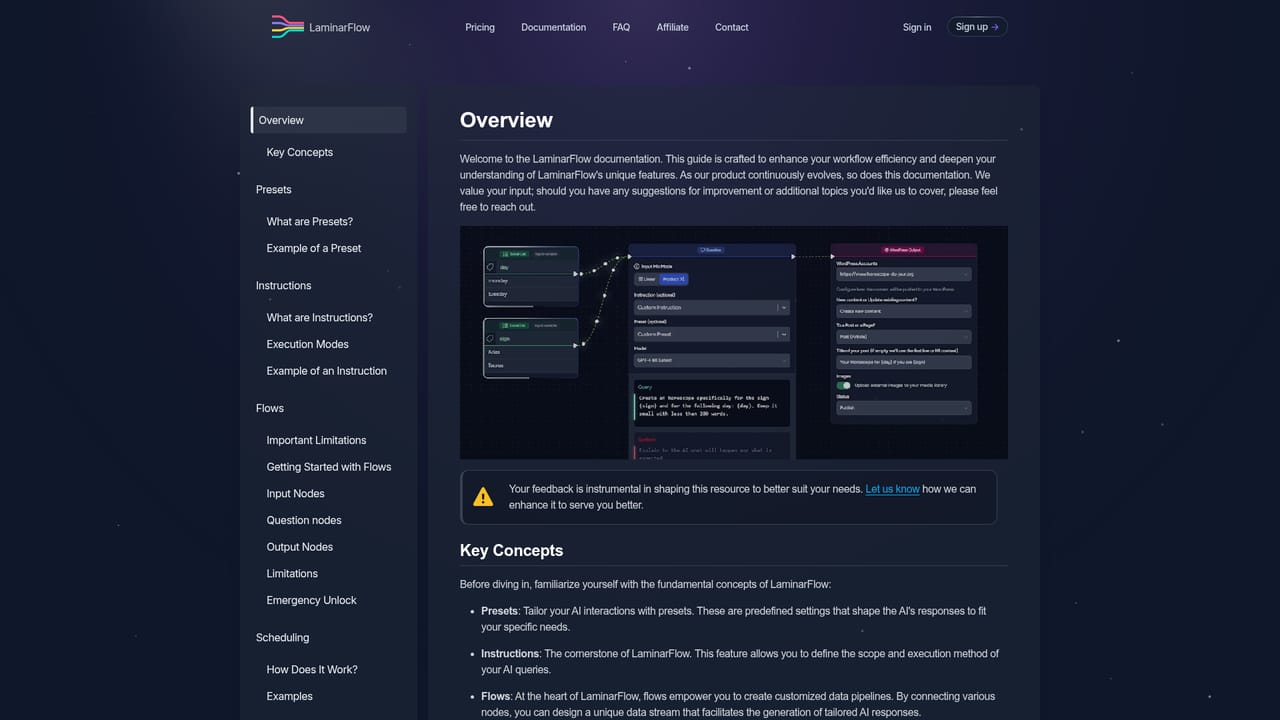
LaminarFlow is a workflow automation platform built around a simple premise: content production can be assembled from reusable parts. Users build Flows, which are sequences of Nodes that pull data in, pass it through AI for transformation, and push the finished result out to a destination. The company positions the product for bloggers and developers, and that split makes sense once you look at the node library. Writers get a WordPress node that handles publishing, while technical users get file uploads, API URL retrieval and storage connectors they can wire together themselves. The core of every Flow is the Question node, where the actual AI query is defined. Inputs you link to that Question determine what context the model receives, and a Question to Question Link node lets one query feed its output into the next, so multi-stage generation is possible without leaving the builder. Supporting nodes cover a local list for stored data, plain text, uploaded files, an API URL fetcher, a web browser node that retrieves page source code, and two content feeds called Newsroom and Articles that surface current news and third party writing. Variable injection lets you define custom values and reuse them across a Flow, and the custom tag feature targets specific sections of a WordPress post for swapping rather than rewriting the whole page. Scheduling is where the product earns its keep. Flows can be set to run on a timetable, which turns the setup into a self-managed autoblogging pipeline: pick sources, generate the article, publish to WordPress, repeat daily. The showcase sites (a business news portal, a horoscope site, an ecology publication) all follow that pattern. Anyone comparing this to general automation builders should note the narrow focus on written content and WordPress rather than a broad app ecosystem. Pricing runs on Units, a consumption currency tied to node usage. Four tiers exist, and the top Pro plan assumes you bring your own OpenAI key. New accounts receive 100,000 free Units.
Signing up grants 100,000 free Units to test Flows before choosing a paid plan. No time limit is stated on the homepage.
Learn moreFour monthly tiers: Small at $9 (1 Flow, 500K Units), Medium at $29 (5 Flows, 2M Units), Large at $89 (10 Flows, 10M Units) and Pro at $199 (50 Flows, 10M Units, your own OpenAI API key). Units stack up to a per plan cap.
Learn moreEmail based support with expert assistance, Premium Support included on all plans for priority responses, and comprehensive documentation with detailed examples.
Learn moreWordPress for publishing, S3, FTP, SFTP and direct URLs for data import and export, plus a web browser node and API URL node for pulling external content.
Flow builder with nodes for AI questions, question chaining, local lists, text, file uploads, API URLs, web page source retrieval, Newsroom and Articles feeds, plus WordPress publishing. Custom variables, custom tag section swaps, scheduled runs and S3, FTP, SFTP or URL based import and export.
Learn more AI Angels400+ customizable AI girlfriends for NSFW chat, voice calls, and roleplay
 Candy AIExperience the future of companionship with AI friends who chat, role-play, and connect with you on a human level.
 ourdream.aiA vast AI roleplay platform with millions of characters for chat, images, video and voiceAI Angels400+ customizable AI girlfriends for NSFW chat, voice calls, and roleplayCandy AIExperience the future of companionship with AI friends who chat, role-play, and connect with you on a human level.ourdream.aiA vast AI roleplay platform with millions of characters for chat, images, video and voice


