LangMagic

An adaptive language reader that writes your next page on the fly

Beginner
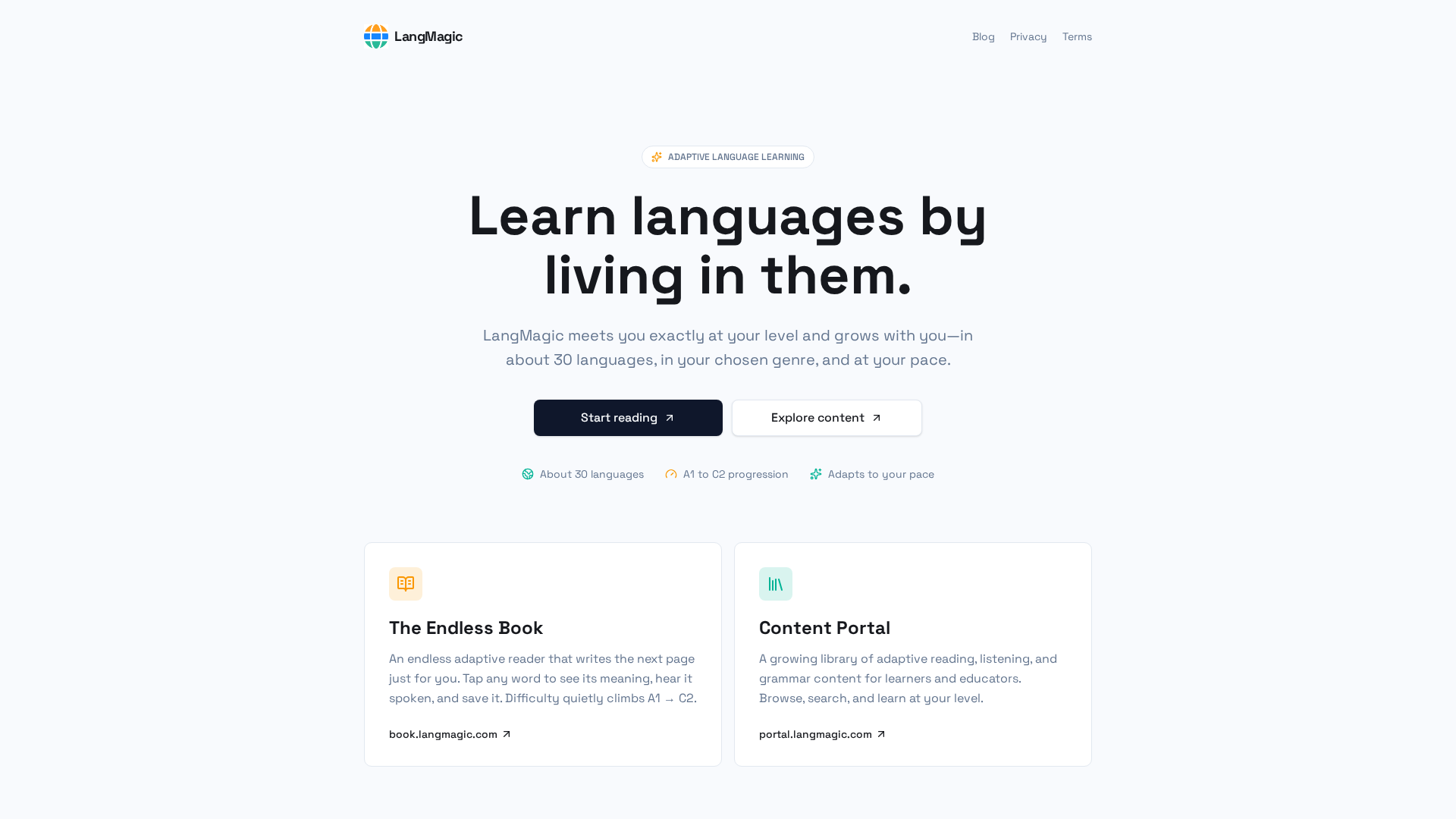
Screenshot of LangMagic, An adaptive language reader that writes your next page on the fly

What is LangMagic?

LangMagic is a content tool. An adaptive language learning platform covering about 30 languages, with an endless generated reader and a browsable content portal for reading, listening and grammar practice at CEFR levels A1 to C2.

LangMagic is an adaptive language learning service built around reading and listening rather than drills. The core idea is that learners absorb a language fastest when they meet it inside material they actually want to read, so the platform generates text at the right difficulty instead of handing everyone the same fixed lesson set. It covers roughly 30 languages and maps progress from A1 through C2, adjusting as the learner moves. The product splits into two tools. The Endless Book is an adaptive reader that keeps writing the next page for the individual learner. Tapping a word reveals its meaning, plays the spoken form, and lets the reader save it for later. Difficulty rises quietly rather than through a level test, so the text stays readable while gradually getting harder. The Content Portal is a broader library of adaptive reading, listening and grammar material that can be browsed and searched by level, aimed at both independent learners and educators who want ready material for their students. The pitch is aimed at self-directed learners who dislike flashcard grinding and want volume of exposure, and at teachers looking for level-appropriate reading and listening content without writing it themselves. Because progress is tied to pacing rather than a fixed syllabus, someone with twenty minutes a day and someone with an hour follow different routes through the same material. Where it differs from mainstream apps is the absence of a gamified lesson path: there are no streaks or leaderboards to speak of, and grammar arrives through content rather than as explicit units to complete. Compared with tutoring or structured courses, it offers breadth of exposure at low cost but far less correction and speaking practice. It suits learners who already read comfortably in their own language and want extensive input, less so absolute beginners who need pronunciation coaching and conversation partners.

How do you use LangMagic?

  1. 1Open the Endless Book reader
    Start at the book subdomain, which hosts the adaptive reader. It generates the first page based on your chosen language and level rather than asking you to pick a fixed course.
  2. 2Set your target language and starting level
    Choose from the roughly 30 supported languages and indicate where you sit on the A1 to C2 scale. The reader uses this as a starting point and then adjusts from there.
  3. 3Read a page and tap unfamiliar words
    Work through the generated text at your own speed. Tapping any word shows its meaning, plays the spoken form and lets you save it to review later.
  4. 4Let the difficulty drift upward
    Keep reading across sessions. Difficulty climbs incrementally rather than through manual level changes, so the text should stay challenging without becoming unreadable.
  5. 5Browse the Content Portal for extra material
    Move to the portal subdomain to search the wider library of adaptive reading, listening and grammar content. Filter by your level to find material beyond the generated book.
  6. 6Keep a saved word list for review
    Words saved while reading collect in your account. Revisit them between reading sessions to reinforce vocabulary that the adaptive text keeps reintroducing.

Pros and cons

Pros

  • Covers roughly 30 languages with a clear A1 to C2 progression pathAI
  • Endless Book generates fresh reading material at the learner's level instead of fixed lessonsAI
  • Tap-to-define, audio playback and word saving make reading sessions double as vocabulary workAI
  • Difficulty adjusts quietly to pace, so daily session length is flexibleAI
  • Content Portal gives teachers and learners a searchable library of reading, listening and grammar materialAI

Cons

  • Homepage gives no pricing, no free tier detail and no trial information, so cost is unknown before signing upAI
  • No visible speaking practice, conversation partner or live tutor componentAI
  • Grammar is absorbed through content rather than taught in structured, explainable unitsAI
  • No integrations, API or third-party tooling are described on the siteAI
  • Material is generated, so accuracy and natural phrasing in less common languages cannot be verified from the homepageAI

How much does LangMagic cost?

Features

An adaptive reader that generates the next page for each learner, tap-to-define words with audio and saving, automatic difficulty progression from A1 to C2, and a searchable Content Portal of reading, listening and grammar material for learners and educators across about 30 languages.

Frequently asked questions about LangMagic

  • How do you use LangMagic?
    The walkthrough on this page covers 6 steps: 1. Open the Endless Book reader 2. Set your target language and starting level 3. Read a page and tap unfamiliar words 4. Let the difficulty drift upward 5. Browse the Content Portal for extra material 6. Keep a saved word list for review.
  • What platforms does LangMagic support?
    LangMagic is available on Web App.
  • What are the limitations of LangMagic?
    Homepage gives no pricing, no free tier detail and no trial information, so cost is unknown before signing up. No visible speaking practice, conversation partner or live tutor component. Grammar is absorbed through content rather than taught in structured, explainable units.

Status

StatusActive
Views0
Outbound clicks0
Added10/21/2026

Platforms

Web App

Pricing

Freemium