Free trial
Registration and browsing are free. New accounts get a one-time $3 balance that cannot pay for a map alone, plus one free map of up to 0.5 km² for eligible accounts.
Learn moreTurn any real city into a downloadable Minecraft world
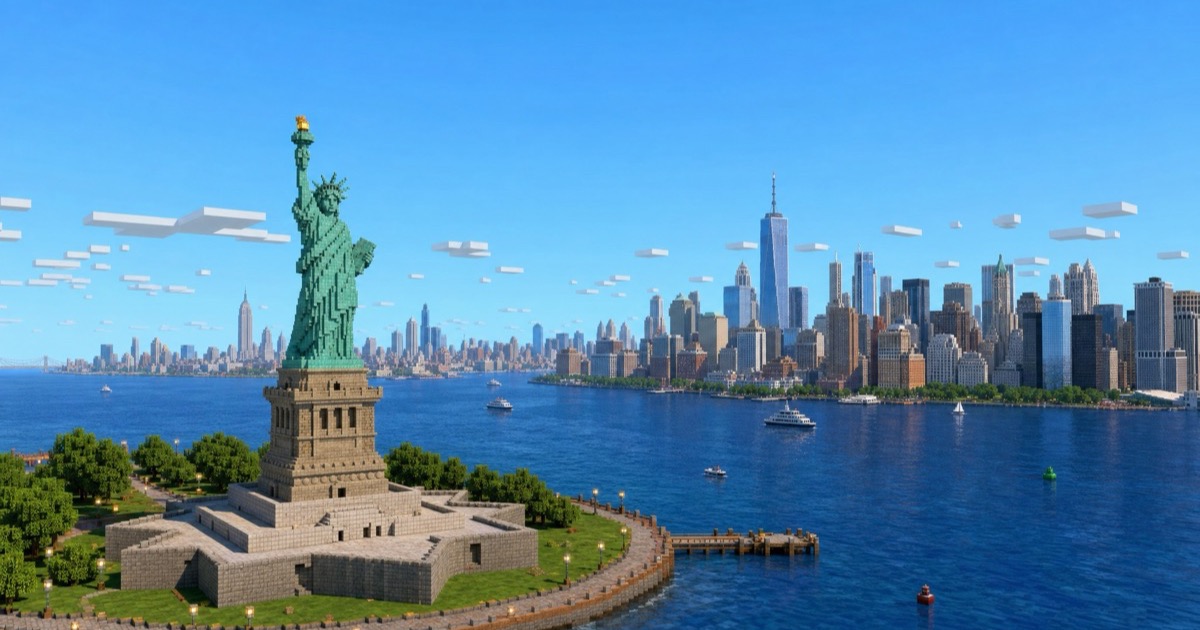
MapMC is a games tool that turns any real city into a downloadable Minecraft world. MapMC turns real-world locations into downloadable Minecraft Java and Bedrock worlds using OpenStreetMap data. Draw an area in the browser, pay per map or with Credits, and import the finished world into Minecraft.
MapMC is a browser-based generator that converts real places on Earth into playable Minecraft worlds. A user pans an online map, draws a rectangle around a city block, landmark, waterfront, campus or village, and the service fetches public OpenStreetMap data for that area. The open-source Arnis engine then translates streets, building footprints, water, land cover and terrain into Minecraft blocks, and the finished result is packaged as a Java world ZIP or a Bedrock .mcworld file. The output is a starting point rather than a hand-built replica: exact facades and interiors are not guaranteed, but the street pattern and layout follow the real place. It is aimed at Minecraft players who want to explore a familiar location in block form, at content creators building videos or streams around recognizable settings, and at educators or server owners who need a quick playable base for a themed map. Because everything runs in the browser, there is no desktop install, and worlds can be generated from a phone or tablet, which suits Bedrock players on the go. Device selection comes first, since Windows players may be on either edition and consoles require a separate transfer route plus an editable Bedrock Realm. The practical workflow is short: pick the area, confirm device and edition, review the area and price, then download and import the file. Small worlds usually arrive in a few minutes, while large or queued jobs can take 30 minutes or longer. Area caps are 40 km² for Java and 32 km² for Bedrock at standard detail, with high detail limited to 5 km². Sparse OpenStreetMap coverage is the main quality risk, so empty rural regions produce mostly plain terrain and cities perform far better. Against desktop tools such as Arnis and MapSmith, MapMC is the hosted option: it absorbs the data fetch, conversion, packaging and refund handling. Payment is one-time rather than subscription, either direct per map or through Credits bought in bonus-loaded top-ups, and download links normally expire 30 days after a successful job, so the world file needs saving locally. Seed Map and the Finders are free, and a showcase library of completed real-place maps gives a sense of the achievable fidelity before spending anything.
Registration and browsing are free. New accounts get a one-time $3 balance that cannot pay for a map alone, plus one free map of up to 0.5 km² for eligible accounts.
Learn moreNo subscription. Direct payment is $6.90 up to 3.1 km², rising to $14.90 at 10 km², $24.90 at 22 km² and $39.90 at the 40 km² Java limit. Wallet payment uses 100 Credits per km² with a 500-Credit minimum, and top-ups add bonus Credits, for example $99 for 25,000 Credits. Seed Map and Finders are free.
Learn moreA full FAQ covers editions, area limits, empty worlds, failed generations, file expiry and account deletion, alongside written import and world creation guides and a refund policy for eligible failures.
Learn moreConverts OpenStreetMap roads, buildings, water, land cover and terrain into Minecraft blocks for a drawn rectangle. Exports Java world ZIPs or Bedrock .mcworld packages up to 40 km² for Java and 32 km² for Bedrock at standard detail. Includes a Seed Map, Finders, a Google Maps to Minecraft guide, import instructions, a showcase library and a free one-off AI image and description improvement.
Learn more AI Angels400+ customizable AI girlfriends for NSFW chat, voice calls, and roleplay
 Candy AIExperience the future of companionship with AI friends who chat, role-play, and connect with you on a human level.
 ourdream.aiA vast AI roleplay platform with millions of characters for chat, images, video and voiceAI Angels400+ customizable AI girlfriends for NSFW chat, voice calls, and roleplayCandy AIExperience the future of companionship with AI friends who chat, role-play, and connect with you on a human level.ourdream.aiA vast AI roleplay platform with millions of characters for chat, images, video and voice