Motion Control AI

Browser-based motion transfer that animates any character from a reference video.

Beginner
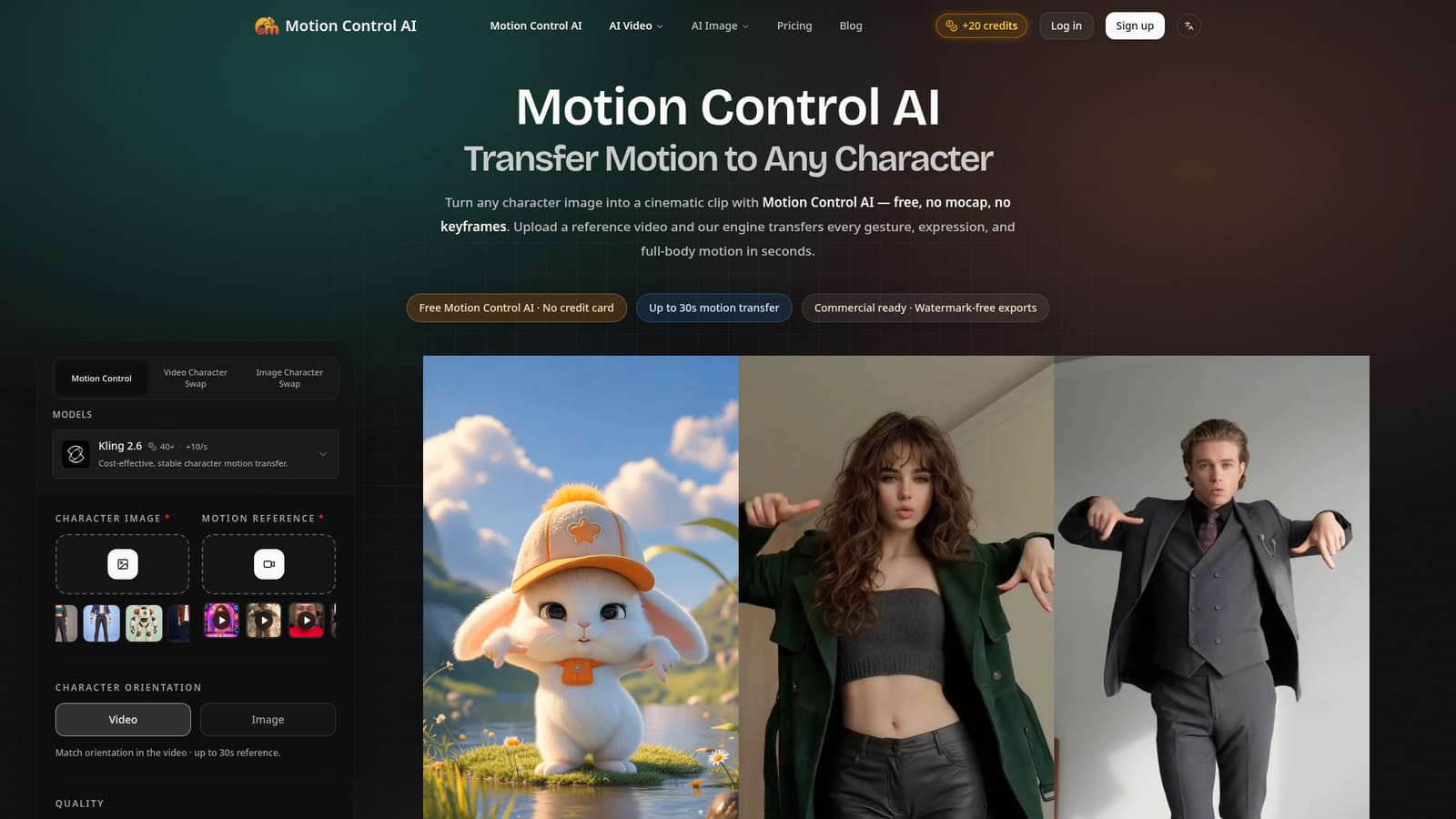
Screenshot of Motion Control AI, Browser-based motion transfer that animates any character from a reference video

What is Motion Control AI?

Motion Control AI is an avatar tool. A browser-based tool that transfers motion from a reference video onto a character image using Kling motion control, aimed at social creators, brand teams, and filmmakers.

Motion Control AI is a browser-based video generator that transfers motion, gestures, and facial expressions from a reference video onto a static character image. Rather than generating motion from a text prompt, the tool extracts pose, timing, and camera movement from an uploaded clip (up to 30 seconds) and retargets it onto a portrait, mascot, avatar, or illustrated character, aiming to keep identity, outfit, and proportions consistent across the full clip. Output is available at 720p or 1080p in 9:16, 16:9, or 1:1 aspect ratios, with watermark-free exports on paid plans. The tool is built around a dedicated Kling motion control pipeline (Kling 2.6 and Kling 3.0) that supports lip sync and audio preservation alongside motion transfer, and it sits inside a broader AI studio that also includes text-to-image, image-to-image, text-to-video, reference-to-video, and frames-to-video tools powered by multiple underlying models such as Veo, Seedance, LTX, and Nano Banana. This makes it less a single-purpose app and more a credit-based generation hub where motion control is one of several video and image capabilities. The stated use cases span social creators recreating dance or trend content, brand teams animating a mascot or product shot into a short ad, indie filmmakers previsualizing scenes, educators building avatar-led explainer videos, and VTuber or virtual influencer creators needing repeatable character motion. Because everything runs in the browser with no rigging, keyframing, or mocap hardware required, it is positioned as a faster, cheaper alternative to traditional animation pipelines and motion capture setups, as well as an alternative to blind text-to-video tools that tend to drift in character identity over the length of a clip.
How do you use Motion Control AI?

  1. 1Create an account and claim trial credits
    Sign up with no credit card required to receive 20 free credits, plus additional check-in credits over the first 3 days.
    Motion Control AI — Create an account and claim trial credits
  2. 2Choose the motion control tool and a model
    Open the Motion Control section and select a Kling engine such as Kling 2.6 or Kling 3.0 depending on cost and quality needs.
  3. 3Upload a character image
    Add a PNG, JPG, or WEBP of a portrait, mascot, avatar, or illustrated character to serve as the subject for the generated video.
  4. 4Upload a reference video
    Drop in up to 30 seconds of footage containing the motion, gestures, or dance moves to be transferred onto the character.
  5. 5Set orientation, quality, and optional prompt
    Match the character orientation to the video, choose 720p or 1080p output, and optionally add a short prompt to guide style or camera notes.
  6. 6Generate and download the result
    Run the generation, which typically completes in 1 to 3 minutes, then download the watermark-free clip or upgrade for more monthly credits.
    Motion Control AI — Generate and download the result

Pros and cons

Pros

  • Transfers full-body motion, hand gestures, and facial expression without manual rigging or keyframingAI
  • Supports reference clips up to 30 seconds with claimed identity lock across the whole clipAI
  • New accounts get 20 free trial credits with no credit card requiredAI
  • Bundles image, text-to-video, and reference-to-video tools alongside motion control in one credit poolAI
  • Paid plans include commercial usage rights and watermark-free exportsAI

Cons

  • Output quality depends heavily on matching body proportions and camera angle between image and reference video, per the site's own FAQAI
  • Credit-based system makes real cost per video hard to predict since usage varies by model and resolutionAI
  • No desktop or mobile app, so it only works through a browser sessionAI
  • Distortion is acknowledged as a known failure mode on mismatched references, requiring trial and errorAI
  • Free tier is limited to trial credits rather than ongoing free usageAI

How much does Motion Control AI cost?

Free trial

New accounts receive 20 free credits with no credit card required, plus 5 additional credits per check-in for the first 3 days.

Learn more

Pricing

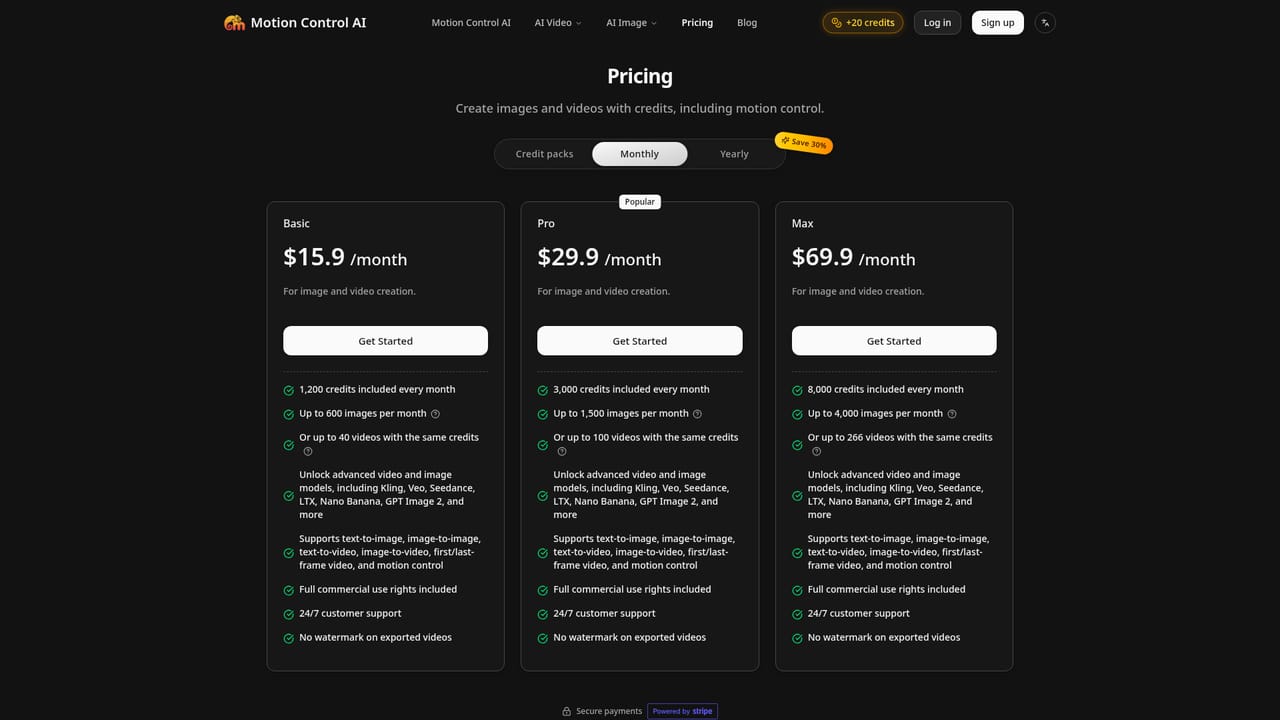
Credit-based pricing with a one-time 600-credit pack at $9.90, plus monthly subscriptions: Basic at $15.90 (1,200 credits), Pro at $29.90 (3,000 credits), and Max at $69.90 (8,000 credits). Credits cover video and image models; yearly billing claims a 30% saving.

Learn more

Support

Paid plans list 24/7 customer support as an included feature; no separate help center or contact page is listed on the homepage.

Integrations

The homepage does not describe third-party integrations; it lists multiple underlying AI models (Kling, Veo, Seedance, LTX, Nano Banana, GPT Image) powering its own generation tools.

Features

Reference-video-to-character motion transfer via Kling motion control, with full-body, hand, and facial retargeting, 30-second clips, 720p/1080p output, lip sync and audio preservation, plus bundled text-to-image, image-to-image, text-to-video, and reference-to-video tools.

Learn more

Frequently asked questions about Motion Control AI

  • How much does Motion Control AI cost?
    Credit-based pricing with a one-time 600-credit pack at $9.90, plus monthly subscriptions: Basic at $15.90 (1,200 credits), Pro at $29.90 (3,000 credits), and Max at $69.90 (8,000 credits). Credits cover video and image models; yearly billing claims a 30% saving.
  • Does Motion Control AI offer a free trial?
    New accounts receive 20 free credits with no credit card required, plus 5 additional credits per check-in for the first 3 days.
  • How do you use Motion Control AI?
    The walkthrough on this page covers 6 steps: 1. Create an account and claim trial credits 2. Choose the motion control tool and a model 3. Upload a character image 4. Upload a reference video 5. Set orientation, quality, and optional prompt 6. Generate and download the result.
  • What platforms does Motion Control AI support?
    Motion Control AI is available on Web App.
  • What does Motion Control AI integrate with?
    The homepage does not describe third-party integrations; it lists multiple underlying AI models (Kling, Veo, Seedance, LTX, Nano Banana, GPT Image) powering its own generation tools.
  • What are the limitations of Motion Control AI?
    Output quality depends heavily on matching body proportions and camera angle between image and reference video, per the site's own FAQ. Credit-based system makes real cost per video hard to predict since usage varies by model and resolution. No desktop or mobile app, so it only works through a browser session.

Status

StatusActive
Views0
Outbound clicks0
Added10/17/2026

Platforms

Web App

Pricing

FreemiumSubscriptionPaid