Free trial
A free start with 50 credits is offered and no credit card is required. The credits are meant to demonstrate real output quality rather than a watermarked preview.
Learn moreUpload a track, get a beat-synced music video directed by AI

MusVideo turns an uploaded song into a cinematic, beat-synced music video. It analyzes tempo, mood and energy, storyboards scenes, and exports a finished video for YouTube, TikTok, Reels or Spotify Canvas, with no editing skills required.
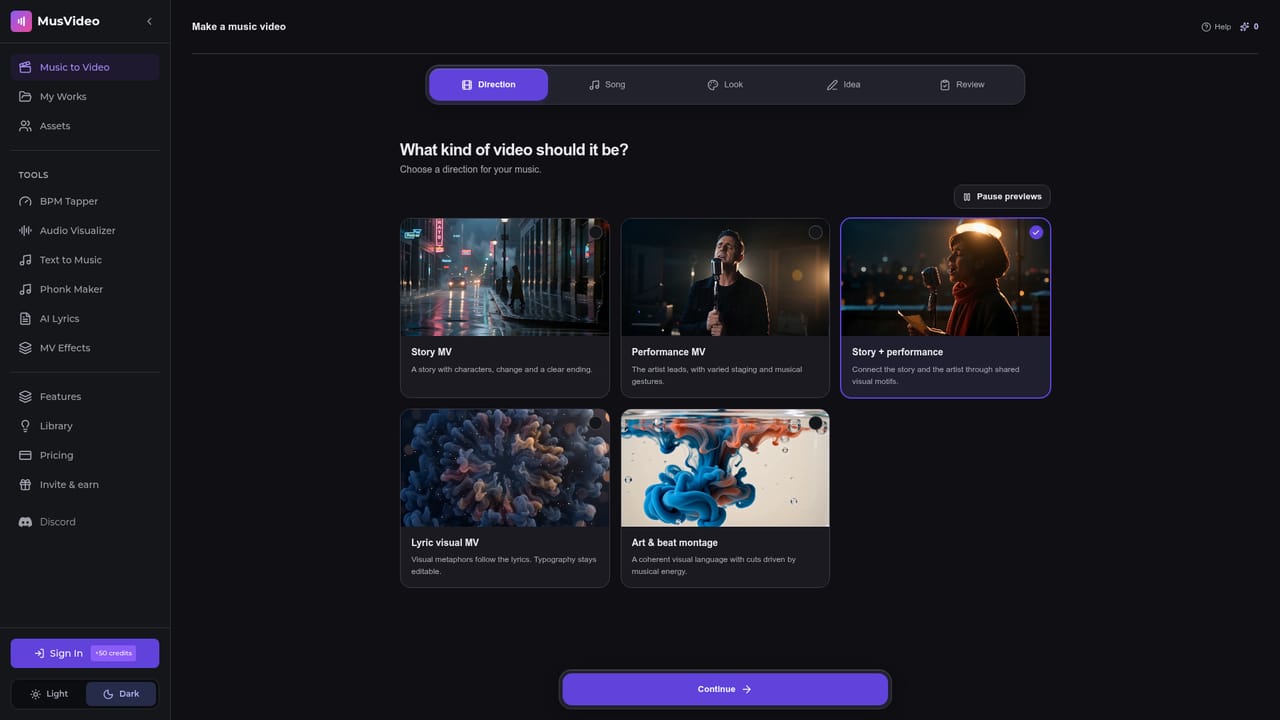
MusVideo is a music-to-video generator built around a single idea: the song you already have should decide what the video looks like. You upload an MP3, WAV, M4A or AAC file, and the engine reads its tempo, energy, mood and structure before planning anything. From that analysis it builds a cinematic storyboard, generates each scene and cuts the visuals against the beat. The result is a downloadable high-definition video, not a looped waveform background. The workflow is deliberately short. Step one is the upload. Step two is choosing a look: cinematic, lyric video, anime, realistic or visualizer, or you can hand the style decision to the AI and let it match the track. Step three is preview and export, with the option to regenerate individual scenes or try another visual direction if the first pass misses. Most renders finish within minutes, and Pro tier renders are queued ahead of standard ones. The same uploaded song can produce a narrative video, a lyric-forward cut or an abstract visualizer, so one track can feed several release formats. The audience is independent musicians, producers, labels and management teams who publish to YouTube, TikTok, Reels and Spotify Canvas but do not run a video production pipeline. It also suits creators who treat music as content rather than as a soundtrack for someone else's footage. Compared with tools that start from a text prompt, MusVideo starts from audio, which is the key structural difference. Compared with a visualizer app, it produces scenes and shots rather than reactive graphics. Commercial use is licensed on paid plans, though you must own or hold rights to the audio you upload. Expect a director's-assistant relationship rather than frame-level control. The value is in getting a publishable cut fast, not in replacing an editor for projects that need precise timing, performance footage or brand-mandated shot lists.
A free start with 50 credits is offered and no credit card is required. The credits are meant to demonstrate real output quality rather than a watermarked preview.
Learn moreThe homepage advertises free credits to start and refers to paid plans, including a Pro tier with prioritized rendering and a commercial license. No prices or plan tiers with figures are listed, so rates must be checked on the site.
Learn moreAudio analysis of tempo, mood, energy and structure; AI storyboarding and scene generation; beat-synced editing; style presets for cinematic, lyric video, anime, realistic and visualizer output; scene regeneration; high-definition export for YouTube, TikTok, Instagram Reels and Spotify Canvas.
Learn more AI Angels400+ customizable AI girlfriends for NSFW chat, voice calls, and roleplay
 Candy AIExperience the future of companionship with AI friends who chat, role-play, and connect with you on a human level.
 ourdream.aiA vast AI roleplay platform with millions of characters for chat, images, video and voiceAI Angels400+ customizable AI girlfriends for NSFW chat, voice calls, and roleplayCandy AIExperience the future of companionship with AI friends who chat, role-play, and connect with you on a human level.ourdream.aiA vast AI roleplay platform with millions of characters for chat, images, video and voice