MyImagineer

Turns one prompt into an illustrated, narrated storybook

Beginner
Screenshot of MyImagineer, Turns one prompt into an illustrated, narrated storybook

What is MyImagineer?

MyImagineer is a books tool that turns one prompt into an illustrated, narrated storybook. MyImagineer is a web storybook generator that turns a prompt into an illustrated flipbook with consistent characters, optional narration and multi-language support. It outputs digital books only, with a free credit tier and paid subscriptions.

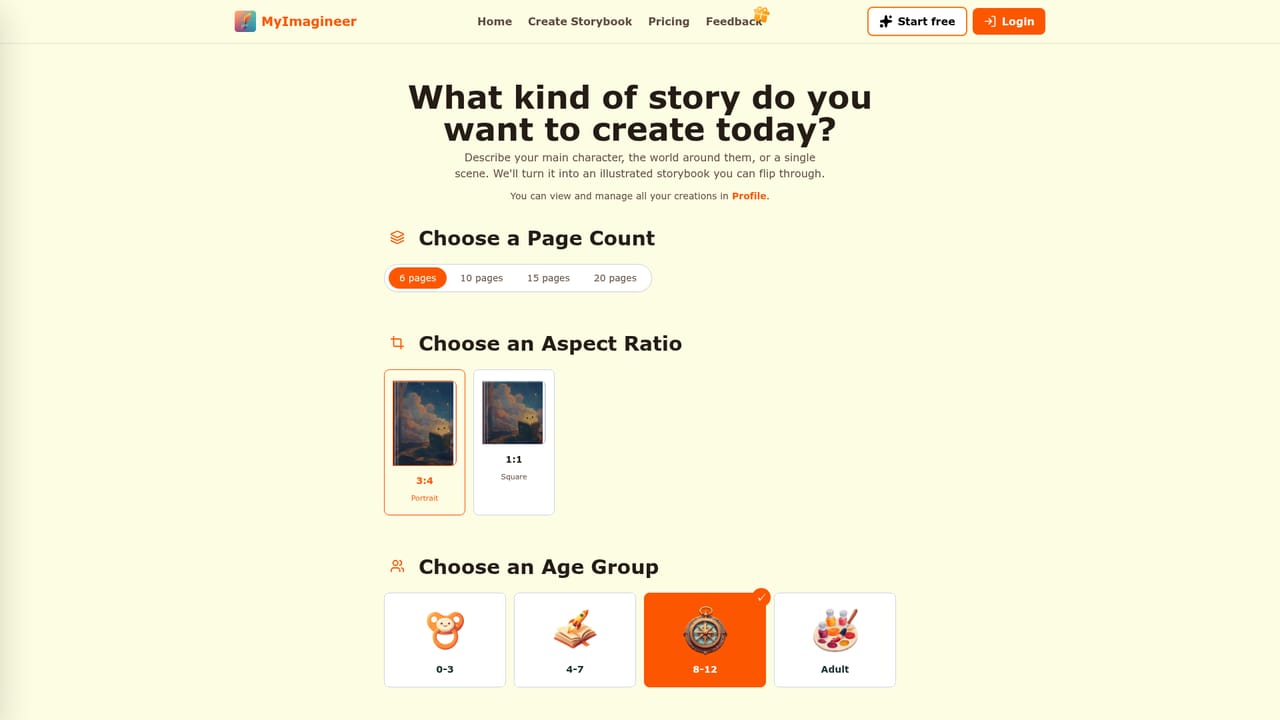
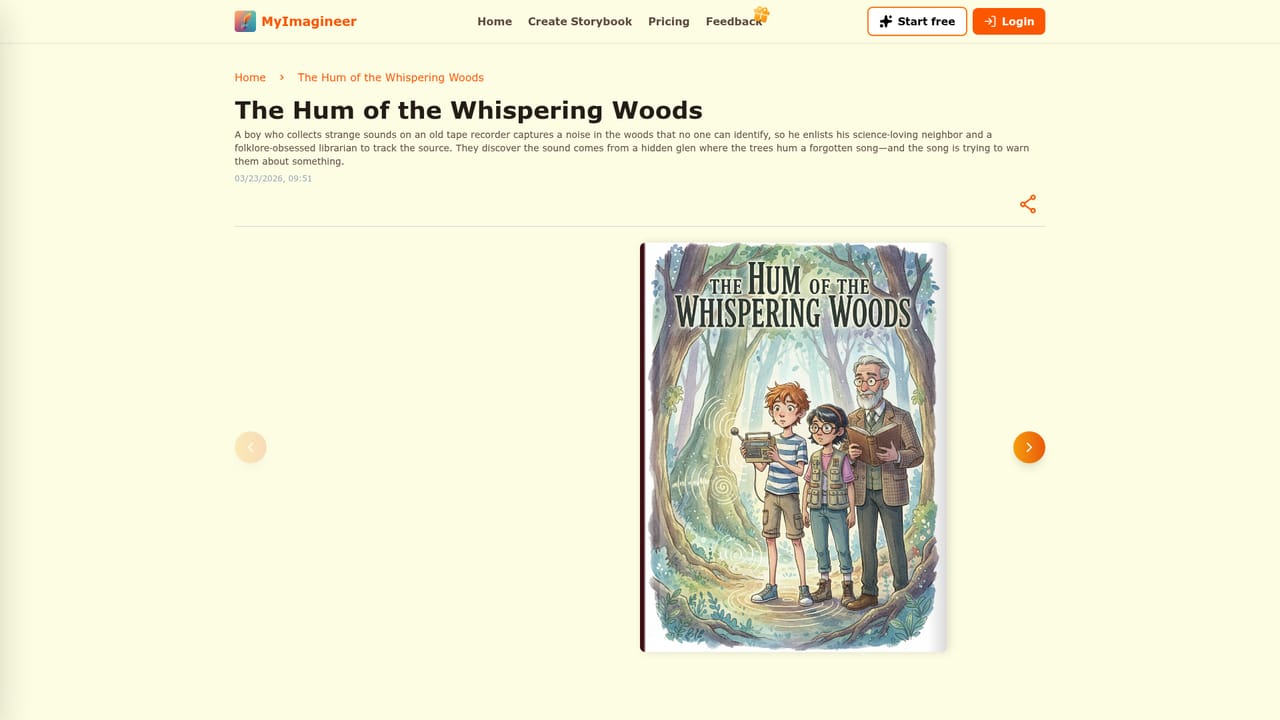
MyImagineer is a web-based storybook generator that produces a complete illustrated book from a single prompt. Instead of returning a block of text, it writes the narrative, draws art for each page, and assembles the result into a flipbook that can be read on screen, narrated aloud, and shared by link. The site states that it runs on Gemini and Nanobanana for its generation. The main selling point is character consistency. A user describes a hero or uploads a reference image, and the same face, outfit and art direction are meant to carry through every page. Setup involves choosing an art style and a book ratio, and the examples on the homepage show a range of looks, including sketch, gothic, watercolor and 3D render, across age groups from toddlers to adults. Books in the gallery run from 6 to 10 pages. After the first pass, scenes can be tweaked and individual images regenerated until the look is right. The audience is deliberately split. Authors and visual storytellers can use it for illustrated fiction drafts and storyboards, creators and small teams can explore mascots and scene sequences, educators can build short stories for classroom or language practice, and parents can put a familiar person in the lead for bedtime reading. Narration is available through system voices or voice cloning, and stories can be written, illustrated and narrated in multiple languages. Output is strictly digital: a shareable flipbook link and a downloadable file where export is offered, with no printing or shipping of physical books. Among alternatives, it sits between plain AI story writers that only output text and general image generators that leave layout and continuity to the user. It is closer to a focused picture-book workspace, with a credit-based model that starts with a free tier and moves to monthly or yearly subscriptions for watermark-free output, longer storage and audiobook and character features.
How do you use MyImagineer?

  1. 1Open the storybook creator
    Go to the create page and sign in to claim the free credits. A free account is required before generating anything.
    MyImagineer — Open the storybook creator
  2. 2Describe the story
    Enter a character, world or scene. A short bedtime idea or a longer fiction sketch both work as a starting prompt.
  3. 3Set style and character
    Pick an art style and a book ratio, then describe the hero or upload a reference so the face and outfit stay the same on every page.
  4. 4Generate and refine pages
    Let the generator write and illustrate the book, then tweak scenes and regenerate any images that miss the look you want.
  5. 5Read, listen and share
    Open the flipbook, add narration if wanted, then share a link or download a digital file. Browse example books first for style ideas.
    MyImagineer — Read, listen and share

Pros and cons

Pros

  • Writes the story and illustrates every page in one pass, so the result is a flippable book rather than plain textAI
  • Character consistency from a description or reference image keeps the hero recognizable across pagesAI
  • Narration with system voices or voice cloning, plus multi-language creation, widens its use for families and educatorsAI
  • Several art styles and book ratios, with per-scene tweaks and image regeneration, give control without design skillsAI
  • Free tier lets new users try the workflow before paying, and shareable flipbook links make review easyAI

Cons

  • No printed or shipped books; output is limited to a digital flipbook and a downloadable file where export is availableAI
  • The free tier is small (20 one-time credits), watermarked, queued normally and keeps books for only one dayAI
  • Audiobook and Add Character features are locked behind paid plans, which limits free testing of its signature consistency featureAI
  • Credit-based limits (400 or 1200 per month) make heavy use of regeneration a budgeting concernAI
  • Gallery examples run 6 to 10 pages, so long-form book projects are not clearly demonstratedAI

How much does MyImagineer cost?

Free trial

A free tier requires sign-up and gives 20 one-time Magic Credits, with watermarked output, a standard queue and 1-day storage. Audiobook and Add Character are not included.

Learn more

Pricing

Free tier at $0 with 20 one-time credits, watermarks and 1-day storage. Basic is $20.9/month (400 credits/month, $250/year) and Pro is $41.9/month (1200 credits/month, $502/year), both watermark-free with 1-year storage, audiobook and Add Character support.

Learn more

Features

Prompt-to-storybook generation with text and page art, consistent characters from descriptions or references, selectable art styles and ratios, scene tweaks and image regeneration, narration with system voices or voice cloning, multi-language creation, flipbook viewer, link sharing and digital download.

Frequently asked questions about MyImagineer

  • How much does MyImagineer cost?
    Free tier at $0 with 20 one-time credits, watermarks and 1-day storage. Basic is $20.9/month (400 credits/month, $250/year) and Pro is $41.9/month (1200 credits/month, $502/year), both watermark-free with 1-year storage, audiobook and Add Character support.
  • Does MyImagineer offer a free trial?
    A free tier requires sign-up and gives 20 one-time Magic Credits, with watermarked output, a standard queue and 1-day storage. Audiobook and Add Character are not included.
  • How do you use MyImagineer?
    The walkthrough on this page covers 5 steps: 1. Open the storybook creator 2. Describe the story 3. Set style and character 4. Generate and refine pages 5. Read, listen and share.
  • What platforms does MyImagineer support?
    MyImagineer is available on Web App.
  • What are the limitations of MyImagineer?
    No printed or shipped books; output is limited to a digital flipbook and a downloadable file where export is available. The free tier is small (20 one-time credits), watermarked, queued normally and keeps books for only one day. Audiobook and Add Character features are locked behind paid plans, which limits free testing of its signature consistency feature.

Status

StatusActive
Views0
Outbound clicks0
Added10/18/2026

Platforms

Web App

Pricing

FreemiumSubscription