Free trial
A free trial is offered on the homepage, described as a way to try the tool before paying. Credit limits for the trial are not stated there.
Learn moreAI keyword, title and description generation for photos and videos
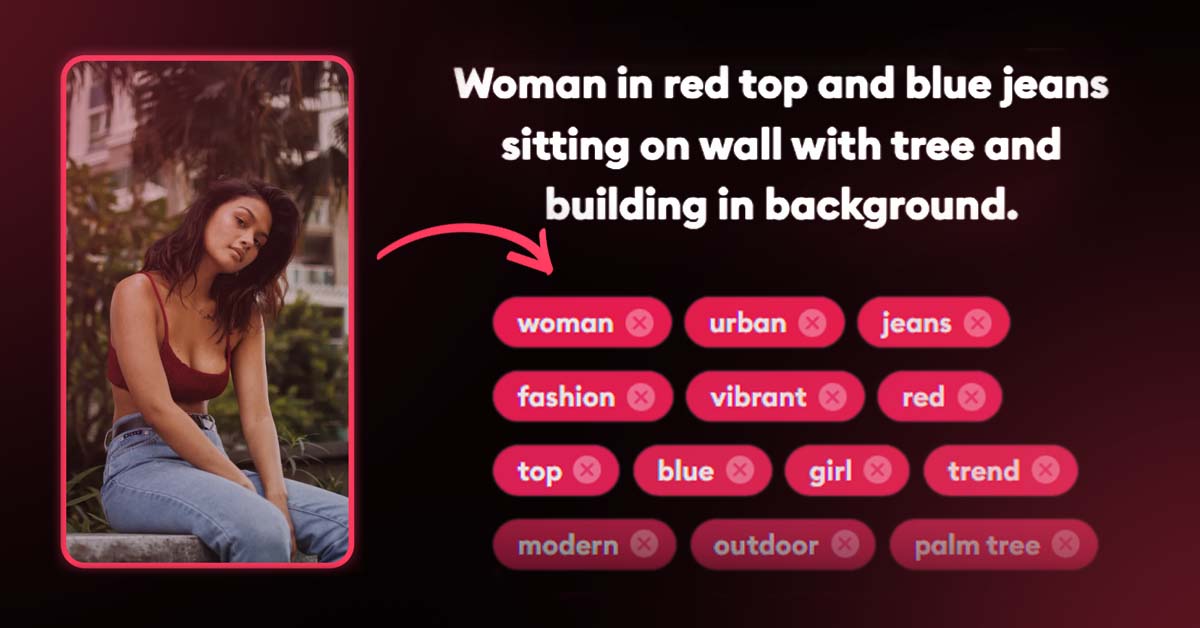
PhotoTag.ai is a photos tool. AI tool that reads a photo or video and drafts keywords, titles and descriptions, then exports the files with metadata attached. Built for microstock contributors, e-commerce sellers and asset managers, with a Lightroom Classic plug-in, an API and a web uploader.
PhotoTag.ai is a metadata generator for visual media. Upload a photo or a video clip and the service drafts a set of keywords, a title and a description by analysing what is in the frame. Output lands in the standard metadata fields rather than in a separate document, so files leave the tool already labelled and ready for upload to a stock marketplace, a product catalogue or a content library. Supported image formats include PNG, JPEG, WEBP, SVG and TIFF, and video support covers MP4, MOV and AVI. The product is aimed at people who sell or manage large image collections. Microstock contributors are the clearest fit: the workflow replaces the slow manual pass of typing dozens of keywords per file with an AI draft followed by human review. E-commerce sellers use it to write titles and descriptions for product shots, and marketers and bloggers use the same output to strengthen the text around visual assets. Anyone maintaining a digital asset management system benefits too, because consistent metadata makes images searchable later. In practice the tool fits into existing editing habits rather than replacing them. There is a Lightroom Classic plug-in for photographers who keep everything in Adobe's catalogue, an API for teams that want to script batch runs from their own pipeline, and a web upload page for one-off jobs. Users are expected to check the generated keywords before publishing, and the site frames the AI as a drafting aid that accelerates the first pass rather than a final authority. A free trial lets newcomers test output quality on their own files before committing. Where it differs from generic image captioning tools is specialisation. PhotoTag.ai is built around metadata standards and export formats that stock and DAM workflows actually consume, including XMP, IPTC and EXIF fields, and around integrations that move tagged files onward without manual copying. Against hand keywording it is faster; against general purpose vision models it offers a narrower, more workflow-shaped product with pricing aimed at individual creators rather than enterprise contracts.
A free trial is offered on the homepage, described as a way to try the tool before paying. Credit limits for the trial are not stated there.
Learn moreThe site advertises affordable pricing with pay-as-you-go options and states that a free trial is available, but the exact credit amounts, tiers and per-file costs are not listed on the homepage. Check the pricing page for current numbers.
Learn moreAn FAQ page and a blog with workflow guides are published on the site. No dedicated help centre or contact channel is described on the homepage.
Learn moreDirect integrations named on the homepage are the Lightroom Classic plug-in and API access, with the stated aim of connecting to stock platforms. A Motion Array integration is mentioned in the blog.
Learn moreAI keyword, title and description generation for images and videos, with support for PNG, JPEG, WEBP, SVG, TIFF, MP4, MOV and AVI files. Metadata is embedded in exported files, and the service is available through a web uploader, a Lightroom Classic plug-in and an API. The site also covers adjacent workflows such as e-commerce product tagging, vector SVG keywording and IPTC metadata for JPEGs.
 AI Angels400+ customizable AI girlfriends for NSFW chat, voice calls, and roleplay
 Candy AIExperience the future of companionship with AI friends who chat, role-play, and connect with you on a human level.
 ourdream.aiA vast AI roleplay platform with millions of characters for chat, images, video and voiceAI Angels400+ customizable AI girlfriends for NSFW chat, voice calls, and roleplayCandy AIExperience the future of companionship with AI friends who chat, role-play, and connect with you on a human level.ourdream.aiA vast AI roleplay platform with millions of characters for chat, images, video and voice