Free trial
Free use is available without a credit card, and the site says to upgrade only when more is needed. No trial length or credit allowance is stated on the homepage.
Learn moreBrowser based AI song generator with a producer tag maker built in

Producer AI generates full songs, AI vocals, producer tags, covers and extended tracks from short text prompts in the browser. Fixed genre styles, lyrics to song conversion, stem exports and commercial usage rights make it a practical pick for creators who need original background music or branded audio without a studio.
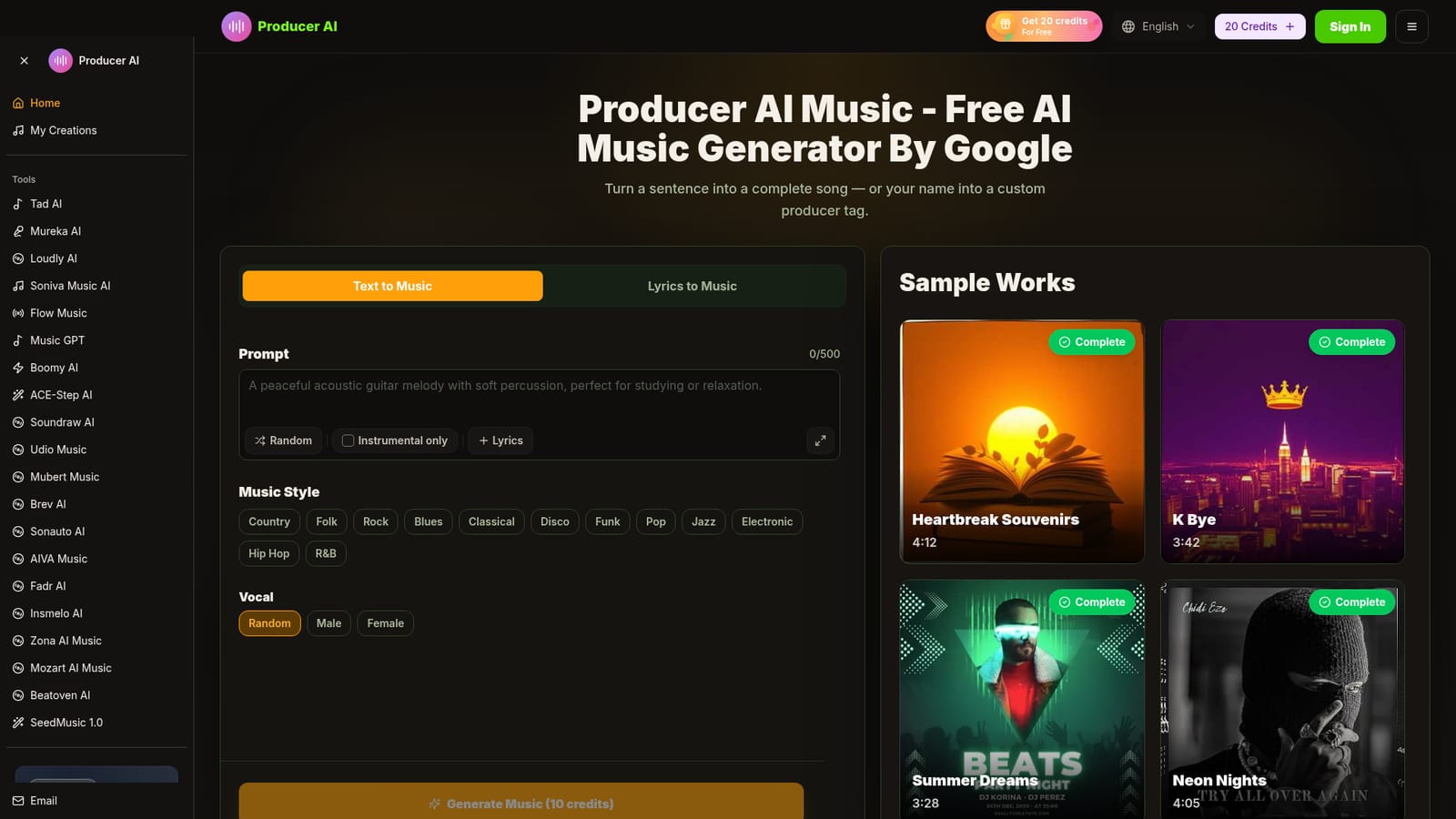
Producer AI is a browser based music generator that turns short text prompts into complete songs, and turns a name into a custom producer tag. The workflow is deliberately narrow: describe the sound you want, choose a genre from a fixed list, decide between vocals and an instrumental, and generate. Country, folk, rock, blues, classical, disco, funk, pop, jazz, electronic, hip hop and R&B are the style options shown on the homepage, and vocal delivery can be left random or set to male or female. No instrument, DAW or musical training is involved in any part of it. Beyond straight text to music, the platform bundles several adjacent jobs into the same workspace. A lyrics mode takes words you have already written and produces a fully performed track around them. The producer tag generator creates short audio watermarks for beat makers who want a recognisable signature. There is also a track extender for lengthening existing audio, a cover tool that reworks a song into a different genre while keeping the melody, and stem separation for pulling individual parts out of a mix. Finished work can be exported as MP3 or WAV, including individual stems, and the site states that tracks come with commercial usage rights. The audience is broad by design. The homepage pitches the tool at YouTube and social creators who need copyright safe background music, podcasters after intro and outro themes, filmmakers scoring projects, marketing teams building jingles and sonic logos, and songwriters sketching ideas. Outputs are typically 3 to 4 minutes according to the sample gallery, and generation is described as completing in under a minute. The platform also carries a community gallery where users share tracks and tags. Where it sits among alternatives is as an all in one front end rather than a single model. The site doubles as a hub linking to comparable tools such as Mureka, Udio, Suno adjacent options like Tad AI, Soundraw, Boomy, Mubert and AIVA, so Producer AI works best for people who want song generation, tags, covers and stems in one place instead of assembling separate services. Anyone needing fine grained mixing control or detailed parameter editing will find the prompt first approach limiting.
Free use is available without a credit card, and the site says to upgrade only when more is needed. No trial length or credit allowance is stated on the homepage.
Learn moreThe homepage advertises a free tier with no credit card and no download required, and charges 10 credits per music generation. A premium tier is promoted with a 20 percent discount and unlimited access to all features, but no prices are listed on the homepage itself.
Learn moreSupport is offered by email at support@producerai.art. No help centre, documentation or live chat is described on the homepage.
Text to music and lyrics to song generation, AI vocals in multiple languages and styles, a producer tag generator, track extension, genre cover creation, stem separation, MP3 and WAV export, a community gallery, and commercial usage rights on generated tracks.
 AI Angels400+ customizable AI girlfriends for NSFW chat, voice calls, and roleplay
 Candy AIExperience the future of companionship with AI friends who chat, role-play, and connect with you on a human level.
 ourdream.aiA vast AI roleplay platform with millions of characters for chat, images, video and voiceAI Angels400+ customizable AI girlfriends for NSFW chat, voice calls, and roleplayCandy AIExperience the future of companionship with AI friends who chat, role-play, and connect with you on a human level.ourdream.aiA vast AI roleplay platform with millions of characters for chat, images, video and voice


