Pricing
The homepage does not list prices. It points to a separate pricing page for Content AI plans.
Learn moreWordPress-native AI writing and on-page SEO assistant from Rank Math

RankMath is a content writing tool. Content AI is Rank Math's AI assistant for WordPress, with 40+ writing tools, the RankBot chat, 125+ prompts and 30 languages. It drafts posts, generates meta tags and ALT text, and fixes failed SEO tests inside the editor.
Content AI is the writing and research layer of the Rank Math SEO plugin for WordPress. It combines more than 40 generation tools with a chat assistant called RankBot, so a site owner can plan, draft and tune pages without leaving the dashboard. The pitch is speed on the routine parts of SEO work: keyword research, topic ideas, outlines and long drafts, which the vendor compares against hours of manual effort. The toolset covers the usual blog pipeline: post ideas, outlines, introductions, conclusions, titles, paragraphs, rewriting, expanding, summarizing and grammar fixes. It also reaches into commerce and business copy, with product descriptions, pros and cons, reviews, FAQs, comment replies, bios, job descriptions and testimonials. SEO-specific features include meta titles and descriptions, OpenGraph tags, bulk generation of titles and descriptions, image ALT text, and one-click fixes for failed SEO tests. A library of over 125 prompts removes most prompt writing, and output can be produced in 30 languages, with suggestions for tone, audience and a consistent brand voice. In practice the tool lives inside the editor. It works with the WordPress block editor and Classic Editor, and with the Elementor and Divi builders. A toolbar offers quick actions such as Write More, Improve, Summarize, Write Analogy and Fix Grammar, an AI command center exposes the tools through a keystroke, and RankBot supports several chat sessions at once. Past outputs are kept in a history for reuse. Setup consists of installing the plugin and connecting an account, which the vendor says takes under five minutes. Content AI suits bloggers, agencies, marketers and small business owners already running WordPress, particularly those who use Rank Math for on-page scoring and want generation tied directly to its checks. Standalone writing assistants and SEO content platforms offer broader channels and team workflows, but the plugin approach here is tightest for people who publish on WordPress and want drafts, metadata and fixes handled in one place. Pricing details are on a separate page.
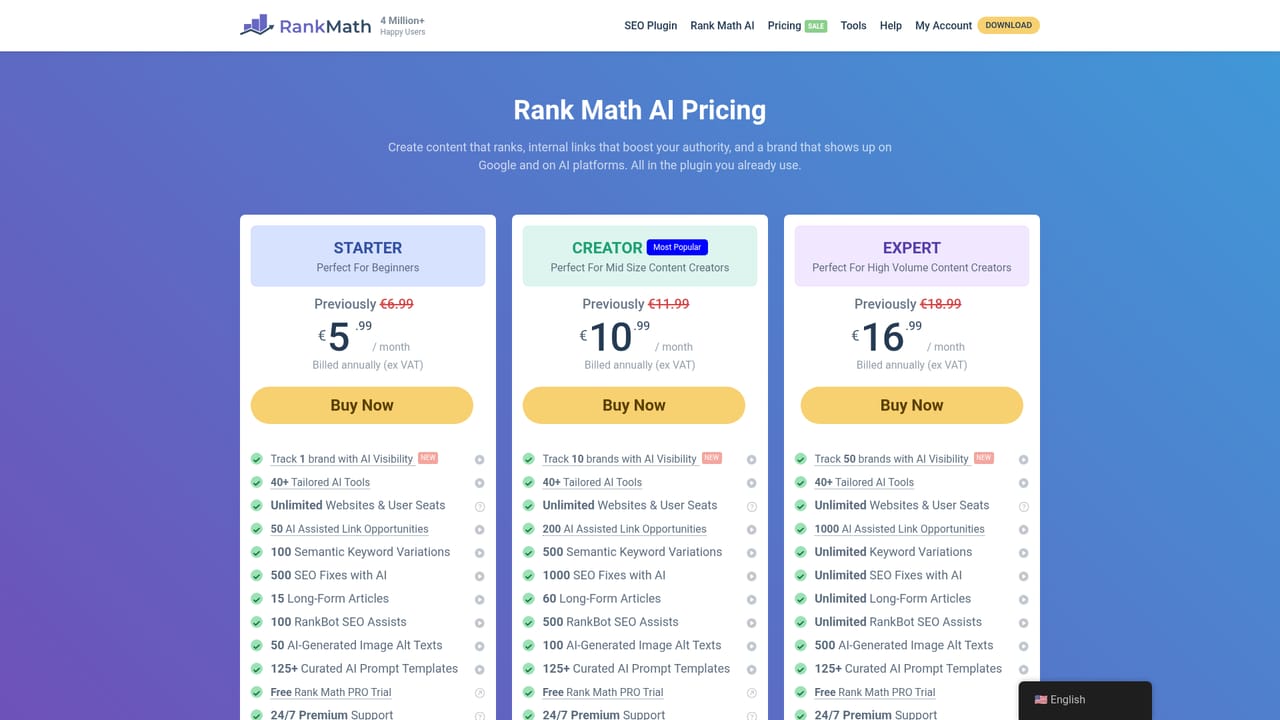


The homepage does not list prices. It points to a separate pricing page for Content AI plans.
Learn moreThe site links knowledge base articles on using Content AI and its editor. Other support channels are not described on the homepage.
Learn moreWorks with WordPress through the Rank Math plugin, including the block editor and Classic Editor, plus the Elementor and Divi page builders.
40+ AI tools, RankBot chat with multiple sessions, 125+ prompts, 30 languages, brand voice and audience guidance, SEO meta and OpenGraph generation, bulk titles and descriptions, ALT text, toolbar actions, AI command center, history and one-click SEO test fixes.
Learn more AI Angels400+ customizable AI girlfriends for NSFW chat, voice calls, and roleplay
 Candy AIExperience the future of companionship with AI friends who chat, role-play, and connect with you on a human level.
 ourdream.aiA vast AI roleplay platform with millions of characters for chat, images, video and voiceAI Angels400+ customizable AI girlfriends for NSFW chat, voice calls, and roleplayCandy AIExperience the future of companionship with AI friends who chat, role-play, and connect with you on a human level.ourdream.aiA vast AI roleplay platform with millions of characters for chat, images, video and voice


