ResumeUp

AI resume builder and ATS checker tested against the big five hiring systems

Beginner
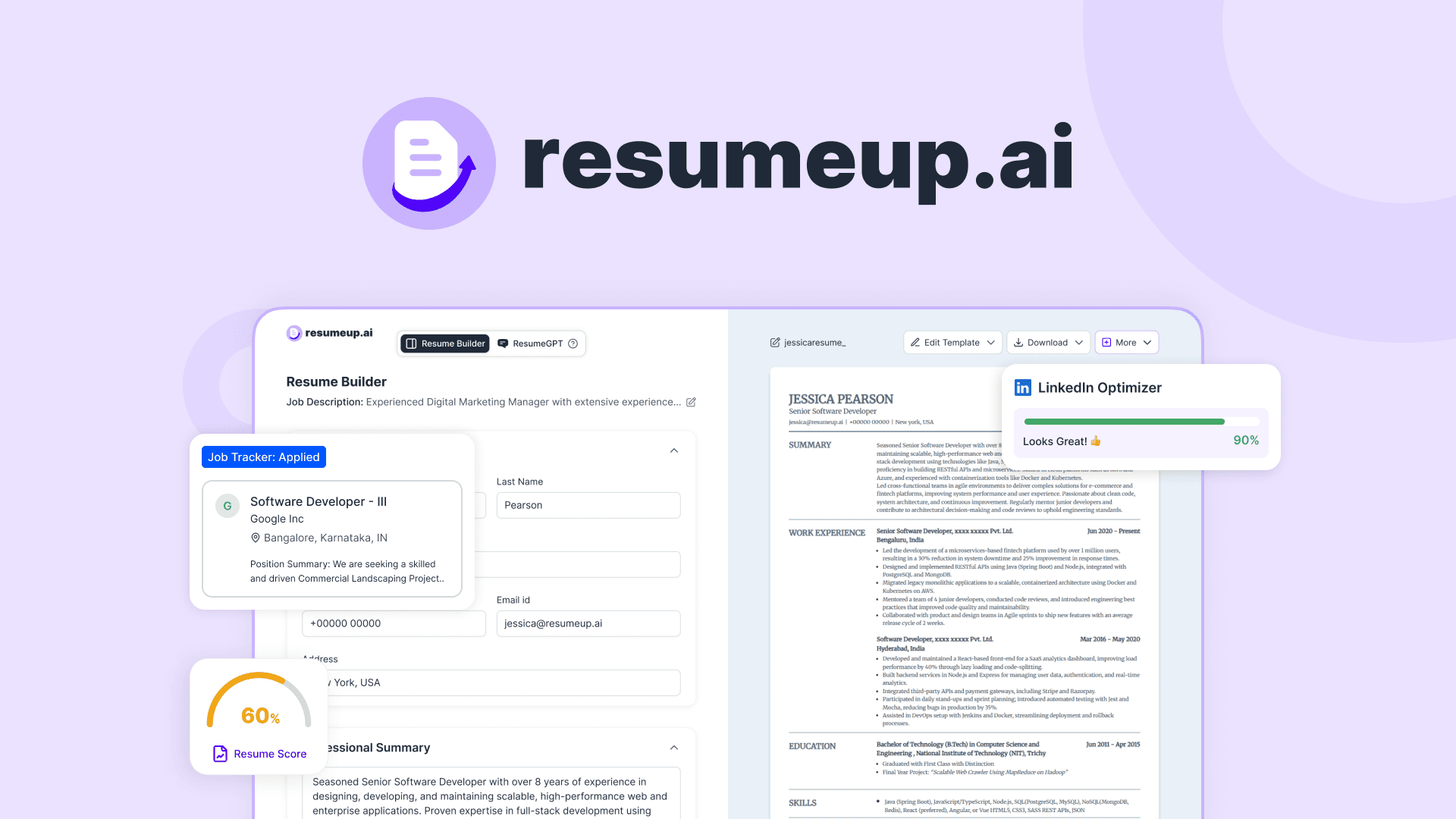
Screenshot of ResumeUp, AI resume builder and ATS checker tested against the big five hiring systems

What is ResumeUp?

ResumeUp is a career tool. AI resume builder with an ATS checker tested against Workday, Greenhouse, Lever, iCIMS and Taleo, plus a template editor, cover letter generator, mock interviews and a recruiter-facing AI profile.

ResumeUp is a resume building and job search workspace built around one claim: that its output survives the applicant tracking systems most large employers actually run. The team says it retests its resume formatting quarterly against Workday, Greenhouse, Lever, iCIMS and Taleo, the five systems it says process the bulk of corporate hiring. That testing claim is the product's main differentiator, and the checker is the part most users will touch first. The ATS Resume Checker scores a resume out of 100 against a pasted job description, runs 28 checks covering grammar, keyword matching, parsing and recruiter readability, and flags missing hard and soft skills in red. A one-click fix rewrites flagged sections, adds absent keywords and corrects grammar. Around that core sit a full document editor (20+ templates, five spacing settings, drag-and-drop custom sections, PDF, DOCX and shareable link export), a conversational builder that assembles a resume section by section, a cover letter generator tuned to tone (formal, conversational, confident) and a mock interview coach with role-specific questions and instant answer feedback. The wider suite is aimed at active job seekers rather than casual updaters: an application tracker, a LinkedIn profile scorer, one-click job saving and application autofill, plus Twinny, a shareable AI profile that answers recruiter questions in the candidate's own words and routes anything it cannot answer to the user's inbox. A job board with match scoring and auto-apply is announced as coming soon, so treat that part as roadmap. ResumeUp sits between single-purpose ATS scanners and full career platforms. It costs more setup than a plain template download, and the breadth only pays off if you are applying now rather than polishing a document once.

How do you use ResumeUp?

  1. 1Create an account and pick a starting point
    Sign in through the app and choose whether to upload an existing resume or start from a blank document. Both routes lead to the same editor.
  2. 2Choose an ATS-friendly template
    Browse the template gallery and filter for the ATS Friendly tag. Switching templates later keeps your content, so the first choice is not permanent.
  3. 3Paste the job description and tailor
    Drop in the target job posting. The AI rewrites bullet points with matching keywords and action verbs, and the keyword finder shows which terms are missing.
  4. 4Run the ATS check and fix flagged items
    Score the draft against the posting, review the section-by-section feedback, then use Fix with AI on each weak spot and recheck before exporting.
  5. 5Generate a matching cover letter
    Produce a cover letter from the same job description, set the tone, and edit the three to four paragraph draft before downloading it as a PDF.
  6. 6Rehearse with a mock interview
    Pick your role and seniority, answer the generated behavioral or technical questions, and review the feedback on clarity, structure and confidence.

Pros and cons

Pros

  • ATS checker scores out of 100 and names the exact keywords and sections to fixAI
  • Templates are explicitly tested against five named enterprise ATS platformsAI
  • Editor keeps content intact when switching templates, so formatting experiments are low riskAI
  • Cover letter generator mirrors resume keywords and offers three tone settingsAI
  • Interview coach and application tracker cover steps beyond the resume itselfAI

Cons

  • Job board with match scoring and auto-apply is only announced as coming soonAI
  • No pricing figures or plan tiers appear on the homepage, so cost is unclear before signing upAI
  • The quarterly ATS testing claim comes from the vendor and is not independently verifiedAI
  • Keyword-driven rewriting carries a real risk of resumes that read as stuffed to human reviewersAI
  • Free tier limits and export restrictions are not documented on the homepageAI

How much does ResumeUp cost?

Features

AI resume builder with a 20+ template editor (colors, fonts, five spacing levels, drag-and-drop sections), an ATS checker scoring out of 100 across 28 checks with keyword gap analysis and one-click fixes, conversational resume building, a tailored cover letter generator with tone control, cover letter checking, a job description keyword finder, AI mock interviews with instant feedback, an application tracker, LinkedIn profile scoring and application autofill.

Learn more

Frequently asked questions about ResumeUp

  • How do you use ResumeUp?
    The walkthrough on this page covers 6 steps: 1. Create an account and pick a starting point 2. Choose an ATS-friendly template 3. Paste the job description and tailor 4. Run the ATS check and fix flagged items 5. Generate a matching cover letter 6. Rehearse with a mock interview.
  • What platforms does ResumeUp support?
    ResumeUp is available on Web App.
  • What are the limitations of ResumeUp?
    Job board with match scoring and auto-apply is only announced as coming soon. No pricing figures or plan tiers appear on the homepage, so cost is unclear before signing up. The quarterly ATS testing claim comes from the vendor and is not independently verified.

Status

StatusActive
Views0
Outbound clicks0
Added10/21/2026

Platforms

Web App

Pricing

FreemiumSubscription