Sassbook AI Story generator

Prompt driven fiction drafting across seven preset story genres

Beginner
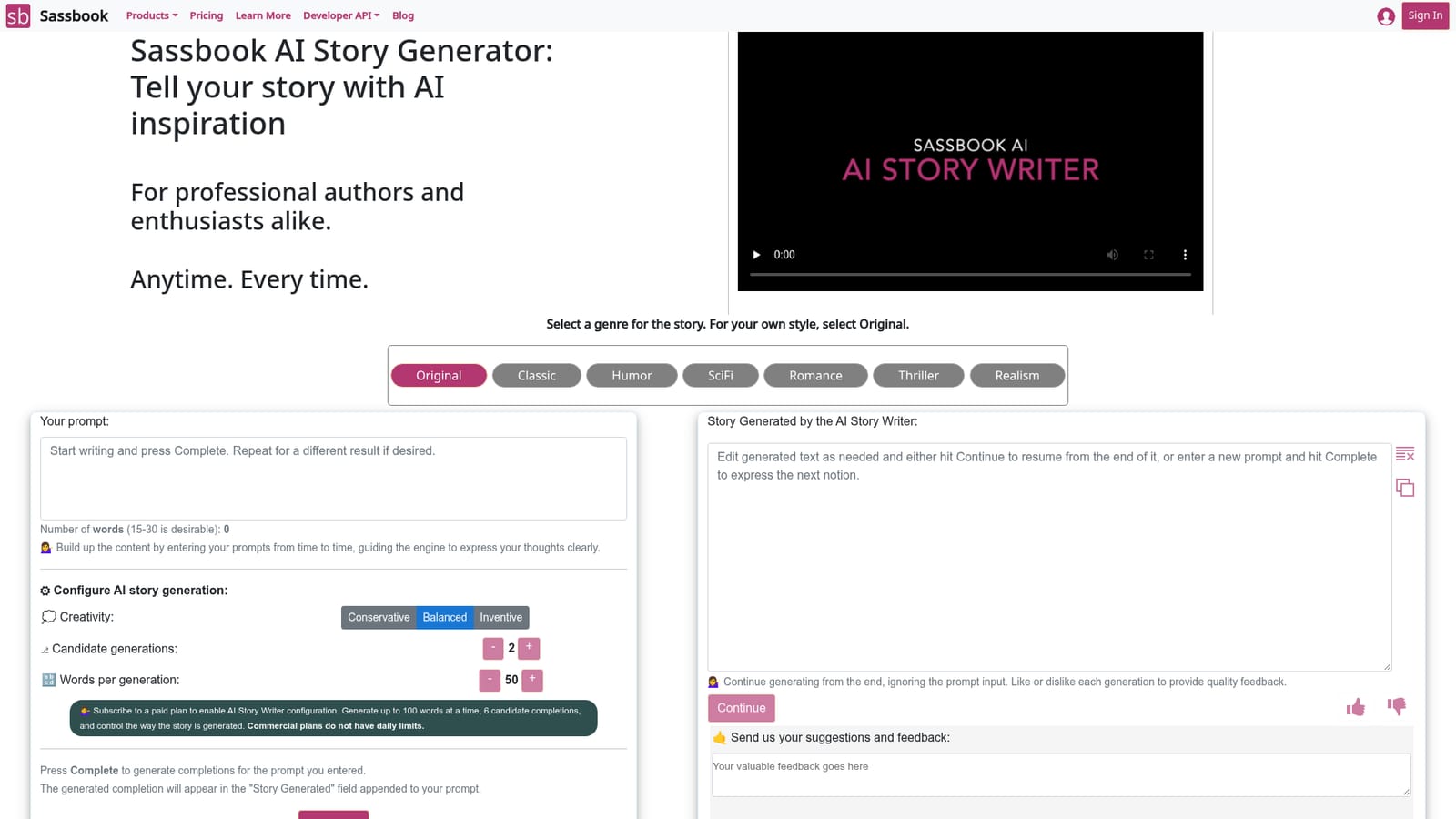
Screenshot of Sassbook AI Story generator, Prompt driven fiction drafting across seven preset story genres

What is Sassbook AI Story generator?

Sassbook AI Story generator is a story continuer tool. A fiction focused AI writing tool with seven preset genres, short prompt driven completions, multiple candidate generations and adjustable creativity, aimed at authors and hobbyists who want help drafting story content.

Sassbook AI Story Generator is a browser based writing tool built specifically for fiction. Rather than producing one block of text and calling it done, it asks the writer to set a genre first and then work forward in short increments. The genre selector offers Original, Classic, Humor, SciFi, Romance, Thriller and Realism, with Original reserved for writers who want the model to stay neutral about style. From there the writer types a prompt, presses Complete, and receives a continuation that is appended to the existing text. The process is deliberately fragmentary. Sassbook recommends prompts of 15 to 30 words, and each generation is short by design, so a story gets built through repeated passes: prompt, read the candidates, keep what works, continue from the end. Paid tiers unlock configuration that changes the character of the output. Creativity can be set to Conservative, Balanced or Inventive, the number of candidate generations can be raised to 6, and the word count per generation can go up to 100. A thumbs up or thumbs down on each result feeds quality feedback back to the service. The target audience is broad. The homepage names professional authors and enthusiasts alike, and stresses that the tool exists for the moments when inspiration runs dry rather than as a replacement for authorship. In practice that means it suits novelists drafting a difficult scene, short story writers testing a premise, and hobbyists who want help getting words onto the page. It is less a full manuscript editor than a brainstorming and continuation engine. Among AI writing tools, Sassbook positions this as a specialist. The same account also covers a general AI Writer, Summarizer, Paraphraser and Headline Generator, and the commercial plans bundle all of them, so the story writer is best read as the fiction focused member of a small suite rather than a standalone product.

How do you use Sassbook AI Story generator?

  1. 1Pick a genre for the story
    Start on the story writer page and choose from Original, Classic, Humor, SciFi, Romance, Thriller or Realism. Select Original if you want the model to follow your own style rather than a preset.
    Sassbook AI Story generator — Pick a genre for the story
  2. 2Write a short opening prompt
    Enter your prompt in the input box. Sassbook suggests keeping it to roughly 15 to 30 words, which sets the scene without over-constraining the continuation.
  3. 3Configure creativity and candidates on a paid plan
    If you are subscribed, set creativity to Conservative, Balanced or Inventive, raise the number of candidate generations up to 6, and set words per generation up to 100. Free users generate with the defaults.
    Sassbook AI Story generator — Configure creativity and candidates on a paid plan
  4. 4Generate completions
    Press Complete and read the candidate results that appear in the Story Generated field, appended to your prompt. Pick the version that fits or take ideas from several of them.
  5. 5Continue from the end
    Use Continue to keep generating from the tail of the current text, ignoring the prompt box. This is how you extend a draft step by step rather than restarting each time.
  6. 6Rate results and read the tips
    Mark each generation with a thumbs up or down to send quality feedback. The announcement post and the learn more page carry examples and guidance on getting better output.
    Sassbook AI Story generator — Rate results and read the tips

Pros and cons

Pros

  • Seven genre presets plus an Original mode give useful steering before the first promptAI
  • Multiple candidate completions per prompt make it easy to compare directions and pick the strongestAI
  • Creativity control (Conservative, Balanced, Inventive) lets writers shift between safe and surprising outputAI
  • Generation is incremental, so writers stay in control of the story rather than accepting one long blockAI
  • Commercial plans bundle the AI Writer, Summarizer, Paraphraser and Headline Generator in one subscriptionAI

Cons

  • Configuration options, including word limits, candidate counts and creativity, are locked behind paid plansAI
  • The free tier caps output at short completions, which is slow going for anything longer than a sceneAI
  • No manuscript level tools are described: no chapter organisation, outline builder or continuity trackingAI
  • Writers who want long form output from a single prompt will find the many small steps tediousAI
  • Interfaces and workflow guidance assume familiarity with prompt crafting, which beginners may find fiddlyAI

How much does Sassbook AI Story generator cost?

Pricing

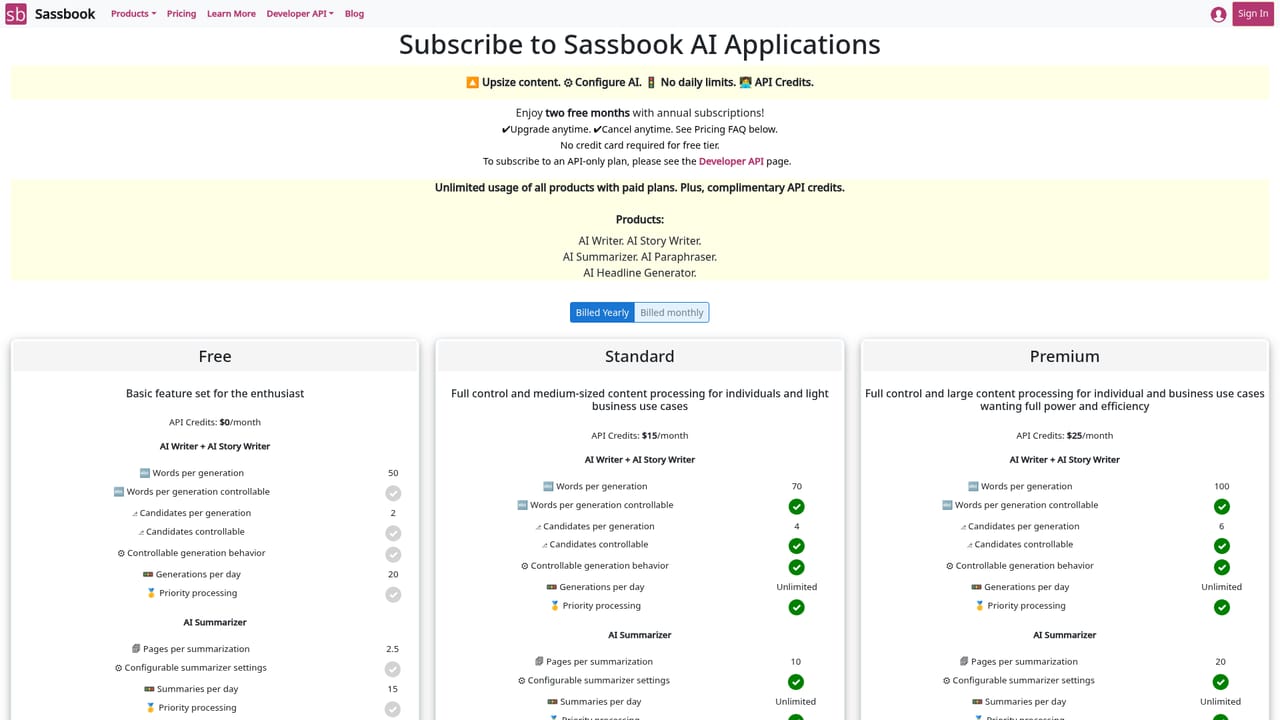
Paid plans unlock AI Story Writer configuration: up to 100 words per generation, 6 candidate completions and creativity control, with all Sassbook apps included. Commercial plans are described as having no daily limits. Exact prices are not shown on the homepage.

Learn more

Support

An on page feedback form with an email field accepts suggestions about the tool. Detailed guidance is published on the Sassbook blog and the dedicated learn more page.

Learn more

Features

Genre presets (Original, Classic, Humor, SciFi, Romance, Thriller, Realism), prompt driven completions appended to your text, multiple candidate generations, creativity control, adjustable words per generation, continue-from-the-end generation, copy to clipboard, and thumbs up or down feedback on each result.

Learn more

Frequently asked questions about Sassbook AI Story generator

  • How much does Sassbook AI Story generator cost?
    Paid plans unlock AI Story Writer configuration: up to 100 words per generation, 6 candidate completions and creativity control, with all Sassbook apps included. Commercial plans are described as having no daily limits. Exact prices are not shown on the homepage.
  • How do you use Sassbook AI Story generator?
    The walkthrough on this page covers 6 steps: 1. Pick a genre for the story 2. Write a short opening prompt 3. Configure creativity and candidates on a paid plan 4. Generate completions 5. Continue from the end 6. Rate results and read the tips.
  • What platforms does Sassbook AI Story generator support?
    Sassbook AI Story generator is available on Web App.
  • What are the limitations of Sassbook AI Story generator?
    Configuration options, including word limits, candidate counts and creativity, are locked behind paid plans. The free tier caps output at short completions, which is slow going for anything longer than a scene. No manuscript level tools are described: no chapter organisation, outline builder or continuity tracking.

Status

StatusActive
Views0
Outbound clicks0
Added10/21/2026

Platforms

Web App

Pricing

FreemiumSubscription