Free trial
No trial is described. The app itself is free with a daily check limit, and the browser detector can be used without an account, so both serve as a no-cost way to evaluate accuracy.
Learn moreOn-device AI detector for text and images, private by default
Own Slop Or Not AI? Verify ownership to get a dofollow link

Slop Or Not AI is an AI chat bot tool. A private AI detector for text and images that runs on iPhone, iPad and Mac using Apple silicon, with a free browser version. It reads SynthID watermarks, C2PA and IPTC credentials and pixel artifacts, and reports 99.5 percent text detection at a 5 percent false-positive rate on the RAID benchmark.
Slop or Not is an AI detector built around one unusual design choice: the checking happens on your own Apple hardware rather than in a data centre. The iPhone, iPad and Mac app installs a compact detection model that runs on Apple silicon with Neural Engine acceleration, so pasted text and photos never leave the device. The browser version at slopornot.ai/en/detect runs the same checks on servers the company owns itself, and it requires no account. Image detection works in layers. The tool reads the SynthID watermark that Google and OpenAI embed in the pixels, verifies C2PA and IPTC content credentials against a bundled trust list (so a forged credential fails rather than passing), looks for generator fingerprints, and finally runs its own pixel-scanning model. That last layer matters because a missing watermark proves nothing; when there is no mark to read, the image model returns a probability instead of a verdict. A provider name is only shown when a watermark is actually found. Text detection uses a custom transformer that runs offline through CoreML. The company reports 99.5 percent AI-text detection at a 5 percent false-positive rate on RAID, an independent public benchmark, and the methodology is written up on the blog for anyone who wants to check it. English is the only supported language today, with more planned. Every text check also returns readability scores calculated on-device in seven languages, using published formulae so the same passage always yields the same numbers. It suits journalists, teachers grading a class set, HR and legal teams handling documents that cannot go to a cloud LLM, moderators cleaning up communities, and ordinary users checking a dating profile photo or a product review. Compared with ZeroGPT, Hive Moderation and similar cloud services, the trade-off is clear: you get genuine on-device privacy and no word caps, but you are tied to Apple hardware for the private mode, and image accuracy is drawn from internal tests rather than a public leaderboard.


No trial is described. The app itself is free with a daily check limit, and the browser detector can be used without an account, so both serve as a no-cost way to evaluate accuracy.
Learn moreThe app is free to download and free to use with a daily check limit; Pro removes that cap and unlocks the Mac CLI and MCP server. Classroom pricing is offered inside the app. The homepage does not list specific prices or subscription amounts.
Learn moreA Discord community is linked from the homepage, and the blog carries methodology write-ups and comparison guides. No email or ticket support channel is described on the homepage.
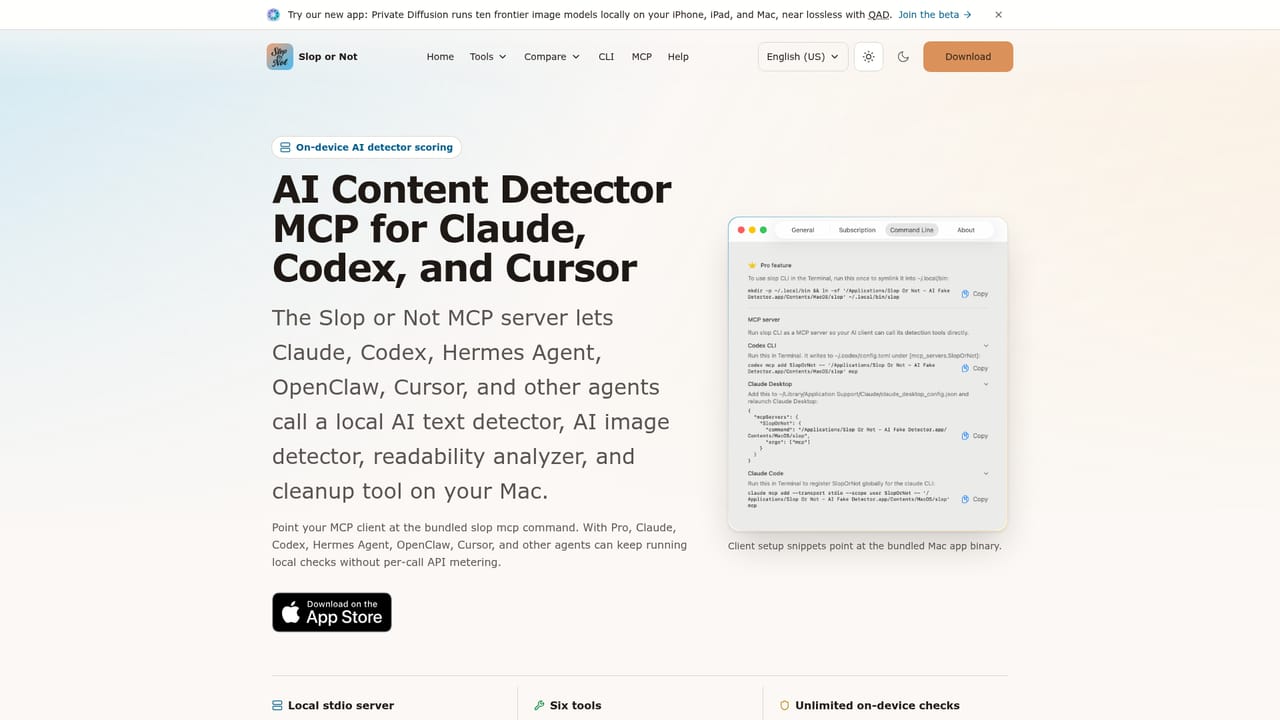
Learn moreA Mac CLI and MCP server connect the detector to Claude, Codex, Hermes Agent, OpenClaw, Cursor and other AI tools. Both are Pro features and the checks execute locally on the Mac.
Learn moreOn-device text and image detection on Apple silicon, with SynthID watermark reading for Google and OpenAI images, C2PA and IPTC credential verification, generator fingerprint matching and a pixel-level image model. Text checks include readability scores in seven languages, a deterministic hidden-character cleanup tool, screenshot text extraction, and a Mac CLI plus MCP server for AI assistants.
Learn more AI Angels400+ customizable AI girlfriends for NSFW chat, voice calls, and roleplay
 Candy AIExperience the future of companionship with AI friends who chat, role-play, and connect with you on a human level.
 ourdream.aiA vast AI roleplay platform with millions of characters for chat, images, video and voiceAI Angels400+ customizable AI girlfriends for NSFW chat, voice calls, and roleplayCandy AIExperience the future of companionship with AI friends who chat, role-play, and connect with you on a human level.ourdream.aiA vast AI roleplay platform with millions of characters for chat, images, video and voice


