Free trial
The live demo at demo.snapmeasureai.com is free and returns the same scan a user would get through the API. It serves as the evaluation path before any integration or licensing discussion.
Learn moreTwo photos in, a 3D body model and 100+ measurements out
Own SnapMeasureAI? Verify ownership to get a dofollow link
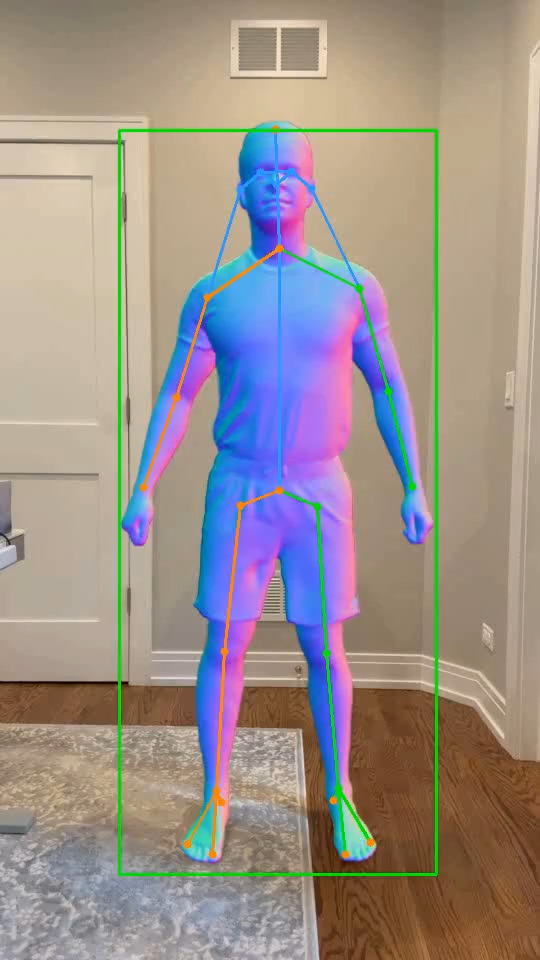
SnapMeasureAI converts a front and side smartphone photo into a 10,000-point 3D body model with 100+ measurements in under ten seconds. It is an API and white-label engine for GLP-1 programs, uniform suppliers, apparel brands and fitness platforms, with roughly 1.6 cm average accuracy in everyday clothing.
SnapMeasureAI turns two smartphone photos into a 10,000-point 3D body model and more than 100 body measurements, usually in under ten seconds. The user stands in an A-pose and takes one front photo and one side photo, wearing everyday clothes such as jeans, shorts or a T-shirt. Patented neural networks trained on over a million images fuse the two views into a reconstructed body. The company reports average accuracy within 1.6 cm across 18 standard measurements when compared with 3D scans. The product is not a consumer app for people to download. It is an engine that businesses embed in their own platforms through a REST API or a white-label scan flow. Developers send two images plus a height and receive structured measurements and an exportable 3D OBJ file. Standard outputs cover chest, waist, hips, thighs, biceps, forearms, calves, neck, shoulder width, inseam and torso lengths, and a custom measurement profile built in the live demo can be sent as JSON so every scan returns exactly the fields a client needs. An embeddable 3D viewer displays the model inside the host product. The main use cases are distinct. GLP-1 and weight-loss programs use periodic scans to show patients how waist, hips and proportions change between appointments. Uniform suppliers and employers send scan links to staff so garments can be sized remotely without fitting days. Apparel brands use measurements to drive size recommendations and made-to-measure orders, while fitness platforms track circumference changes by body part over time. Among body measurement tools, SnapMeasureAI competes less with apps and more with hardware scanners and manual tape measurement. It requires no kiosk, no controlled lighting and no special clothing, and photos are deleted after processing rather than stored. Pricing is not listed on the homepage, and access runs through a demo, a contact request or an enterprise agreement that can include dedicated cloud and on-premise deployment.
The live demo at demo.snapmeasureai.com is free and returns the same scan a user would get through the API. It serves as the evaluation path before any integration or licensing discussion.
Learn moreSupport and inquiries go through a contact form and a direct email address listed on the site. Technical walkthroughs, licensing discussions and pilots are handled by the team, and social channels are linked from the homepage.
Learn moreIntegration runs through one REST API that accepts two photos and a height and returns measurements plus a 3D model. The capture flow and 3D viewer can be embedded and white-labelled, and dedicated cloud or on-premise deployment is available under enterprise agreements.
Learn moreTwo-photo capture produces a 10,000-point 3D body model and 100+ measurements in under ten seconds. Standard outputs include chest, waist, hips, thighs, biceps, forearms, calves, neck, shoulder width, inseam and torso lengths. Custom measurement profiles can be exported as JSON. Results arrive through a REST API or a white-label flow, with an OBJ export and an embeddable 3D viewer.
Learn more AI Angels400+ customizable AI girlfriends for NSFW chat, voice calls, and roleplay
 Candy AIExperience the future of companionship with AI friends who chat, role-play, and connect with you on a human level.
 ourdream.aiA vast AI roleplay platform with millions of characters for chat, images, video and voiceAI Angels400+ customizable AI girlfriends for NSFW chat, voice calls, and roleplayCandy AIExperience the future of companionship with AI friends who chat, role-play, and connect with you on a human level.ourdream.aiA vast AI roleplay platform with millions of characters for chat, images, video and voice