Free trial
A 15 day free trial covers full access to both Cleanup and Organize, with no card details stated on the homepage.
Learn moreAI file organizer and Mac cleaner that declutters in minutes

Sparkle is a Mac cleaner from Every that deletes junk files and duplicates, then uses an AI agent to sort remaining documents into folders that match how you work. It offers scheduled cleanup, trash-first deletions, cloud folder support and a 15 day free trial.
Sparkle is a Mac utility that combines disk cleanup with AI file organization. It scans a Mac for junk files, duplicates, old screenshots and leftover app data, then categorizes and moves the remaining documents into folders that reflect how the owner actually works. The publisher reports that users reclaim 18GB of space on average, and the app is pitched against manual maintenance, which the site estimates at roughly four hours a week with only 2 to 3 GB recovered. The interaction model is conversational rather than menu driven. Instead of building filters and rules, the user describes what should happen and a cleanup agent interprets the request. From there Sparkle proposes folder structures based on patterns in the file collection, so a downloads folder or a tax folder gets sorted without the user defining a taxonomy first. A scheduling feature runs the same routine on a recurring basis, and deletions are routed to the trash before anything is removed permanently, which makes most actions reversible. The tool is aimed at individual Mac owners, freelancers and small teams whose storage fills up faster than anyone wants to manage it, particularly people whose downloads and desktop folders have become a dumping ground. A separate app uninstaller and duplicate detection round out the cleanup side. Cloud folders are supported, so the organization is not limited to local storage. Sparkle is built by Every, the media and software company behind Cora, Spiral and Monologue, and it ships as a notarized macOS download rather than a web app. Privacy is part of the pitch: files are read only to sort them, encrypted in transit, never stored or used for training, and the site describes the retention policy as zero. A subscription is sold on its own or bundled with the other Every products. For buyers choosing between Sparkle and conventional cleaners such as menu-driven cleanup suites, the difference is that Sparkle attempts to keep the machine organized over time rather than only freeing space once.
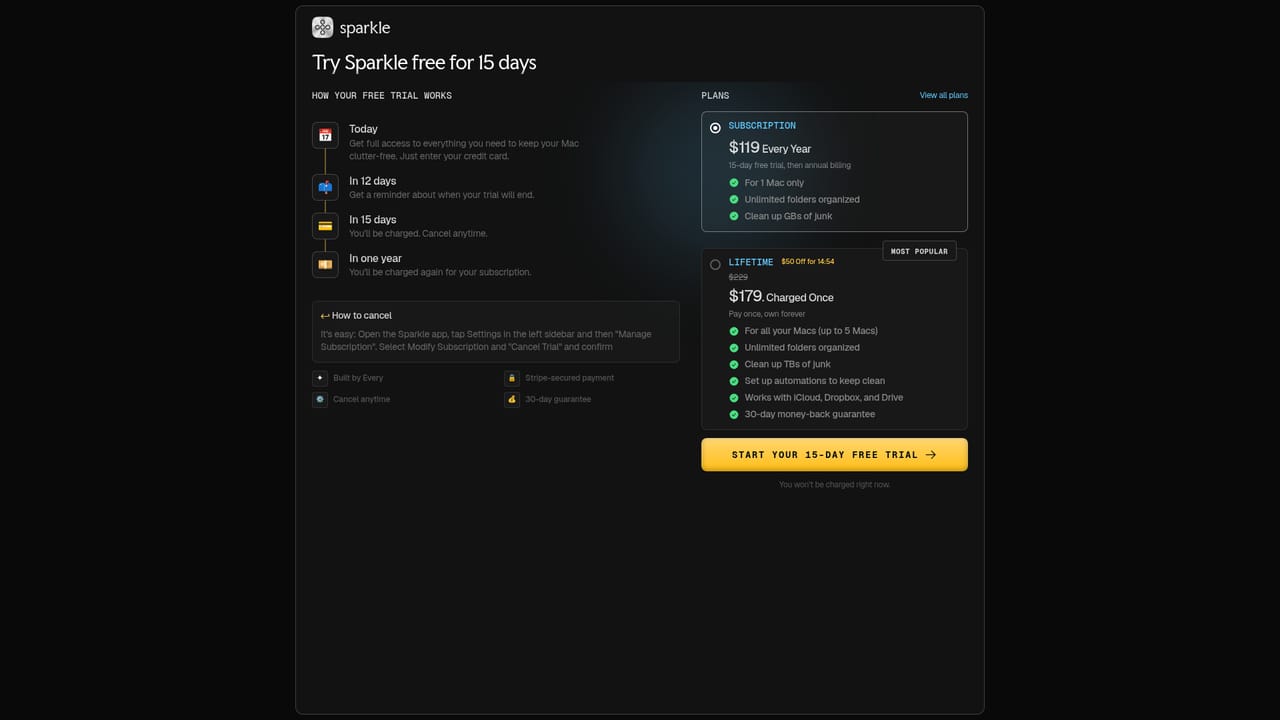
A 15 day free trial covers full access to both Cleanup and Organize, with no card details stated on the homepage.
Learn morePlans start at $9.25 per month and include full access to Cleanup and Organize. An Every bundle at $30 per month adds Cora, Spiral, Monologue and the AI insider newsletter. The plans page carries the detailed tiers.
Learn moreHelp documentation and release notes live on the Every help centre, with a direct email address for unanswered questions and product updates posted on X.
Sparkle works with cloud folders on the Mac and is part of the Every app family alongside Cora, Spiral and Monologue. No other integrations are listed.
Cleanup finds junk files, duplicates, old screenshots and leftover app data, with an app uninstaller and one tap delete. Organize uses a cleanup agent that takes plain language instructions and builds folders from patterns in your files. Schedules keep cleanup running continuously, cloud folders are supported, and deletions go to the trash first.
 AI Angels400+ customizable AI girlfriends for NSFW chat, voice calls, and roleplay
 Candy AIExperience the future of companionship with AI friends who chat, role-play, and connect with you on a human level.
 ourdream.aiA vast AI roleplay platform with millions of characters for chat, images, video and voiceAI Angels400+ customizable AI girlfriends for NSFW chat, voice calls, and roleplayCandy AIExperience the future of companionship with AI friends who chat, role-play, and connect with you on a human level.ourdream.aiA vast AI roleplay platform with millions of characters for chat, images, video and voice


