Spellbox

AI coding assistant that writes and explains code from plain prompts

Beginner
Screenshot of Spellbox, AI coding assistant that writes and explains code from plain prompts

What is Spellbox?

SpellBox is an AI coding assistant for desktop and VS Code that turns plain language prompts into code and explains existing snippets. It covers 17 languages including Python, Java, SQL and MATLAB, and adds bookmarking so useful snippets stay within reach.

SpellBox is an AI programming assistant built around two core actions: generating code from a written prompt and explaining code that already exists. The desktop app and a companion VS Code extension put both actions in the same place, so a developer can describe a problem in plain language, get working code back, and then ask the tool to walk through what that code does line by line. The homepage positions the product around speed, arguing that time lost to syntax errors, debugging and searching documentation can be replaced with a prompt and an immediate answer. The explanation feature is the piece that matters most for learning and for inherited code. Rather than reading through unfamiliar documentation, a user pastes in a snippet and gets a written breakdown of its behaviour. Combined with the generation feature, that makes SpellBox useful in two directions: unblocking when a solution is not obvious, and understanding the solution once it arrives. A bookmarking feature lets users keep snippets they want to revisit, which suits developers who jump between projects and repeatedly need the same patterns. Language coverage is broad rather than niche. Dedicated pages exist for JavaScript, TypeScript, Python, Java, C#, C++, Go, Rust, Ruby, PHP, Swift, Dart, SQL, HTML, CSS, MATLAB and Excel formulas. That range makes the tool as relevant to a data analyst writing spreadsheet logic as to a mobile developer working in Swift. The stated audience spans three groups: professional engineers who want routine coding tasks off their plate, students who need explanations alongside answers, and hobbyists or teachers who write code occasionally. Against general purpose chat assistants, SpellBox trades breadth for a focused coding surface with bookmarks and editor integration built in. Against full AI code editors, it is narrower: it targets prompt to code and code to explanation, not whole project orchestration.

How do you use Spellbox?

  1. 1Download SpellBox for your operating system
    Pick the macOS build or the Windows build from the download page. The desktop app requires Windows 10 or later, or macOS 10.15 or later on Intel, M1 or M2 hardware.
  2. 2Or install the VS Code extension
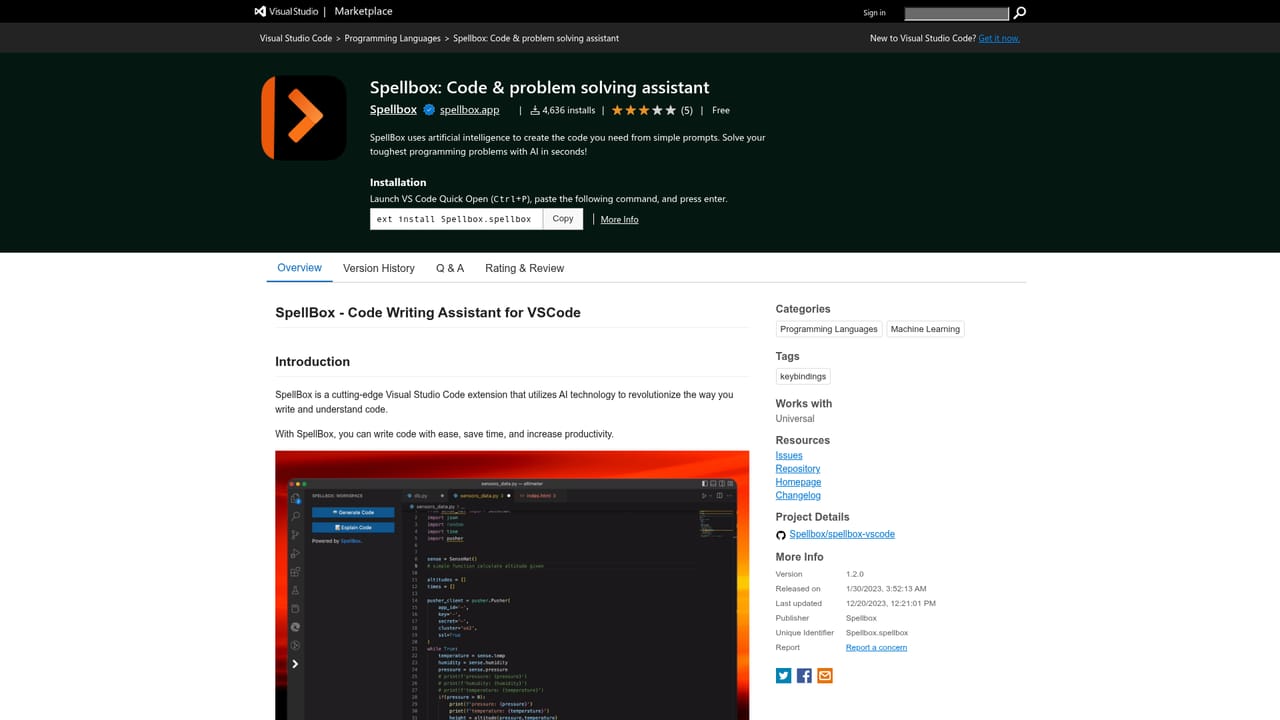
    Developers who prefer to stay inside their editor can add SpellBox from the VS Code marketplace listing. The extension exposes the same generation and explanation features without leaving the editor.
    Spellbox — Or install the VS Code extension
  3. 3Buy a license and enter the code
    Complete the purchase form, pay through Stripe, and use the license code you receive to activate the app on any number of your machines.
  4. 4Generate code from a prompt
    Describe what you need in plain language, such as an HTTP request in Java or a quadratic equation solver in MATLAB, and SpellBox writes the code for you.
  5. 5Ask for an explanation of existing code
    Paste in a snippet you did not write and use the code explanation feature to get a walkthrough of how it works, instead of reading the documentation from scratch.
  6. 6Bookmark snippets you want to keep
    Save generated or explained code as bookmarks so the same solution can be retrieved later when you switch back to that project.

Pros and cons

Pros

  • Combines code generation and code explanation in one tool, so learners can get an answer and understand itAI
  • Dedicated support pages for 17 languages, from Python and Rust to SQL, MATLAB and Excel formulasAI
  • Ships as both a macOS and Windows desktop app and a VS Code extension, covering standalone and in editor workflowsAI
  • Bookmarking keeps generated snippets retrievable across projectsAI
  • One year license covers unlimited code generation and unlimited computersAI

Cons

  • License is a one year purchase rather than a rolling subscription, so access has to be renewed manuallyAI
  • The homepage states no free tier or trial, only a paid license with a 5 day refund windowAI
  • No details on how prompts or code leave the machine, which matters for proprietary codebasesAI
  • Only VS Code is supported as an editor integration, leaving JetBrains and other IDEs outAI
  • No team, collaboration or shared snippet features are describedAI

How much does Spellbox cost?

Pricing

A one year license costs $40, discounted from $65, and includes unlimited code generation, unlimited computers and code bookmarking. The homepage lists an early bird price valid through October 2024 and a promo code, EARLYBIRD15, for an extra 15 percent off at checkout. A 5 day money back guarantee applies from the purchase date.

Learn more

Integrations

The product integrates with Visual Studio Code through a dedicated extension. No other editor or third party integrations are described on the homepage.

Learn more

Features

SpellBox generates code from a plain language prompt and explains code you provide, with bookmarking for snippets you want to revisit. It runs as a standalone macOS or Windows app and as a VS Code extension, and it lists support for JavaScript, TypeScript, Python, Java, C#, C++, Go, Rust, Ruby, PHP, Swift, Dart, SQL, HTML, CSS, MATLAB and Excel.

Frequently asked questions about Spellbox

  • How much does Spellbox cost?
    A one year license costs $40, discounted from $65, and includes unlimited code generation, unlimited computers and code bookmarking. The homepage lists an early bird price valid through October 2024 and a promo code, EARLYBIRD15, for an extra 15 percent off at checkout. A 5 day money back guarantee applies from the purchase date.
  • How do you use Spellbox?
    The walkthrough on this page covers 6 steps: 1. Download SpellBox for your operating system 2. Or install the VS Code extension 3. Buy a license and enter the code 4. Generate code from a prompt 5. Ask for an explanation of existing code 6. Bookmark snippets you want to keep.
  • What platforms does Spellbox support?
    Spellbox is available on MacOS, Windows and Browser extension.
  • What does Spellbox integrate with?
    The product integrates with Visual Studio Code through a dedicated extension. No other editor or third party integrations are described on the homepage.
  • What are the limitations of Spellbox?
    License is a one year purchase rather than a rolling subscription, so access has to be renewed manually. The homepage states no free tier or trial, only a paid license with a 5 day refund window. No details on how prompts or code leave the machine, which matters for proprietary codebases.

Status

StatusActive
Views0
Outbound clicks0
Added10/21/2026

Platforms

MacOSWindowsBrowser extension

Pricing

Paid