Free trial
The homepage invites visitors to get started for free, but does not specify a trial length, feature limits or whether a card is required.
Learn moreBuild and teach step-by-step online courses, with AI help from plan to launch

Steppit is a content tool that builds and teach step-by-step online courses, with AI help from plan to launch. A course platform that combines AI-assisted planning, in-app video and audio recording, and cohort teaching tools. Aimed at teachers, tutors, providers and coaches who want short step-by-step lessons rather than long lectures, with Stripe payments and branded channels.
Steppit is a course creation and teaching platform built around short, step-by-step sessions rather than hour-long lectures. Creators plan a course, film or record each step inside the app, then sell spaces or enroll learners through a branded channel. The pitch is that micro-learning keeps learners engaged while still letting a single educator reach a large audience. The build process leans on an assistant the site calls a personal AI, which is trained to reflect the creator's own voice. Courses are assembled with drag and drop, and existing material such as PDFs and links can be pulled in as resources. Production happens in the same place: vertical or horizontal video, audio-only recording, and a generated script read from an in-app teleprompter. That combination means a solo teacher does not need a separate editor, a microphone setup, or a scriptwriter to get a first course live. Teaching features go beyond video hosting. Cohorts can be paced with drip-fed sessions or given everything at once, learners post in private feeds and message threads for feedback, and certificates can be tied to required uploads on specific sessions. Channels can be styled with custom colors, banners and profile images. Payments run through a Stripe connection, so class places are sold directly from the channel. Steppit fits educators, tutors, independent learning providers and coaches who want a more structured format than a video library but less overhead than a full LMS. The site cites 3,000+ courses and 2,000+ channels created, and markets two routes: a self-serve Pro channel and a Select package where the Steppit team helps deliver the course end to end. A Zapier integration covers enrollment and notification automation for teams that need it.
The homepage invites visitors to get started for free, but does not specify a trial length, feature limits or whether a card is required.
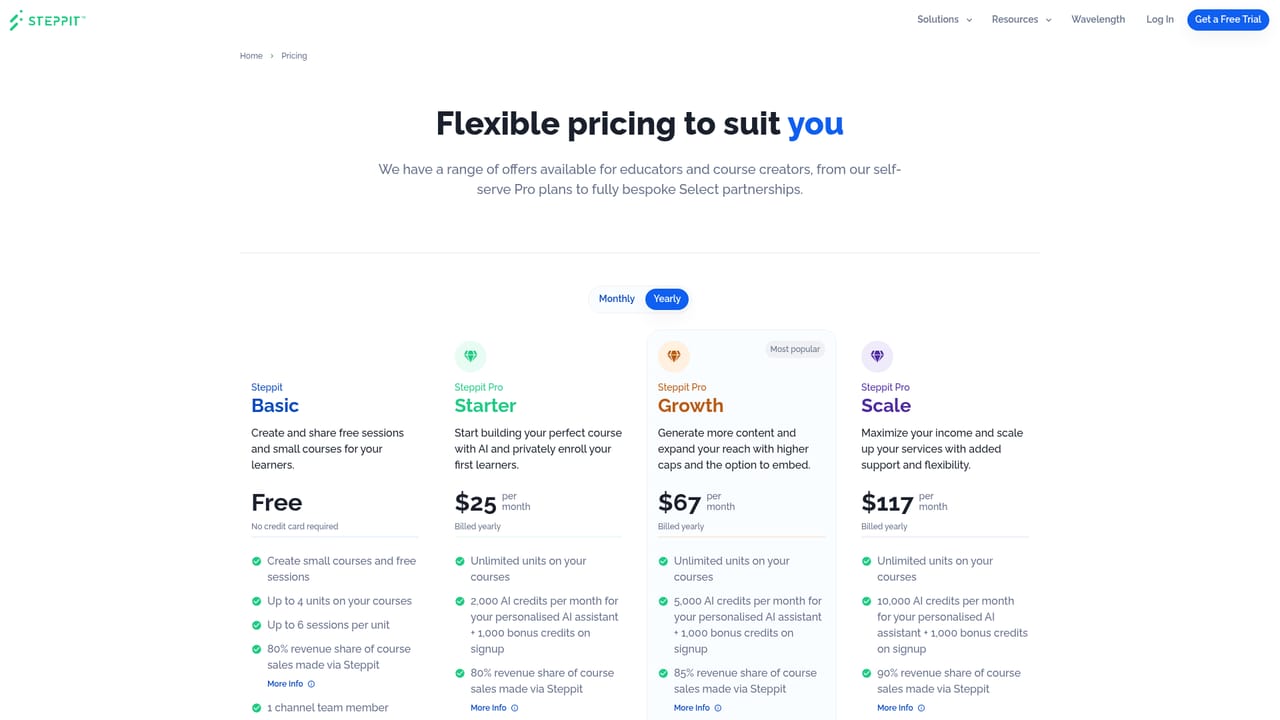
Learn moreTwo routes are described: Steppit Pro, a self-serve channel with the course creation tools, and Steppit Select, an end-to-end package with expert guidance and support from the Steppit team. The homepage gives no figures, so see the pricing page for actual plan costs.
Learn moreSupport is a selling point: the site cites a 4.6/5 customer support rating and offers intro calls with the team, plus hands-on guidance for Select customers. Named educator testimonials describe direct contact with staff.
Learn moreStripe for selling class spaces and a built-in Zapier connection for automating notifications, enrollments and workflows across 5,000+ apps. No other native integrations are named on the homepage.
AI-assisted course planning trained on the creator's voice, drag-and-drop course building, PDF and link uploads, in-app video (vertical and horizontal) and audio recording, generated scripts with a teleprompter, branded channels, drip-fed sessions, feedback feeds and messages, certificates tied to session uploads, Stripe payments and Zapier automation.
 AI Angels400+ customizable AI girlfriends for NSFW chat, voice calls, and roleplay
 Candy AIExperience the future of companionship with AI friends who chat, role-play, and connect with you on a human level.
 ourdream.aiA vast AI roleplay platform with millions of characters for chat, images, video and voiceAI Angels400+ customizable AI girlfriends for NSFW chat, voice calls, and roleplayCandy AIExperience the future of companionship with AI friends who chat, role-play, and connect with you on a human level.ourdream.aiA vast AI roleplay platform with millions of characters for chat, images, video and voice


