Free trial
A free tier with core features and limited usage quotas is available, with no registration beyond login and no credit card. It is a free plan rather than a timed trial.
Learn moreManual and AI-driven backtesting on tick-level market data

Tradebreath is a web-based backtesting platform that combines tick-by-tick manual replay with an AI agent that writes strategies, runs tests and exports scripts, across 800+ symbols and seven asset classes.
Tradebreath is a browser-based backtesting platform for traders who want to test an idea against historical prices before risking money. It offers two ways to work. In the manual mode, a replay moves through history tick by tick and the trader places and manages orders on the chart. In the agent mode, a plain-language instruction such as a market, a timeframe and an entry rule is turned into a strategy, a backtest run and an explanation of what was done. The data layer is a large part of the pitch. The catalog covers more than 800 symbols across forex, stocks, crypto, commodities, indices, ETFs and bonds, with up to 20 years of history and timeframes from one second to one month. Tick history carries L1 bid and ask quotes, so simulated fills use prices that existed at that moment. Traders can also upload their own OHLCV or tick files in CSV, TSV or TXT format, which are parsed in the browser. The chart supports drawing tools, candlestick patterns, more than 36 built-in indicators with room for custom ones, and replay across several charts, symbols and timeframes at once. The two modes share the same data and the same order list, which is the practical link between them. An agent-run backtest lands as a list of orders that can be opened on the chart, where the trader continues by hand: adding entries, closing early or letting a position run. Strategies and indicators can be exported as scripts for TradingView (Pine), MetaTrader 5 (MQL5) or Python, so work is not confined to the site. Each session ends with a report covering net profit, profit factor, win rate, expectancy, maximum drawdown and Sharpe ratio, plus a performance calendar, Monte Carlo simulation and an AI commentary on the figures. Within its field, Tradebreath sits next to replay tools such as TradingView's Bar Replay, FXReplay, Forex Tester and TradeZella, which the site itself names as comparisons. Its distinguishing angle is the pairing of hands-on replay with an agent that writes rules and code. It suits discretionary traders practising a method, beginners learning from simulated mistakes, and systematic traders who want quick rule tests and portable scripts.
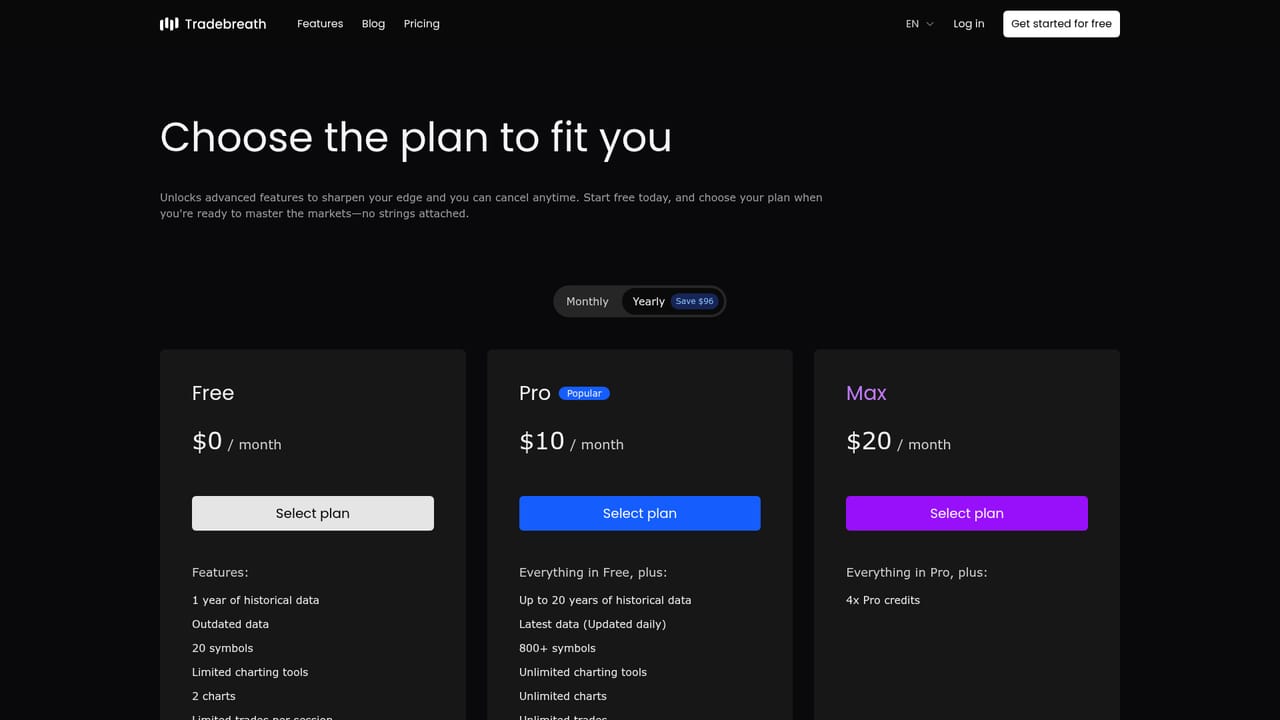
A free tier with core features and limited usage quotas is available, with no registration beyond login and no credit card. It is a free plan rather than a timed trial.
Learn moreFreemium. The core product is free to start with limited usage quotas and needs no credit card. Paid plans unlock more capacity and features. Specific prices are not stated on the homepage.
Learn moreSupport and feedback go through email at support@tradebreath.com. A YouTube tutorial playlist is available, and a user manual is said to be in preparation.
Exports strategies and indicators as Pine scripts for TradingView, MQL5 for MetaTrader 5 and Python for custom research. Accepts CSV, TSV and TXT data uploads. No third-party app integrations are listed.
Tick-by-tick manual replay, an AI agent that writes strategies and custom indicators, 800+ symbols over seven asset classes, 36+ indicators, multi-chart replay, CSV upload, script export to Pine, MQL5 and Python, and performance reports with Monte Carlo simulation.


