Vimmerse

Template-driven AI image and video workflows for photobooths and marketing

Beginner
Screenshot of Vimmerse, Template-driven AI image and video workflows for photobooths and marketing

What is Vimmerse?

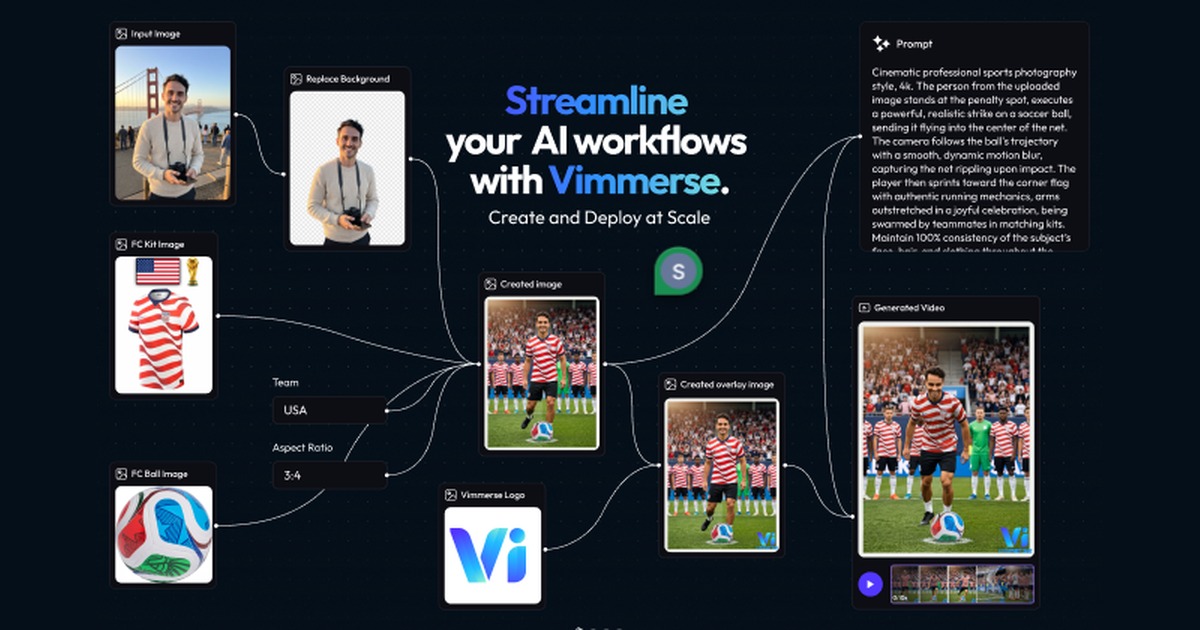
Vimmerse is a web platform for designing and deploying AI image and video workflows, built around a big template library for photobooth activations, marketing content, events and restaurant promotions.

Vimmerse is a web platform for building and running AI creative workflows, with a particular focus on photobooth style activations, marketing assets and short stories. Instead of starting from a blank prompt box, users begin with a large library of ready-made templates and adapt them to a brand, an event or a product. The pitch is repeatability: a workflow designed once can be deployed again and again, which suits teams that need the same creative treatment applied to many people, products or locations. The template catalogue is the most visible part of the product. It is filterable by theme, including fun and lifestyle, marketing, sport, events and cards, and restaurants. Examples named on the homepage range from personal transformations such as Tiny Me, Giant Me, Sticker Me and Sketch Me, to wedding scenes, holiday cards, trading cards and time freeze effects, to commercial formats such as billboard ads, product posters, product showcases, UGC style product reviews and website marketing videos. Sports campaign templates built around the 2026 World Cup sit alongside restaurant and cafe promotions, which shows how far the same engine is stretched across consumer and business use. In practice, a user picks a template, supplies the images or details it needs, and runs the workflow to get finished images or video. The site also exposes a text to image tool and a personal workflows area where saved pipelines are managed. Several templates take multiple images or convert between grids and individual frames, so the tool covers more than single image generation. Within the wider market, Vimmerse sits between general AI video generators and event activation software. It is less of an open-ended creative studio than a template and workflow layer, which makes it a fit for marketers, agencies, event organisers and restaurant or retail operators who value consistent output at volume. Buyers who want fine manual control over every frame will find the template-first approach more constraining than a conventional editor.

How do you use Vimmerse?

  1. 1Browse the template library
    Open the homepage and filter templates by theme such as Marketing, Sport, Events & Cards or Restaurants. Pick one close to the result you want.
  2. 2Try the text to image tool
    Use the text to image page to generate a starting visual from a written prompt if you need source material for a workflow.
  3. 3Open a template and add inputs
    Select a template and supply the photos or product images it asks for. Multi-image templates need several uploads.
  4. 4Run and review the output
    Run the workflow and check the generated image or video. Adjust the inputs and rerun until the result matches the brand or event.
  5. 5Manage saved workflows
    Return to your workflows page to find, reuse and redeploy the pipelines you have created.

Pros and cons

Pros

  • Large template library covering lifestyle, marketing, sport, events and restaurantsAI
  • Workflow approach lets one design be reused across many people or productsAI
  • Templates cover both consumer fun formats and commercial ad formatsAI
  • Includes a text to image tool and a personal workflows area in one placeAI
  • Aimed at photobooth and event activations, a niche most generic generators ignoreAI

Cons

  • Pricing, credits and usage limits are not shown on the homepageAI
  • Template-first design offers less open-ended control than a full video editorAI
  • No integrations or API are mentioned, so fitting it into existing pipelines is unclearAI
  • Many templates are tied to seasonal or event themes and may date quicklyAI
  • Support options and documentation are not described on the homepageAI

How much does Vimmerse cost?

Features

Template library filterable by theme, AI image and video workflows, photobooth activation formats, product and billboard ad templates, multi-image and grid conversion templates, a text to image tool, and a personal workflows area for saved pipelines.

Frequently asked questions about Vimmerse

  • How do you use Vimmerse?
    The walkthrough on this page covers 5 steps: 1. Browse the template library 2. Try the text to image tool 3. Open a template and add inputs 4. Run and review the output 5. Manage saved workflows.
  • What platforms does Vimmerse support?
    Vimmerse is available on Web App.
  • What are the limitations of Vimmerse?
    Pricing, credits and usage limits are not shown on the homepage. Template-first design offers less open-ended control than a full video editor. No integrations or API are mentioned, so fitting it into existing pipelines is unclear.

Status

StatusActive
Views0
Outbound clicks0
Added10/20/2026

Platforms

Web App

Pricing

Paid