Free trial
A free plan provides 30 minutes of transcription with timestamps, AI generated summaries and TXT export. No credit card is required to start.
Learn moreTurn audio and video into accurate, editable text in 100+ languages
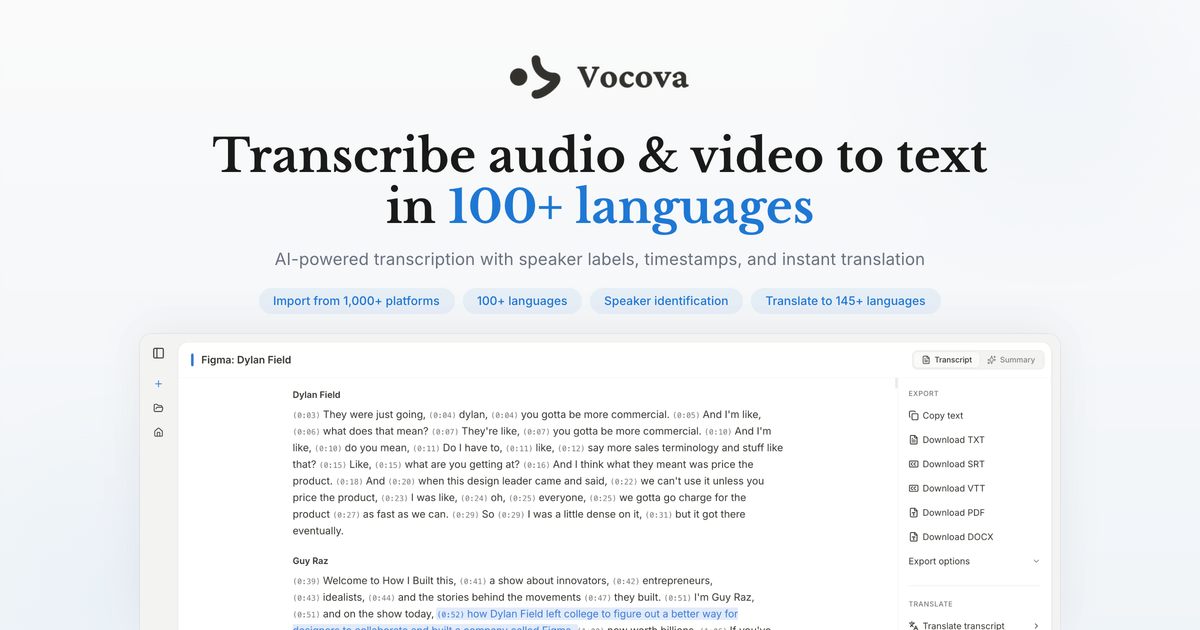
Vocova is an AI transcriber tool that turns audio and video into accurate, editable text in 100+ languages. Vocova transcribes audio and video to text in over 100 languages, with speaker labels, timestamps, AI summaries, translation into 140+ languages and exports to PDF, DOCX, SRT, VTT and CSV.
Vocova is a browser based speech to text service that converts audio and video recordings into written transcripts. It accepts direct uploads of common media formats up to 500MB, in browser recording, and link imports from YouTube, Vimeo, Dailymotion, Bilibili, Apple Podcasts, SoundCloud, Mixcloud, Zoom recordings, and files stored in Google Drive, Dropbox or OneDrive. The source language is detected automatically or can be set by hand, and the engine handles audio in more than 100 languages. The output goes well beyond a plain wall of text. Transcripts arrive with word level timestamps, an AI generated summary, and speaker labels on paid tiers, so meetings, interviews and podcasts can be read as a dialogue with clear attribution. An inline editor lets you correct wording, reassign speakers and adjust timing before anything is exported. Export options cover TXT, PDF, DOCX, SRT, VTT and CSV, with SRT and VTT making the tool usable as a subtitling step for video work. Translation is the feature that separates Vocova from simpler transcription utilities. Plus and Pro subscribers can convert a finished transcript into 140+ languages and view the original and translation side by side in a bilingual mode, then export that paired layout. That makes the product relevant to multilingual teams, language learners and creators publishing accessible versions of the same recording. Vocova sits in the same bracket as dedicated transcription services, but with the emphasis on simple storage, sharing and access rather than on live meeting capture. Files are encrypted in transit and at rest, transcripts are saved to the cloud for later replay and editing, and any transcript can be shared through a link that recipients can open without an account. Free users get 30 minutes of transcription with timestamps, summaries and TXT export; Plus adds 1,800 monthly minutes and the full feature set, while Pro removes the minute cap. It is a sensible pick for people who need occasional transcripts, subtitle files or translated versions of recordings without installing software.
A free plan provides 30 minutes of transcription with timestamps, AI generated summaries and TXT export. No credit card is required to start.
Learn moreThree tiers. Free includes 30 minutes of transcription with timestamps, AI summaries and TXT export. Plus provides 1,800 transcription minutes per month plus speaker identification, translation, all export formats and uploads up to 5GB. Pro includes everything in Plus with unlimited transcription minutes. Exact prices are not listed on the homepage.
Learn moreImport from Google Drive, Dropbox and OneDrive, and paste links from 1,000+ public or shared sources including YouTube, Vimeo, Dailymotion, Bilibili, Instagram, Facebook, X, Apple Podcasts, SoundCloud, Mixcloud and Zoom recordings.
Transcription in 100+ languages with automatic language detection, speaker identification, word level timestamps and AI summaries. Transcripts can be edited inline, translated into 140+ languages with a bilingual side by side view, exported as TXT, PDF, DOCX, SRT, VTT or CSV, and shared via a link that needs no account. Files are encrypted in upload and storage and stored in the cloud for later access.
 AI Angels400+ customizable AI girlfriends for NSFW chat, voice calls, and roleplay
 Candy AIExperience the future of companionship with AI friends who chat, role-play, and connect with you on a human level.
 ourdream.aiA vast AI roleplay platform with millions of characters for chat, images, video and voiceAI Angels400+ customizable AI girlfriends for NSFW chat, voice calls, and roleplayCandy AIExperience the future of companionship with AI friends who chat, role-play, and connect with you on a human level.ourdream.aiA vast AI roleplay platform with millions of characters for chat, images, video and voice





