What The Food

Photo first macro tracking for people who refuse to log meals by hand

Beginner
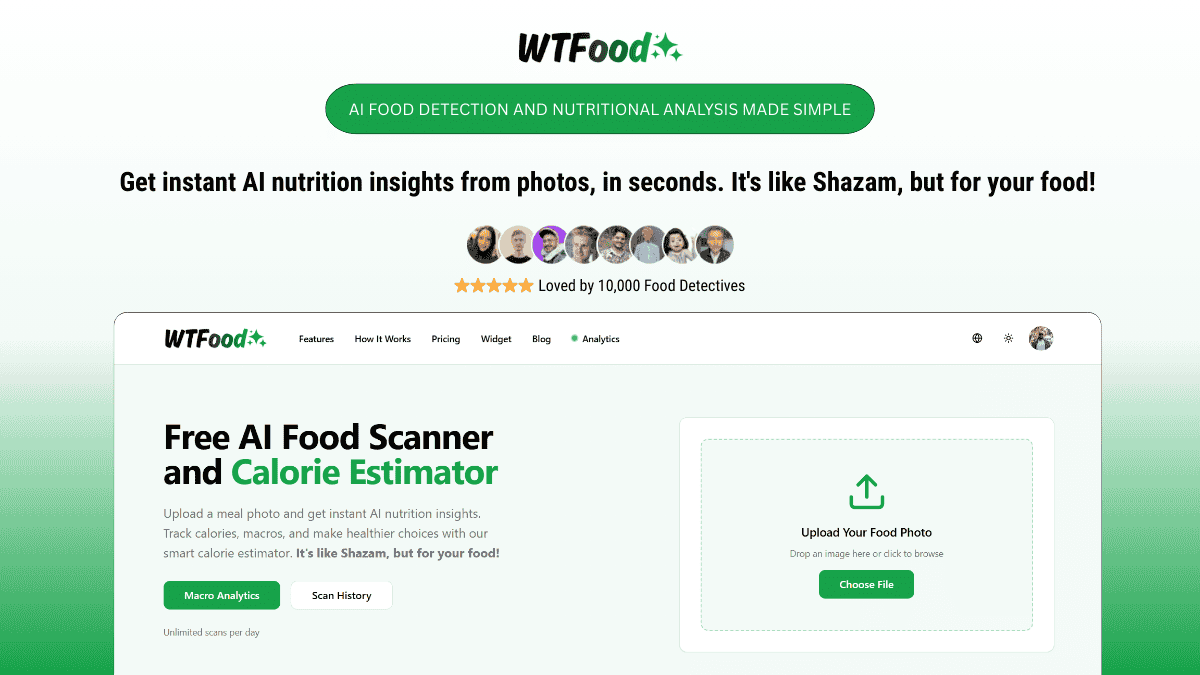
Screenshot of What The Food, Photo first macro tracking for people who refuse to log meals by hand

What is What The Food?

What The Food is a self improvement tool. A photo based calorie and macro tracker: upload a meal picture, get calories, protein, carbs and fat, plus recipe instructions. Free tier covers logging and history; premium adds analytics, meal planning and progress tracking.

What The Food is a calorie and macro tracker built around a single action: uploading a picture of a meal. The food scanner identifies the dish, estimates portion sizes, and returns a breakdown of calories, protein, carbohydrates and fat. That replaces the search and weigh routine that makes most manual food logs collapse after a week or two. The product is aimed at people who already care about macros but dislike the admin of tracking them: gym users watching protein intake, dieters monitoring energy balance, and home cooks who want a nutrition read on whatever they just made. Logged meals accumulate in a history view, and the tracker surfaces patterns across days and meals so a user can see whether intake is actually balanced rather than guessing. A meal planning module builds suggestions around stated health goals, allergies and diet preferences, with keto, low carb and balanced eating named explicitly. The recipe side is the second half of the product. Any analyzed meal can be turned into step by step cooking instructions with ingredients and portions spelled out, so the same photo that produced a macro read can also produce something to cook. The site also publishes reference articles on common foods (pizza slices, eggs and chicken, sweet potato and chickpeas, fruit) for people who want numbers without the scanner. Against rivals, What The Food sits in the photo recognition camp rather than the barcode database camp. It is lighter than full nutrition suites and clearly built for phone use, with App Store and Google Play downloads promoted on the homepage. Anyone who needs restaurant chain databases or wearable syncing should check whether those exist before committing, because the homepage does not promise them. Pricing runs on a free tier (auto food logging, history, saved recipes) and a premium tier at $14.99 monthly or $9.99 monthly on annual billing.

How do you use What The Food?

  1. 1Open the site and upload a meal photo
    Go to the homepage and use the upload box to drop in an image of your food, or pick a file from your device.
  2. 2Read the detection and macro breakdown
    The scanner names the meal, estimates portions and returns calories, protein, carbs and fat. Check the portion guess first, since everything downstream depends on it.
  3. 3Build a logging habit across days
    Keep adding meals so the history fills up. The tracker compares days and meals to expose patterns in energy and macro balance.
  4. 4Set diet context for meal planning
    Enter health goals, allergies and diet preferences (keto, low carb, balanced) so generated meal plans match what you actually eat.
  5. 5Generate a recipe from a meal
    Turn an analyzed dish into cooking instructions with ingredient quantities and ordered steps, useful for recreating a restaurant plate at home.
  6. 6Read the beginner guide before paying
    The blog explains how AI macro tracking works and where it diverges from manual logging, which helps you judge whether premium analytics are worth it.

Pros and cons

Pros

  • Meal analysis starts from a photo, which removes the search and portion entry work that kills manual food logsAI
  • Returns a full macro split (calories, protein, carbs, fat) rather than calories aloneAI
  • Turns an analyzed meal into step by step cooking instructions with ingredients and portionsAI
  • Meal plans adapt to stated goals, allergies and diet preferences such as keto or low carbAI
  • Free tier includes auto food logging, food history and recipe saving, so the core loop can be tested at no costAI

Cons

  • Accuracy depends on the model guessing portions from a flat image, and the site does not publish error rates against weighed ground truthAI
  • No stated integrations with wearables, health platforms or restaurant databases on the homepage, so it likely sits outside an existing fitness stackAI
  • Premium pricing is only shown monthly; the real annual cost per year is not stated on the pageAI
  • Recipe generation is a secondary feature, and users wanting a dedicated cooking app may find it shallowAI
  • Web upload is offered, but the homepage pushes App Store and Google Play downloads, hinting the mobile app is the primary experienceAI

How much does What The Food cost?

Pricing

Free tier at $0 covers auto food logging, food history and recipe saving. Premium is listed at $14.99 per month, or $9.99 per month billed annually, and adds macro tracking and analytics, personalized health context, progress tracking and customized meal planning. Cancel anytime.

Learn more

Features

AI food detection from meal photos, with portion estimation and a calories, protein, carbs and fat breakdown. Automatic calorie and macro tracking accumulates over days and meals to reveal patterns. Meal planning adapts to goals, allergies and diet preferences including keto and low carb. An AI recipe generator converts a meal into ingredient lists and step by step instructions.

Frequently asked questions about What The Food

  • How much does What The Food cost?
    Free tier at $0 covers auto food logging, food history and recipe saving. Premium is listed at $14.99 per month, or $9.99 per month billed annually, and adds macro tracking and analytics, personalized health context, progress tracking and customized meal planning. Cancel anytime.
  • How do you use What The Food?
    The walkthrough on this page covers 6 steps: 1. Open the site and upload a meal photo 2. Read the detection and macro breakdown 3. Build a logging habit across days 4. Set diet context for meal planning 5. Generate a recipe from a meal 6. Read the beginner guide before paying.
  • What platforms does What The Food support?
    What The Food is available on Web App, iOS and Android.
  • What are the limitations of What The Food?
    Accuracy depends on the model guessing portions from a flat image, and the site does not publish error rates against weighed ground truth. No stated integrations with wearables, health platforms or restaurant databases on the homepage, so it likely sits outside an existing fitness stack. Premium pricing is only shown monthly; the real annual cost per year is not stated on the page.

Status

StatusActive
Views0
Outbound clicks0
Added10/21/2026

Platforms

Web AppiOSAndroid

Pricing

FreemiumSubscription