Free trial
A 3 day free trial gives access to 12+ use cases with a 100 AI word cap. No credit card is required to start.
Learn moreAI copy and blog writer with 100+ templates and a low monthly cap

Writebot is a template-based AI writing tool for blog content, ads, product descriptions, SEO tags and social captions. Premium costs $14.99 per month for up to one million AI words, with a 3 day free trial that does not require a credit card.
Writebot is a web-based AI writing tool built around ready-made copy tasks rather than a blank chat box. The homepage lists twelve use cases plus a broader set of more than one hundred content types, covering blog ideas and outlines, full blog sections, business ideas, cover letters, Facebook and Twitter ads, Google Search ads, social captions, product descriptions, SEO meta titles and descriptions, and video descriptions. Each template is designed for one job, so a user fills in short prompts and gets a structured draft back in seconds. The workflow is template-driven. A user picks a use case, fills in the blank fields with as much or as little detail as they want, and the tool returns a complete draft. If the result is thin, the user adds more context and regenerates. Drafts land in a basic text editor for tweaking before publishing, which keeps the tool focused on producing copy rather than replacing a full document editor. That makes Writebot a reasonable fit for solo marketers, small business owners and bloggers who need fast first drafts without learning prompt craft. Among copywriting tools, Writebot positions itself as a budget option with a generous monthly allowance. The Premium plan is listed at $14.99 per month for up to one million AI words, and a 3 day free trial is offered with a 100 word cap and no credit card required. The template catalog is narrower than some rivals and there is no sign of a public API or third-party integrations. It is a practical choice for individuals who want quick marketing copy, not for teams that need collaborative workflows or a developer API.
A 3 day free trial gives access to 12+ use cases with a 100 AI word cap. No credit card is required to start.
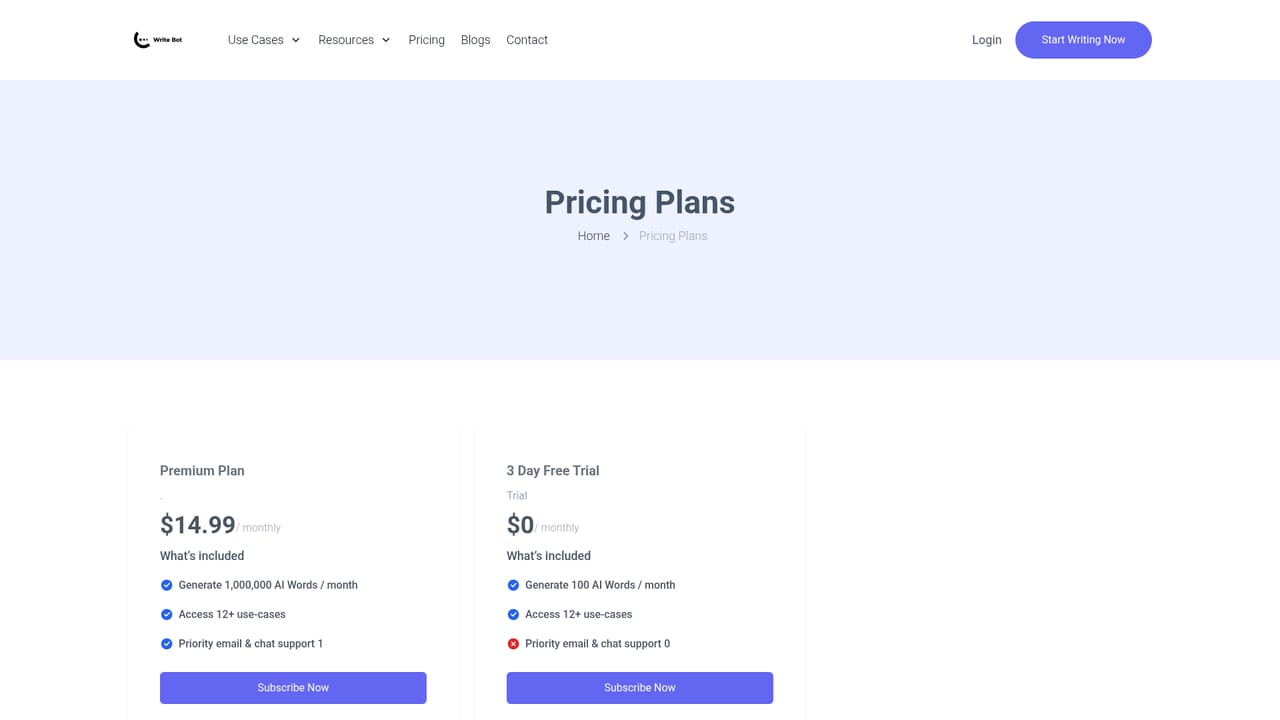
Learn moreTwo plans are shown. The Premium plan costs $14.99 per month and includes up to 1,000,000 AI words, access to 12+ use cases and priority email and chat support. The 3 day free trial costs $0 and includes 100 AI words with the same use cases but no support item.
Learn morePriority email and chat support is listed as part of the paid and trial plans, and a contact page is linked in the site footer. No help centre or documentation hub is shown.
Learn moreTemplates cover blog ideas and outlines, blog sections, business ideas, cover letters, Facebook and Twitter ads, Google Search ads, social post and caption ideas, product descriptions, SEO meta titles and descriptions, and video descriptions. The homepage also claims more than 100 content types overall. Drafts appear in a built-in text editor for editing before publishing.
 AI Angels400+ customizable AI girlfriends for NSFW chat, voice calls, and roleplay
 Candy AIExperience the future of companionship with AI friends who chat, role-play, and connect with you on a human level.
 ourdream.aiA vast AI roleplay platform with millions of characters for chat, images, video and voiceAI Angels400+ customizable AI girlfriends for NSFW chat, voice calls, and roleplayCandy AIExperience the future of companionship with AI friends who chat, role-play, and connect with you on a human level.ourdream.aiA vast AI roleplay platform with millions of characters for chat, images, video and voice


