Zety Resume Builder

Template-driven resume builder with AI-written content and guided steps

Beginner
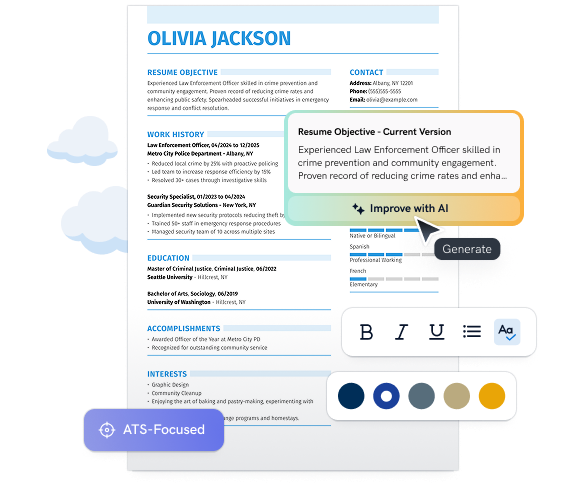
Screenshot of Zety Resume Builder, Template-driven resume builder with AI-written content and guided steps

What is Zety Resume Builder?

Zety Resume Builder is a web-based, AI-assisted resume maker with around twenty templates, step-by-step guidance, resume import and examples by profession. It suits job seekers, especially those with little work experience.

Zety Resume Builder is a browser-based tool for assembling a resume from a library of designed templates, with AI assistance for the wording. The builder walks a user through each section of a resume in sequence, starting with a question about experience level, and offers ready-made content and an "Improve with AI" option that rewrites passages such as a resume objective. Users can also import an existing resume to carry over their details instead of typing everything again. The product is aimed at job seekers across industries, and it leans toward people early in their careers. The site states that 53% of its users have little or no work experience, and that the median time to finish a resume is 16 minutes. Those figures come from the vendor, as do the claims of 30% faster job landings and 42% more recruiter responses, so they should be read as marketing numbers rather than independent results. Trustpilot shows a 4.5 rating on the page. In practice, the flow is template first. Around twenty named designs are offered, including Cascade, Crisp, Iconic, Muse, Simple and Vibes, ranging from minimalist single-column layouts to icon-heavy and two-column styles. Choosing one opens the builder with that design applied, and the content is then filled in section by section. Around the builder sit supporting resources: a library of resume examples by profession, cover letter examples, a cover letter builder, a resume checking page and a blog of writing guides on topics like summaries and job titles. Among alternatives, Zety competes with other template-based resume makers and with general AI writing assistants that can draft resume text. Its advantage is the combination of structured prompts, profession-specific examples and a design library in one place, which suits users who want guidance rather than a blank page. Users who need deep customization of layout or a fully free export should check the pricing terms before committing, since the homepage does not detail what is included at each level.

How do you use Zety Resume Builder?

  1. 1Start a new resume
    Open the builder and answer the experience level question, which tailors the guidance that follows.
  2. 2Pick a template
    Browse the template gallery and choose a design such as Crisp, Iconic or Vibes to apply to the resume.
  3. 3Import or enter details
    Upload an existing resume to transfer its information, or fill in each section using the step-by-step prompts.
  4. 4Refine with AI and examples
    Use the Improve with AI action on sections like the objective, and compare wording against profession-specific examples.
  5. 5Check and add a cover letter
    Run the resume check page for feedback, then build a matching cover letter.

Pros and cons

Pros

  • Guided step-by-step flow starting with experience level suits first-time resume writersAI
  • Roughly twenty templates cover minimalist, creative and icon-based stylesAI
  • Existing resumes can be imported to avoid retyping detailsAI
  • AI improvement option rewrites sections such as the resume objectiveAI
  • Large library of resume and cover letter examples by profession plus writing guidesAI

Cons

  • Homepage gives no pricing details, so costs and export limits are unclear before startingAI
  • Headline results such as 30% faster hiring are vendor claims without independent verificationAI
  • Template-based design limits freedom for users wanting fully custom layoutsAI
  • AI rewriting is shown only as a single Improve with AI action, with little detail on control or qualityAI

How much does Zety Resume Builder cost?

Features

AI-assisted writing with an Improve with AI action, about twenty customizable templates, resume import from an existing file, step-by-step guidance, resume examples by profession, a cover letter builder, a resume check page and a blog of writing guides.

Learn more

Frequently asked questions about Zety Resume Builder

  • How do you use Zety Resume Builder?
    The walkthrough on this page covers 5 steps: 1. Start a new resume 2. Pick a template 3. Import or enter details 4. Refine with AI and examples 5. Check and add a cover letter.
  • What platforms does Zety Resume Builder support?
    Zety Resume Builder is available on Web App.
  • What are the limitations of Zety Resume Builder?
    Homepage gives no pricing details, so costs and export limits are unclear before starting. Headline results such as 30% faster hiring are vendor claims without independent verification. Template-based design limits freedom for users wanting fully custom layouts.

Status

StatusActive
Views0
Outbound clicks0
Added10/7/2026

Platforms

Web App

Pricing

Freemium

Categories