Adalo

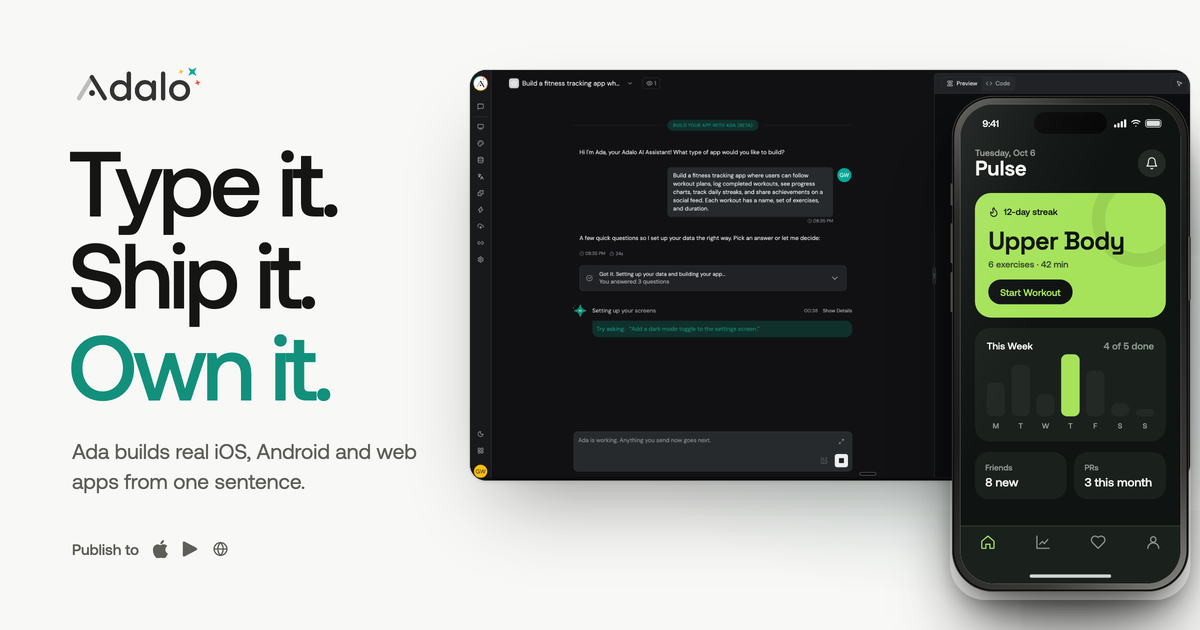
Describe an app in plain language and Ada builds it for iOS, Android and web

Beginner
Screenshot of Adalo, Describe an app in plain language and Ada builds it for iOS, Android and web

What is Adalo?

Adalo is an AI project builder tool. Adalo pairs an AI builder named Ada with a visual multi-screen canvas. Describe an app and get screens, a relational database, navigation and login automatically, then refine by pointing at elements. Projects publish as native iOS and Android builds plus a web app.

Adalo is a no-code app builder where an AI assistant called Ada does the first pass of construction. You write a sentence describing the app you want, and Ada returns a working prototype: multiple screens, a relational database with collections and relationships, navigation, user authentication and sample data. Adalo says this usually lands in under two minutes. From there the project lives on a visual canvas that shows every screen at once, so you can drag, resize, connect and edit without switching between pages. The refinement layer is where Adalo separates itself from chat-only generators. Ada accepts visual direction, meaning you select a button or a list on the canvas and tell the AI what to change, rather than describing in text where that element sits. A companion feature called Magic Add writes new features from a prompt, adding the screens, collections and logic together. X-Ray runs a pre-publish scan for broken data connections, dead navigation paths, performance problems and design inconsistencies, and reports fixes. One project compiles to native iOS (IPA) and Android (AAB) builds and also deploys as a web app. The audience is small business owners, solo founders and internal teams who need a custom app but have no development staff: marketplaces, CRMs, booking tools, fitness trackers, delivery and restaurant apps, social products and healthcare clients. It also suits people who tried a prompt-driven web builder and found the exported code hard to maintain, since Adalo generates no codebase to look after. Adalo positions itself against Lovable, Bolt and v0 on the strength of native builds, a bundled database and the canvas, and against FlutterFlow on unlimited usage without per-seat limits. Adalo Blue exists as a separate track for established businesses. Expect a learning curve on the data model even though coding is not required, and plan to test flows on real devices before submitting to the stores.

How do you use Adalo?

  1. 1Create your Adalo account
    Sign up to open a workspace. Adalo states that the free tier includes unlimited apps with AI features available from the start.
  2. 2Describe the app to Ada
    On the prompt screen, write what the app needs to do. The more specific the description (user types, actions, key screens), the less refinement is needed later.
  3. 3Let Magic Start generate the prototype
    Ada builds screens, a relational database, navigation flow, authentication and sample data. The result appears on the visual canvas for review.
  4. 4Refine on the canvas with visual direction and Magic Add
    Select an element and instruct Ada to change it, or use Magic Add to attach new features such as reviews or notifications. Run X-Ray to catch broken data links and navigation dead ends.
  5. 5Preview across device sizes
    Test the full flow (login, browsing, creating content, notifications) on phone, tablet and desktop form factors before publishing.
  6. 6Publish to the stores and web
    Compile native iOS and Android builds and follow Adalo's submission guidance, with the same project also deploying as a responsive web app.

Pros and cons

Pros

  • Magic Start returns a working prototype with screens, database, navigation and sample data, described as under two minutesAI
  • Visual direction lets you point at an element on the canvas and instruct Ada, which is more precise than describing layout in textAI
  • A single project compiles to native iOS and Android builds and deploys to web, so the work is not tripled per platformAI
  • Relational database and user authentication are included, with no external backend to wire upAI
  • X-Ray scans for broken connections, dead navigation ends and design inconsistencies before publishingAI

Cons

  • AI generation does not remove the need to understand data modelling; collection relationships still have to be reviewed by handAI
  • The comparison claims come from Adalo's own marketing page and are not independently verifiedAI
  • Publishing to the Apple App Store and Google Play still means dealing with store review and account requirementsAI
  • Native builds and unlimited usage are the selling points, but the homepage gives no detailed limits for the free tier beyond 500 recordsAI
  • Visual pointing works on the canvas, so larger multi-screen projects can become crowded to navigateAI

How much does Adalo cost?

Pricing

The homepage states that building is free forever with unlimited apps and AI included, and links to a pricing page for paid plans. It mentions 500 free records in the built-in database and contrasts Adalo with FlutterFlow at $80 per month per seat. Full plan details are not listed on the homepage.

Learn more

Support

Adalo maintains a help centre at help.adalo.com, and the product links there from its own site. The homepage does not state which support channels or response times are attached to each plan.

Learn more

Integrations

The homepage mentions connecting Google Sheets through SheetBridge and lists push notifications, camera, GPS and Face ID as device capabilities available to apps. A wider integrations directory is not described on the page.

Features

Magic Start generates a full app from a text description, including screens, a relational database, navigation and sample data. Magic Add inserts new features from a prompt. Visual AI direction lets you select an element on the multi-screen canvas and instruct changes to it. X-Ray scans for performance issues, broken links, missing data connections and design inconsistencies before publishing. One project exports as native IPA and AAB builds plus a web app.

Learn more

Frequently asked questions about Adalo

  • How much does Adalo cost?
    The homepage states that building is free forever with unlimited apps and AI included, and links to a pricing page for paid plans. It mentions 500 free records in the built-in database and contrasts Adalo with FlutterFlow at $80 per month per seat. Full plan details are not listed on the homepage.
  • How do you use Adalo?
    The walkthrough on this page covers 6 steps: 1. Create your Adalo account 2. Describe the app to Ada 3. Let Magic Start generate the prototype 4. Refine on the canvas with visual direction and Magic Add 5. Preview across device sizes 6. Publish to the stores and web.
  • What platforms does Adalo support?
    Adalo is available on Web App, iOS and Android.
  • What does Adalo integrate with?
    The homepage mentions connecting Google Sheets through SheetBridge and lists push notifications, camera, GPS and Face ID as device capabilities available to apps. A wider integrations directory is not described on the page.
  • What are the limitations of Adalo?
    AI generation does not remove the need to understand data modelling; collection relationships still have to be reviewed by hand. The comparison claims come from Adalo's own marketing page and are not independently verified. Publishing to the Apple App Store and Google Play still means dealing with store review and account requirements.

Status

StatusActive
Views0
Outbound clicks0
Added10/21/2026

Platforms

Web AppiOSAndroid

Pricing

FreeFreemiumSubscription