AI PhotoPrompt

Browse real AI image prompts, see the result, then recreate the look with your own photo.

Beginner
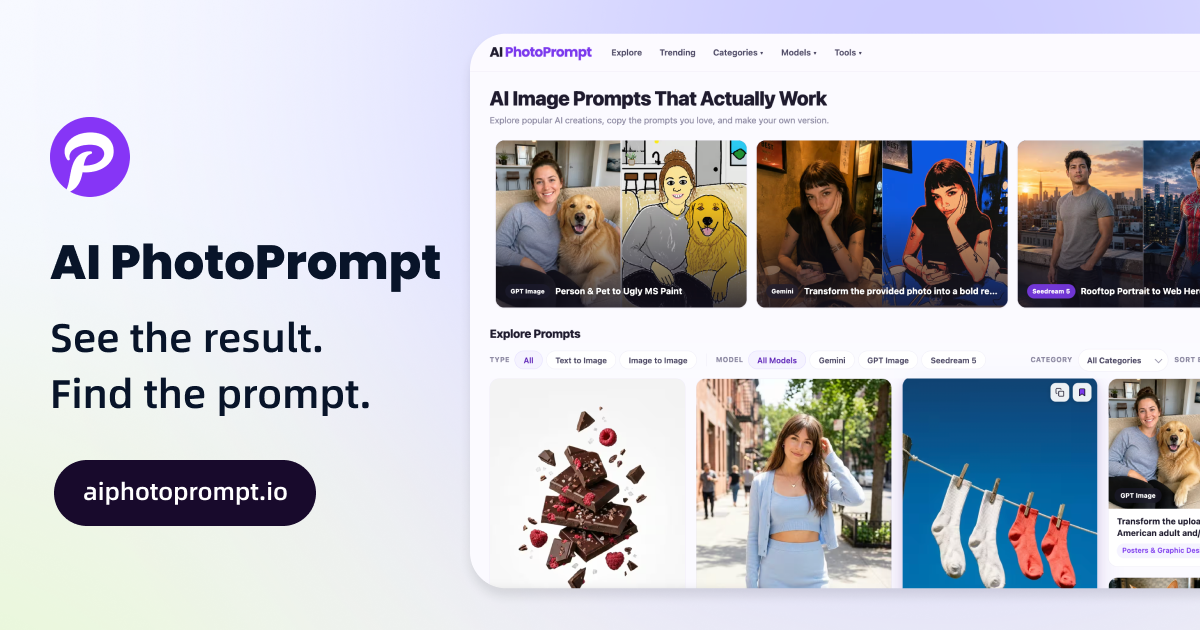
Screenshot of AI PhotoPrompt, Browse real AI image prompts, see the result, then recreate the look with your own photo

What is AI PhotoPrompt?

AI PhotoPrompt is an image editor prompt tool. A curated library of free AI image prompts, each shown with before and after examples, built for recreating a look on your own photo or product using GPT Image, Gemini or Seedream.

AI PhotoPrompt is a browsable library of AI image prompts paired with the pictures they produced. Each entry shows a before and after example, so the effect of a prompt is visible before it is copied. The library is described as holding more than 300 free prompts, split into text to image and image to image types, and the stated model support covers Gemini, GPT Image and Seedream 5. Entries are grouped into six categories: Portraits and People, Products and Ads, Photo Editing, Posters and Graphic Design, Illustration and Art, and Photography and Scenes. The practical use case is recreation rather than inspiration alone. A visitor finds a look they like, such as a selfie turned LinkedIn headshot, a pet rendered as a meme sticker pack, a real street photo rebuilt as a tabletop miniature diorama, or a product bottle placed on a mossy branch, then uploads their own subject and runs the prompt in a supported image model. Prompts are published in full, with composition, lighting and styling language included, which makes them readable as reference material for people learning how prompt structure affects output. The directory is aimed at photographers, social media creators, small brand and ecommerce teams producing product or ad visuals, and hobbyists who want a specific style without authoring the prompt themselves. Filters for model, category and type (text to image versus image to image), plus sorting by recommended, trending or latest, keep browsing manageable once the collection grows. Compared with general prompt marketplaces, the distinguishing feature here is the consistent before and after pairing and the emphasis on photo transformation workflows involving an uploaded subject. The trade off is scope: the collection is curated and finite, it is not a prompt generator, and the site does not document an editor, API or team features. Pricing terms are not stated on the homepage.

How do you use AI PhotoPrompt?

  1. 1Open the prompt library
    Start on the homepage and scroll to the Explore Prompts section, where the full collection is listed with preview images.
  2. 2Narrow by type, model and category
    Use the three dropdowns to pick Text to Image or Image to Image, a model such as Gemini, GPT Image or Seedream 5, and a category like Portraits and People.
  3. 3Compare the before and after
    Open a prompt entry to see the original photo next to the transformed result, which shows how far the prompt moves the source image.
  4. 4Copy the prompt text
    Read the full prompt on the detail page, including composition and lighting instructions, and copy it as written or adapt details to your own subject.
  5. 5Run it in your image model
    Paste the prompt into the supported model you use, upload your own photo or product shot where the prompt expects a subject, and generate.
  6. 6Start from a different example
    If the first result does not suit the brief, switch to another entry in the same category and repeat the copy and generate loop.

Pros and cons

Pros

  • Every prompt is paired with a real result image, so the output style is visible before you commit.AI
  • Strong coverage of image to image workflows where you upload a person, pet or product and restyle it.AI
  • Prompts are published in full, including lighting, composition and texture language, useful for learning prompt structure.AI
  • Filters by model, category and type plus sorting by trending or latest make a 300+ prompt collection navigable.AI
  • No account or payment is mentioned for browsing and copying prompts.AI

Cons

  • The library is curated and finite, so niche subjects may simply not exist yet.AI
  • Usable only with third party image models; there is no built in generation engine on site.AI
  • Results depend heavily on the chosen model and the quality of your uploaded source photo.AI
  • No pricing, licensing or commercial use terms are stated on the homepage.AI
  • No API, editor or team collaboration features are documented, which limits agency scale workflows.AI

How much does AI PhotoPrompt cost?

Features

Searchable and filterable prompt library with more than 300 free entries, split into text to image and image to image. Each prompt comes with a before and after example image. Filters cover model (Gemini, GPT Image, Seedream 5), category (Portraits and People, Products and Ads, Photo Editing, Posters and Graphic Design, Illustration and Art, Photography and Scenes) and prompt type, with sorting by recommended, trending or latest. Prompts are shown in full for copying.

Frequently asked questions about AI PhotoPrompt

  • How do you use AI PhotoPrompt?
    The walkthrough on this page covers 6 steps: 1. Open the prompt library 2. Narrow by type, model and category 3. Compare the before and after 4. Copy the prompt text 5. Run it in your image model 6. Start from a different example.
  • What platforms does AI PhotoPrompt support?
    AI PhotoPrompt is available on Web App.
  • What are the limitations of AI PhotoPrompt?
    The library is curated and finite, so niche subjects may simply not exist yet. Usable only with third party image models; there is no built in generation engine on site. Results depend heavily on the chosen model and the quality of your uploaded source photo.

Status

StatusActive
Views0
Outbound clicks0
Added10/21/2026

Platforms

Web App

Pricing

Free