Free trial
No trial is needed because the tool itself is free to use in beta. The homepage invites visitors to try it at no cost.
Learn moreTurn typed app ideas into visual specs, user flows and growth plans

AppFlows is an AI project builder tool that turns typed app ideas into visual specs, user flows and growth plans. Free, privacy-first planning tool from UK app consultancy Pocketworks. Type a feature list and get an illustrated app specification, user journey, growth model and strategy canvas, with an optional AI coach and PDF or table export.
AppFlows is a browser-based planning tool for founders, product managers and technical leads who need to describe a mobile app concept quickly without opening a design application. Instead of drawing screens or filling in spreadsheets, the user types out features and the tool generates an illustrated specification with example screens, a user journey and supporting documentation. It was built by Tobin Harris and the team at Pocketworks, a UK app development and growth consultancy, initially to serve their own clients. The workflow revolves around three panels. The app specification starts from a plain description of the product and expands into an outline, a basic user flow, a SWOT analysis and key product requirements; a testimonial on the site describes this output landing close to a concept that took hours of manual research. The Growth Planner takes the target audience and revenue goal and works out how many users are needed to hit them, using what the site calls real industry data, for subscription and regular apps. The Mobile Strategy Canvas, which follows Roger Martin's Playing to Win framework, prompts the bigger positioning questions before any screen design begins. A trained AI coach is available throughout to suggest improvements, and generated specs can be exported as a table or PDF, or shared through a read-only online viewer. Privacy is the design centre. Everything typed is stored in the user's own browser and is not sent to AppFlows servers or third parties by default, and the AI features are opt-in rather than automatic. That makes it viable for confidential roadmaps before a launch. Where AppFlows competes is against the grab bag of spreadsheets, Word docs and Figma boards that teams normally use at the concept stage. It deliberately stops short of detailed visual design, so it complements a design tool rather than replacing it. The product is in beta and the team states it is free to use with no plans to charge.

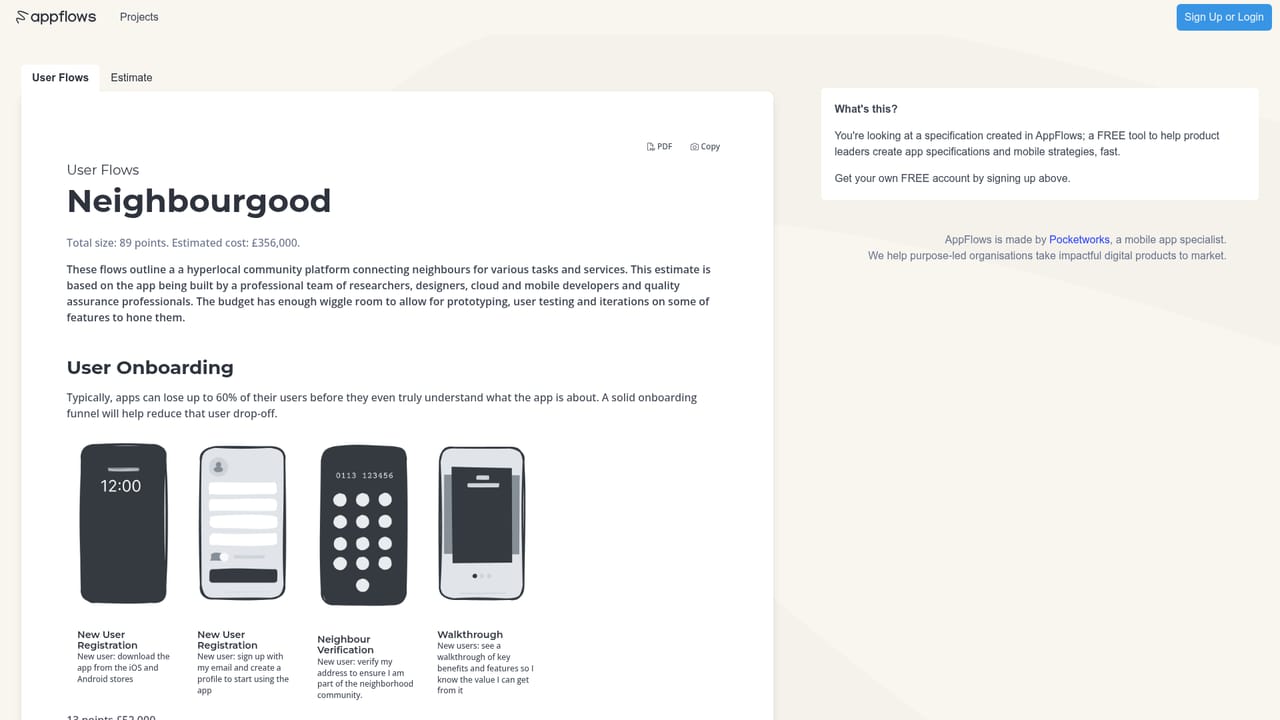
No trial is needed because the tool itself is free to use in beta. The homepage invites visitors to try it at no cost.
Learn moreThe site states AppFlows is free to use and that there are no plans to start charging, describing it as FREE forever for tech leaders, founders and product managers. Separately, Pocketworks sells paid access to its app specialists for answering app-related questions; no price is listed.
Learn moreThe site answers yes to offering support and provides a contact email for questions, plus an option to pay Pocketworks specialists for direct input on app questions.
Typed app specifications with automatically generated example screenshots, user journey and flow outlines, SWOT and requirement summaries, table and PDF export, a library of app best practices, a Growth Planner with user and revenue projections, a Mobile Strategy Canvas based on Playing to Win, an opt-in AI coach, and a read-only online viewer for sharing concepts.
 AI Angels400+ customizable AI girlfriends for NSFW chat, voice calls, and roleplay
 Candy AIExperience the future of companionship with AI friends who chat, role-play, and connect with you on a human level.
 ourdream.aiA vast AI roleplay platform with millions of characters for chat, images, video and voiceAI Angels400+ customizable AI girlfriends for NSFW chat, voice calls, and roleplayCandy AIExperience the future of companionship with AI friends who chat, role-play, and connect with you on a human level.ourdream.aiA vast AI roleplay platform with millions of characters for chat, images, video and voice


