AutoSubtitles

AI subtitles and styled video captions, generated in the browser

Beginner
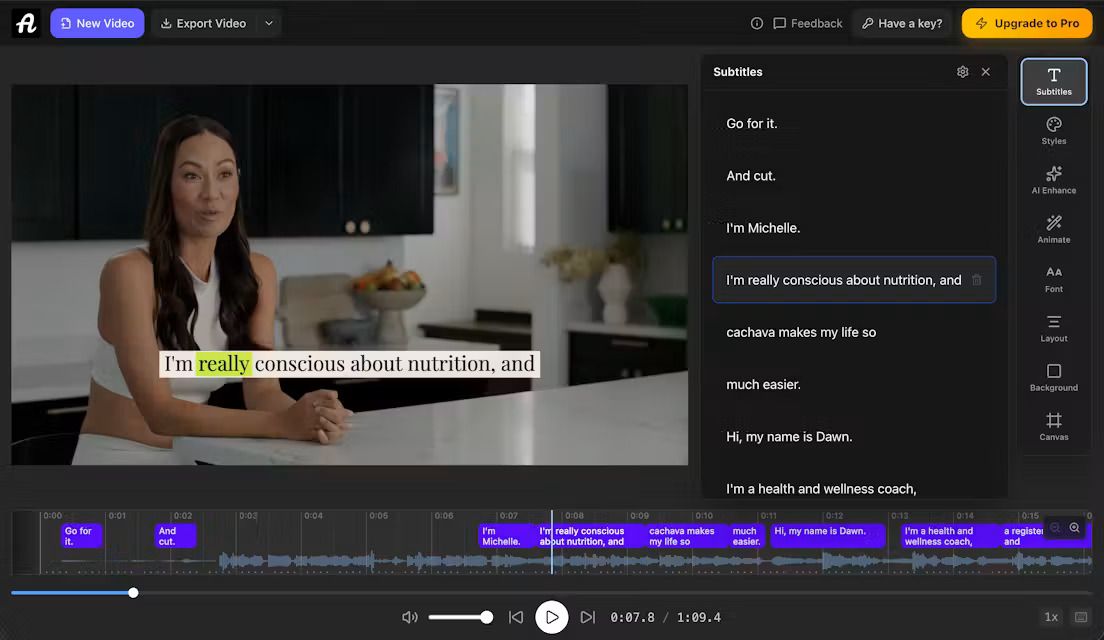
Screenshot of AutoSubtitles, AI subtitles and styled video captions, generated in the browser

What is AutoSubtitles?

AutoSubtitles is a video subtitle remover tool. Browser based AI captioning tool that transcribes video audio, generates timed subtitles in over 100 languages, styles them with 28 presets and burns them into an exported file. Free tier with 720p output and a watermark; Pro at $9 per month adds longer videos, translation and subtitle file downloads.

AutoSubtitles is a browser based captioning tool that listens to the audio in a video and writes timed subtitles automatically. A file is dragged into the page, the AI transcribes the speech, and a caption track appears ready for correction. No account is required to start, which puts it in the same practical bracket as hosted captioning services but without the onboarding step. Transcription handles accents, background noise and multiple speakers, and language detection is automatic across a very large set of languages, including English, Spanish, French, German, Portuguese and Japanese. The audio track is what gets sent for processing and is deleted straight after; the video itself stays on the local machine. Output can be burned directly into the video, and a full editor allows word level corrections, start and end time adjustments, and splitting or merging of segments. Styling is where the tool spends most of its effort. Twenty eight presets cover looks such as Classic, Neon, Karaoke, Street and Corporate, and each one applies a complete design in a single click. Beyond that, font, size, colour, outline, background, position and alignment are all editable, so a channel or brand treatment can be reproduced consistently. The audience is creators publishing on YouTube, TikTok and Reels, along with educators, freelancers, agencies and social media managers who caption other people's footage. Podcasters use it to cut captioned clips from audio. The free tier exports up to 720p with a watermark and caps videos at ten minutes; Pro at $9 per month removes the watermark, raises the limit to thirty minutes, adds translation and file downloads, and Max extends to one hour videos. It suits fast, no install work rather than deep post production. It competes on speed and the absence of setup. Against editor plugins it is far quicker to reach a finished file, but anyone needing advanced compositing or team workflows will find the ceiling early.

How do you use AutoSubtitles?

  1. 1Upload the video you want to caption
    Open the site and drag an MP4, MOV, WebM or other common video file into the upload area. No signup or login is needed to begin.
  2. 2Let the AI transcribe the audio
    The tool detects the spoken language and produces a timed subtitle track in seconds. Accents, background noise and speaker changes are handled during transcription.
  3. 3Correct words and timing in the editor
    Step through the subtitle list, fix misheard words, and adjust start and end times or split and merge segments until the timing matches the speech.
  4. 4Apply a style preset or build your own
    Pick one of the 28 presets such as Classic, Neon, Karaoke or Street, then adjust font, size, colour, outline, background, position and alignment if the preset needs tuning.
  5. 5Export the captioned video
    Render the video with subtitles burned in and download it for posting. Pro accounts additionally export SRT, VTT and TXT subtitle files.
  6. 6Read the full guide if you get stuck
    The site publishes a walkthrough covering the upload to export flow, useful for checking format requirements or caption placement before a first attempt.

Pros and cons

Pros

  • Captions are generated without an account, so a first test costs nothing but the uploadAI
  • Video stays on the local device while only the audio track is sent for transcription and then deletedAI
  • 28 style presets plus fine control over font, colour, outline, position and alignmentAI
  • Editor allows word level fixes and segment splitting or merging for accurate timingAI
  • Automatic language detection across a very wide set of languages, useful for multilingual channelsAI

Cons

  • Free exports carry a watermark and are capped at 720p, so the free tier is a trial rather than a workflowAI
  • Video length is limited at every tier: ten minutes free, thirty on Pro and one hour on MaxAI
  • SRT, VTT and TXT subtitle files are locked to Pro, and translation is also a paid featureAI
  • Browser processing depends on local hardware, so long or heavy footage may stall on modest machinesAI
  • Priority support and reusable styles sit behind the paywall, which leaves free users self reliantAI

How much does AutoSubtitles cost?

Pricing

Three tiers. Free covers AI generation, all styles and animations, exports up to 720p for videos of up to ten minutes, with a small watermark. Pro at $9 per month removes the watermark, raises videos to thirty minutes, and adds AI translation, saved custom styles and font uploads. Max includes Pro features with videos up to one hour.

Learn more

Support

Priority support is listed as a Pro benefit. A help link sits in the product and the site offers a written guide to adding subtitles along with a public review page.

Learn more

Features

AI transcription of video audio in over 100 languages with automatic language detection, a word level subtitle editor for text and timing, 28 style presets including Classic, Neon, Karaoke and Street, full customisation of font, colour, outline, background, position and alignment, and export of video with burned-in captions. Pro adds translation and SRT, VTT and TXT downloads.

Frequently asked questions about AutoSubtitles

  • How much does AutoSubtitles cost?
    Three tiers. Free covers AI generation, all styles and animations, exports up to 720p for videos of up to ten minutes, with a small watermark. Pro at $9 per month removes the watermark, raises videos to thirty minutes, and adds AI translation, saved custom styles and font uploads. Max includes Pro features with videos up to one hour.
  • How do you use AutoSubtitles?
    The walkthrough on this page covers 6 steps: 1. Upload the video you want to caption 2. Let the AI transcribe the audio 3. Correct words and timing in the editor 4. Apply a style preset or build your own 5. Export the captioned video 6. Read the full guide if you get stuck.
  • What platforms does AutoSubtitles support?
    AutoSubtitles is available on Web App.
  • What are the limitations of AutoSubtitles?
    Free exports carry a watermark and are capped at 720p, so the free tier is a trial rather than a workflow. Video length is limited at every tier: ten minutes free, thirty on Pro and one hour on Max. SRT, VTT and TXT subtitle files are locked to Pro, and translation is also a paid feature.

Status

StatusActive
Views0
Outbound clicks0
Added10/21/2026

Platforms

Web App

Pricing

FreeFreemiumSubscription