Support
Every client gets dedicated support from Capable's engineering and account-management teams, and the company assists with onboarding. Security scoping, access controls and audit expectations are agreed before production work begins.
Managed AI agents for claims and customer support operations

Capable is an AI calls tool. Capable deploys configurable AI support agents for home warranty, car warranty, property management and home service operations, covering call reception, claim intake, coverage validation, reimbursement estimates and response drafting, with human approval retained at every decision point.
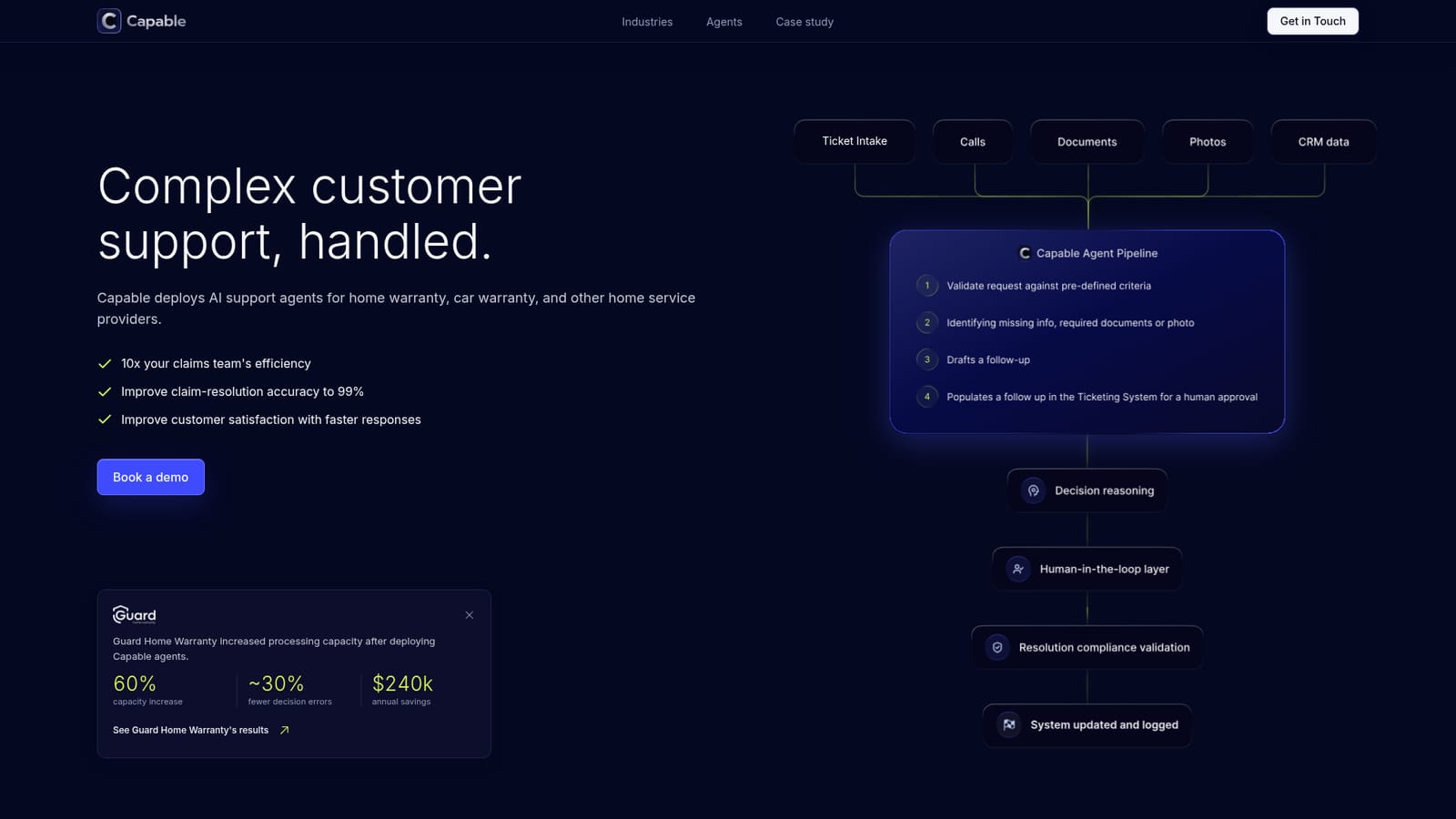
Capable is a managed platform for deploying AI support agents inside claims-heavy service businesses. It targets home warranty, car warranty, property management, home service operations and internet service providers, where routine requests still consume a manager's day and manual claim handling invites wrong payouts and delays. Rather than a generic chatbot, each agent is built around a defined workflow, approved company context, operating rules and a review policy. The setup follows three stages. A client loads its rules, contract terms and specialized knowledge, then connects the systems that hold the work. Capable then structures that material into agent instructions and configures working agents around the approved context. Teams operate through a Chrome Extension that sits alongside the existing ticketing system, while the Capable dashboard exposes agent reasoning and configuration for deeper inspection. The agent pipeline validates each request against predefined criteria, flags missing documents or photos, drafts a follow-up and routes it into the ticketing system for human approval. The agent set is specific rather than general purpose. An AI receptionist handles after-hours calls with a scripted, retrieval-augmented flow. Transcription and quality analysis agents link calls to tickets and score representatives against service standards. Customer-facing pieces include a coverage guidance assistant on the marketing site and a claim filing chatbot that collects structured requests. On the claims side, agents draft evidence-backed responses, validate coverage against terms and exclusions, run pre-payout compliance checks, estimate labor and parts from public sources, and test issues against manufacturer warranties. Capable is aimed at operations and claims leaders at insurers, warranty providers and service networks, not individual creatives or solo operators. It is a fit when a team already runs a CRM or ticketing stack and wants automation layered around it. People keep authority over claim decisions, payout approvals and customer communications; agents supply transcripts, estimates, drafts and gathered information. Implementation of a single agent typically runs one to six weeks, and a focused first workflow is the usual starting point.
Every client gets dedicated support from Capable's engineering and account-management teams, and the company assists with onboarding. Security scoping, access controls and audit expectations are agreed before production work begins.
Capable describes a configurable layer around supported claims-management, CRM, ticketing, warranty and telephony systems, naming Zoho Desk, Zoho CRM, Salesforce, Warranty One and RingCentral. Daily use runs through a Chrome Extension alongside the existing ticketing system.
Agents cover ticket intake, calls, documents, photos and CRM data. Named agents include an AI call receptionist with RAG-supported scripts, call transcription and quality analysis, a coverage guidance assistant, a claim filing chatbot, response drafting, coverage validation, reimbursement validation and estimation, and manufacturer warranty analysis. Each runs a pipeline that validates requests, requests missing evidence and routes drafts to the ticketing system for human approval.
 AI Angels400+ customizable AI girlfriends for NSFW chat, voice calls, and roleplay
 Candy AIExperience the future of companionship with AI friends who chat, role-play, and connect with you on a human level.
 ourdream.aiA vast AI roleplay platform with millions of characters for chat, images, video and voiceAI Angels400+ customizable AI girlfriends for NSFW chat, voice calls, and roleplayCandy AIExperience the future of companionship with AI friends who chat, role-play, and connect with you on a human level.ourdream.aiA vast AI roleplay platform with millions of characters for chat, images, video and voice


