Free trial
The site offers a Start For Free entry point into the ChatAvatar workspace, but does not state how many generations that includes or what limits apply.
Learn moreFull-body 3D avatar assets generated from text prompts or reference portraits.
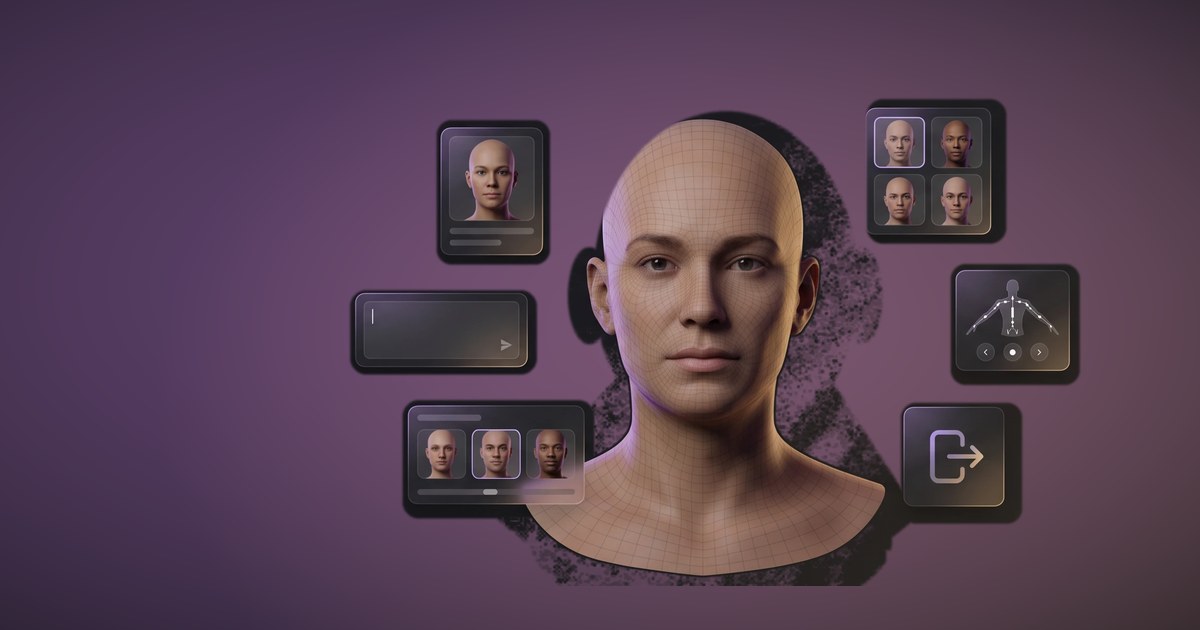
ChatAvatar is a chat with images tool. ChatAvatar from Hyper3D generates nearly production-ready full-body 3D avatars from text prompts or reference images, bundling a detailed face, matching body mesh, PBR materials, blendshapes, ARKit-compatible expressions, and lip-sync for game, VR/AR, and virtual presenter workflows.
ChatAvatar, built by the Hyper3D team, generates complete 3D avatar assets from a text prompt, a reference portrait, or a combination of both. The output is a bundled package rather than a loose mesh: a detailed face, a matching body mesh with believable proportions, rich surface detail, and PBR materials. Realistic, stylized, and cartoon-inspired directions are all supported, so the same pipeline covers a lifelike digital human and a deliberately exaggerated character. What separates ChatAvatar from basic image-to-3D tools is the rigging layer. Each nearly production-ready package ships with facial controls, blendshapes, ARKit-compatible expressions, visemes, and lip-sync support. That combination points at real-time avatar work specifically: game NPCs and player characters, virtual presenters and digital hosts, VR/AR identities, and social spaces. Because the head and body arrive together rather than as separate purchases, the proportions already match when the asset reaches an engine or a DCC tool. The working loop is short. A creator describes the character or uploads a portrait or concept image, supplies identity cues and a style prompt, generates the asset, reviews the result, refines the look if needed, and exports. Clear facial visibility in the reference image alongside a concise style prompt is the guidance the site gives for better results. Output is described as nearly production ready and supports flexible export for supported avatar workflows, which implies some cleanup or integration work remains on the artist's side. ChatAvatar sits closest to character-generation suites and avatar-creation apps, and its differentiator is the facial animation data bundled with the mesh. Buyers should read the plan and license terms carefully: commercial use depends on the plan and the asset license badge attached to a generation. Enterprise teams can approach Hyper3D about API access, custom workflows, and pipeline integration for larger productions. Artists wanting raw static meshes may find the package heavier than needed; teams building real-time avatars will find the facial layer the reason to choose it.
The site offers a Start For Free entry point into the ChatAvatar workspace, but does not state how many generations that includes or what limits apply.
Learn moreThe site directs users to chat with the team through the Contact Us workspace page for unanswered questions. No documentation portal or help centre is listed.
Learn moreEnterprise teams can discuss API access, custom workflows, and pipeline integration with Hyper3D. No self-serve integration or plugin list is published on the page.
Learn moreText, image, or combined input for character generation; detailed face plus matching body mesh; realistic, stylized, and cartoon directions; PBR materials and rich surface detail; facial controls, blendshapes, ARKit-compatible expressions, visemes, lip-sync, and expression presets; export for supported game, VR/AR, social, and DCC workflows; commercial use tied to plan and asset license badge.
 AI Angels400+ customizable AI girlfriends for NSFW chat, voice calls, and roleplay
 Candy AIExperience the future of companionship with AI friends who chat, role-play, and connect with you on a human level.
 ourdream.aiA vast AI roleplay platform with millions of characters for chat, images, video and voiceAI Angels400+ customizable AI girlfriends for NSFW chat, voice calls, and roleplayCandy AIExperience the future of companionship with AI friends who chat, role-play, and connect with you on a human level.ourdream.aiA vast AI roleplay platform with millions of characters for chat, images, video and voice

.png)