Free trial
The free plan requires no card and includes 200 credits every month with selected chat and image models. Video generation is limited to Pro and Max plans.
Learn moreOne chat composer for images, video, music, sites and games
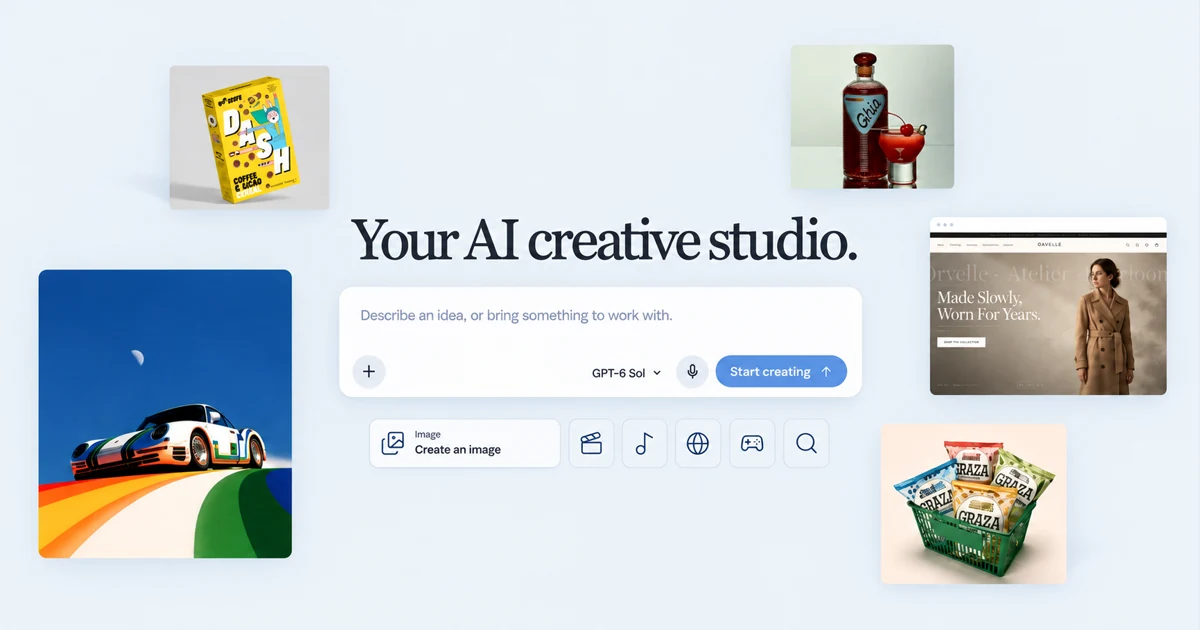
Clico is a chat with images tool. Clico bundles several third party chat, image and video models into one conversational studio. Briefs, reference photos and PDFs move between writing, image generation, image to video, music, website building and browser game creation, with a monthly credit allowance on Free, Pro and Max plans.
Clico is a web based creative studio that puts conversational AI at the centre of several production tools. The composer is the starting point: a brief, a reference photo, a chat thread or a PDF goes in, and the workspace routes it to whichever output fits, whether that is an image, a video, a piece of music, a small website or a playable browser game. The pitch is continuity, so the same brief and references stay in view while the output type changes. The model roster is deliberately mixed. Chat is handled by third party engines including Claude Opus 5.5, GPT-6 Sol, Gemini 3.8 Flash and Kimi K3, images by GPT Image 2.5 Flare, Nano Banana Pro, Seedream 5.0 Pro and FLUX.2 Max, and video by Seedance 2.5, Kling 3.0 Pro and Veo 3.1. Clico does not train models, it assembles them behind one interface and one credit balance. Personas (Deep Research Analyst, Visual Content Director, Video Director, Music Producer) adjust the tone and approach of responses, and an Auto mode picks a chat model based on the request when the user does not want to choose. The practical workflow is iterative rather than one shot. A generated website can be previewed, revised in conversation and then published, and Pro and Max subscribers can download the source for sites and games. Image to video sits beside straight generation, so a still can be animated instead of regenerated. The gallery doubles as a prompt reference, showing finished images and clips with the text that produced them. It suits generalist creators, small marketing teams and founders who need a landing page, a campaign visual and a short clip without stitching four subscriptions together. The trade off is depth: specialists who need fine grain control over a single medium will likely find a dedicated image or video tool more precise. Writing help comes through chat rather than a separate editor, so copy drafting, research summaries and document explanations happen in the same thread as the visual work.
The free plan requires no card and includes 200 credits every month with selected chat and image models. Video generation is limited to Pro and Max plans.
Learn moreFree gives 200 credits a month with selected chat and image models, and video requires Pro or Max. Pro is $19.90 per month for 2,000 credits with paid image and video models and source downloads. Max is $49.90 per month for 5,000 credits. Prices in USD, taxes shown at checkout.
Learn moreOne composer handles writing, research, image generation and editing, image to video, music, website building and browser games. Third party chat models include Claude Opus 5.5, GPT-6 Sol, Gemini 3.8 Flash and Kimi K3, with image models such as GPT Image 2.5 Flare and FLUX.2 Max, and video models such as Seedance 2.5, Kling 3.0 Pro and Veo 3.1. Personas and an Auto model picker shape responses.
Learn more AI Angels400+ customizable AI girlfriends for NSFW chat, voice calls, and roleplay
 Candy AIExperience the future of companionship with AI friends who chat, role-play, and connect with you on a human level.
 ourdream.aiA vast AI roleplay platform with millions of characters for chat, images, video and voiceAI Angels400+ customizable AI girlfriends for NSFW chat, voice calls, and roleplayCandy AIExperience the future of companionship with AI friends who chat, role-play, and connect with you on a human level.ourdream.aiA vast AI roleplay platform with millions of characters for chat, images, video and voice

.png)