ClawOneClick

Deploy your own always-on AI chatbot in under 60 seconds

Beginner API
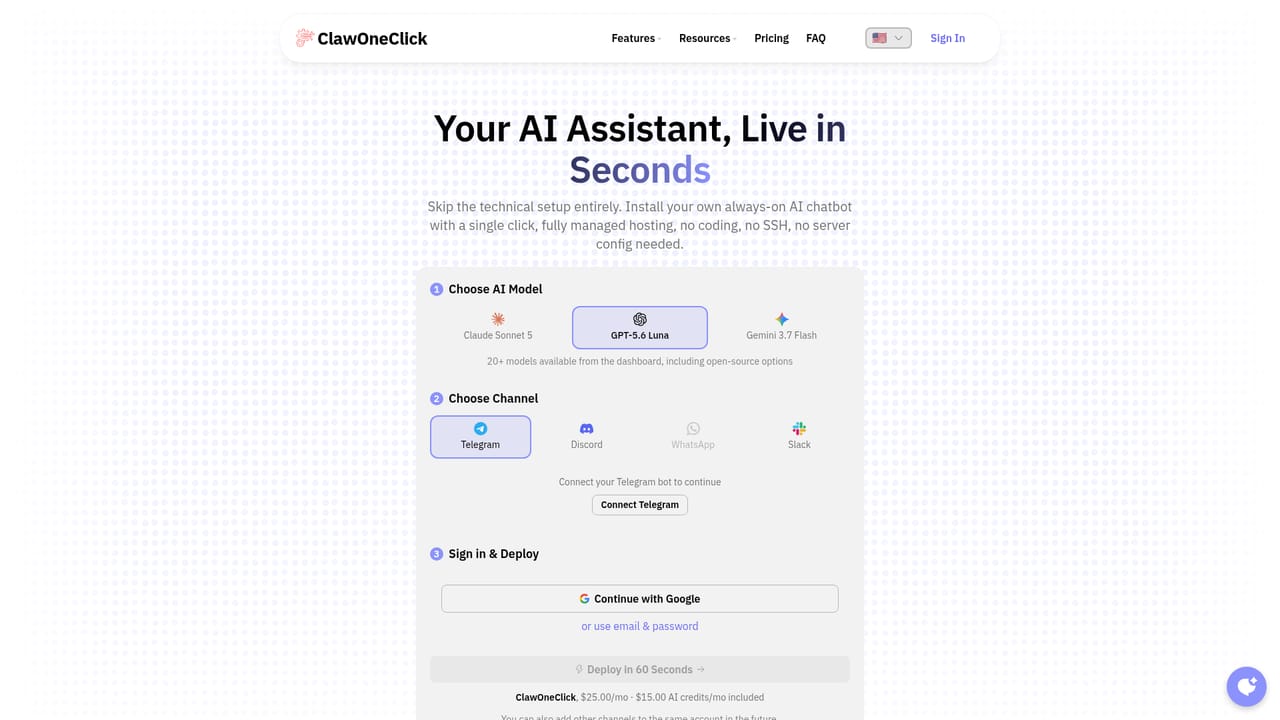
Screenshot of ClawOneClick, Deploy your own always-on AI chatbot in under 60 seconds

What is ClawOneClick?

ClawOneClick is fully managed hosting for OpenClaw, the open-source AI assistant. Pick a model, connect Telegram, Discord, WhatsApp or Slack, and deploy a persistent chatbot in under a minute with no SSH or server work. Plans start at $25 per month with bundled API credits and a bring-your-own-key option.

ClawOneClick is a managed hosting service for personal AI assistants built on OpenClaw. Instead of renting a server, generating SSH credentials and wiring up runtime dependencies yourself, you pick an AI model, connect a chat channel and deploy. The whole flow is advertised at under 60 seconds, and the company notes that you can complete it from a phone with no terminal access at all. The selling point is that the assistant runs continuously in the cloud rather than only while a browser tab is open. The setup asks three things. First, you choose from more than 20 models exposed in the dashboard, including Claude, GPT and Gemini variants plus open-source options. Second, you connect a channel: Telegram, Discord, WhatsApp or Slack, with the option to attach further channels to the same account later. Third, you sign in with Google or an email and password, then deploy. From that point the assistant answers in the messaging app you already use. Typical jobs listed on the site include summarizing email, drafting quick replies, translating, proofreading, condensing reports, handling customer queries and capturing meeting action items. Plans differ mainly in how many assistant instances and team seats you get. Starter covers one instance and one member, Pro scales to three instances and five members, and Enterprise lifts both limits while adding a private dedicated VPS, region selection and an admin and monitoring panel. Each tier bundles a monthly pot of API credits, and a bring-your-own-key mode is available if you would rather route model calls through your own provider account. Purchases are monthly or yearly with cancellation at any point. Compared with self-hosting the same underlying software, ClawOneClick trades some control for speed and upkeep. Compared with a standard chat subscription, it adds channel delivery, persistent memory, scheduled and autonomous task handling, skills from ClawHub, an API and MCP connections. A 3D office view called ClawOffice visualizes deployed agents, which is cosmetic rather than functional. The service suits developers, small teams and creators who want an assistant embedded in their messaging stack without maintaining infrastructure.

How do you use ClawOneClick?

  1. 1Pick an AI model from the dashboard list
    Choose from more than 20 models, including Claude, GPT and Gemini variants and open-source options. The choice determines how your assistant reasons and how much of your bundled credits each exchange consumes.
    ClawOneClick — Pick an AI model from the dashboard list
  2. 2Connect a messaging channel
    Select Telegram, Discord, WhatsApp or Slack and authorize the connection. You can attach additional channels to the same account afterward without redeploying.
  3. 3Sign in and deploy
    Authenticate with Google or an email and password, then trigger the deployment. The assistant comes online as a hosted instance rather than something you install locally.
  4. 4Test the assistant in your chat app
    Send a message from the connected channel and check that replies arrive. Try a realistic task such as summarizing a thread or drafting a reply before you hand the assistant to anyone else.
  5. 5Review plans and choose a tier
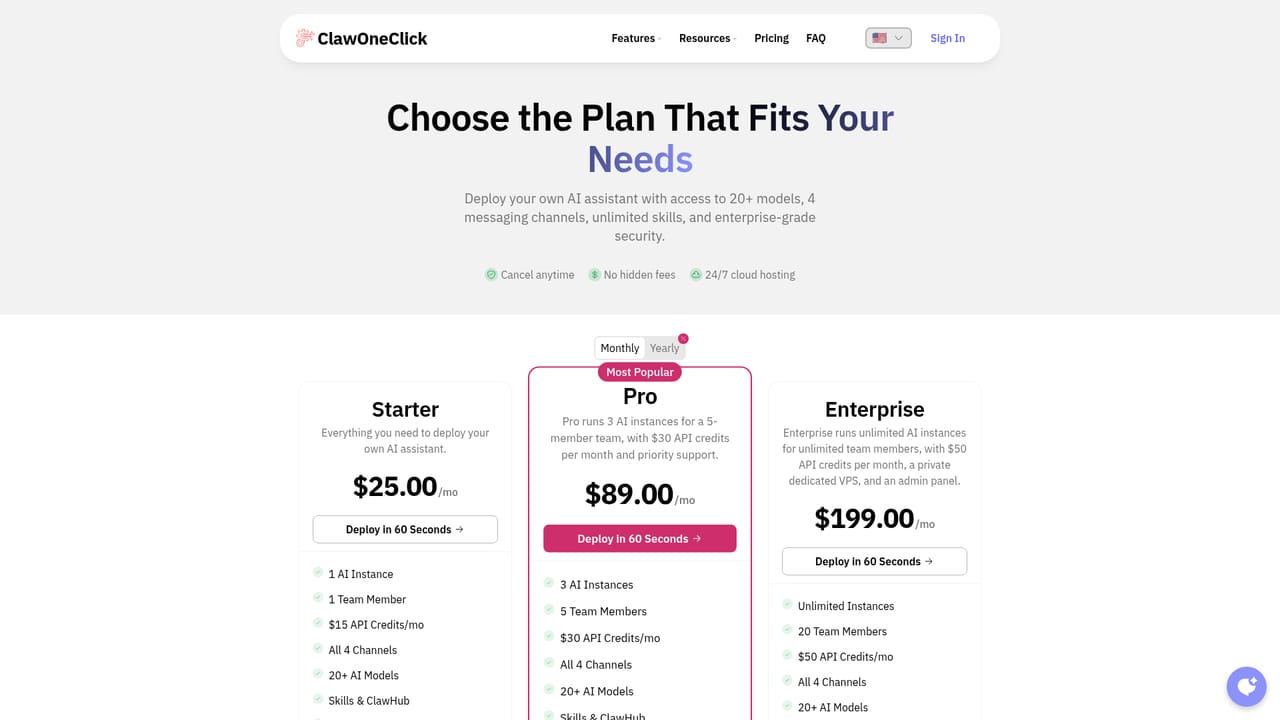
    Compare instance counts, seats and monthly API credits across Starter, Pro and Enterprise on the pricing page. Choose monthly or yearly billing; cancellation is allowed at any point.
    ClawOneClick — Review plans and choose a tier
  6. 6Book a setup call if the connection stalls
    If channel authorization or deployment fails, the team offers a free call to walk you through it. This is the fastest route when a messaging platform refuses the link.

Pros and cons

Pros

  • Deployment is genuinely fast: model, channel and sign-in, with no terminal or config files involvedAI
  • Four messaging channels (Telegram, Discord, WhatsApp, Slack) are included on every plan, with extras addable laterAI
  • Bring-your-own-key mode lets you route model usage through your own provider accountAI
  • Persistent memory, skills from ClawHub, API access and MCP connections are bundled rather than sold as add-onsAI
  • Every tier includes a monthly allotment of API credits, so light users may not need a separate model billAI

Cons

  • Pricing is per instance and per seat, so a small team needing several assistants pays for Pro or Enterprise quicklyAI
  • The bundled API credits are modest, and heavy usage will likely push you into BYOK or extra provider spendAI
  • No free tier or trial is advertised on the homepage, so evaluating it means committing to a paid monthAI
  • The site describes outcomes such as log monitoring and deployment triggers without documenting the underlying skills in detailAI
  • ClawOffice, the 3D agent office, adds little practical value for buyers focused on the chatbot itselfAI

How much does ClawOneClick cost?

Pricing

Three plans, billed monthly or yearly: Starter at $25 per month (1 instance, 1 member, $15 API credits), Pro at $89 per month (3 instances, 5 members, $30 credits, priority support) and Enterprise at $199 per month (unlimited instances, 20 members, $50 credits, private dedicated VPS, region selection, admin panel). No hidden fees; cancel anytime.

Learn more

Support

Priority support is listed on Pro and Enterprise; Starter does not state a support tier. A free setup call can be booked with the team for deployment or connection problems, and Enterprise adds an admin and monitoring panel.

Learn more

Integrations

Messaging channels are Telegram, Discord, WhatsApp and Slack, all included on every plan. The site also references MCP connections (one reviewer describes linking Figma) and an API for programmatic access, plus bring-your-own-key support for external model providers.

Learn more

Features

Choose from 20+ AI models (Claude, GPT, Gemini and open-source), connect Telegram, Discord, WhatsApp or Slack, and deploy a hosted OpenClaw instance in under a minute. Included across plans: persistent memory, skills and ClawHub, BYOK mode, 24/7 cloud hosting, API access and a 3D ClawOffice view of your agents. Upper tiers add more instances, seats, priority support, a dedicated VPS and an admin and monitoring panel.

Learn more

Frequently asked questions about ClawOneClick

  • How much does ClawOneClick cost?
    Three plans, billed monthly or yearly: Starter at $25 per month (1 instance, 1 member, $15 API credits), Pro at $89 per month (3 instances, 5 members, $30 credits, priority support) and Enterprise at $199 per month (unlimited instances, 20 members, $50 credits, private dedicated VPS, region selection, admin panel). No hidden fees; cancel anytime.
  • Does ClawOneClick have an API?
    Yes, ClawOneClick offers an API.
  • How do you use ClawOneClick?
    The walkthrough on this page covers 6 steps: 1. Pick an AI model from the dashboard list 2. Connect a messaging channel 3. Sign in and deploy 4. Test the assistant in your chat app 5. Review plans and choose a tier 6. Book a setup call if the connection stalls.
  • What platforms does ClawOneClick support?
    ClawOneClick is available on Web App.
  • What does ClawOneClick integrate with?
    Messaging channels are Telegram, Discord, WhatsApp and Slack, all included on every plan. The site also references MCP connections (one reviewer describes linking Figma) and an API for programmatic access, plus bring-your-own-key support for external model providers.
  • What are the limitations of ClawOneClick?
    Pricing is per instance and per seat, so a small team needing several assistants pays for Pro or Enterprise quickly. The bundled API credits are modest, and heavy usage will likely push you into BYOK or extra provider spend. No free tier or trial is advertised on the homepage, so evaluating it means committing to a paid month.

Status

StatusActive
Views0
Outbound clicks0
Added10/22/2026

Platforms

Web App

Pricing

PaidSubscription