ClothesChange.ai

Free browser-based AI clothes changer with no sign-up needed

Beginner
Screenshot of ClothesChange.ai, Free browser-based AI clothes changer with no sign-up needed

What is ClothesChange.ai?

ClothesChange.ai is a free web tool that swaps the outfit in a personal photo using a reference image, a text description or a ready-made template, with no login required and no watermark on downloads.

ClothesChange.ai is a browser-based virtual try-on tool that replaces the clothing in a personal photo while leaving the rest of the picture intact. The main page works as the editor itself: a visitor drops in a photo of a person, supplies a target outfit, and the AI renders a new version of the image. The site states that no account is needed, that downloads carry no watermark, and that usage is unlimited. The outfit can be specified in two ways. One is a reference image of a garment, such as a screenshot from an online store. The other is a short text description like a navy business suit or a red cocktail dress. A template gallery offers a third route, with pre-styled looks grouped under headings such as Casual, Business, Formal, Party & Glam, Streetwear, Activewear, Vacation & Beach and Men, plus a separate Hairstyles tab. An AI model selector sits beside the upload area, and the site names several underlying engines, including Google Nano Banana, Qwen Image Editor and OpenAI Image. The audience is mostly casual: shoppers who want to preview a dress in another colour before buying, people mocking up business-casual profile or dating photos, fashion bloggers testing looks, and families planning costumes. The site claims it keeps the subject's face recognizable and adjusts sleeves, waistlines and fabric drape to the person's pose and proportions, though results on unusual poses or low-quality photos are best judged by trying them. Beyond clothing, the same site hosts adjacent generators, including an AI face swap studio for video, photo and GIF, and an AI kiss video generator. Compared with paid try-on apps and general image editors, ClothesChange.ai trades depth and account features for speed and zero cost: there is nothing to install and no sign-up step, but it is a single-purpose web utility rather than a full photo workflow.
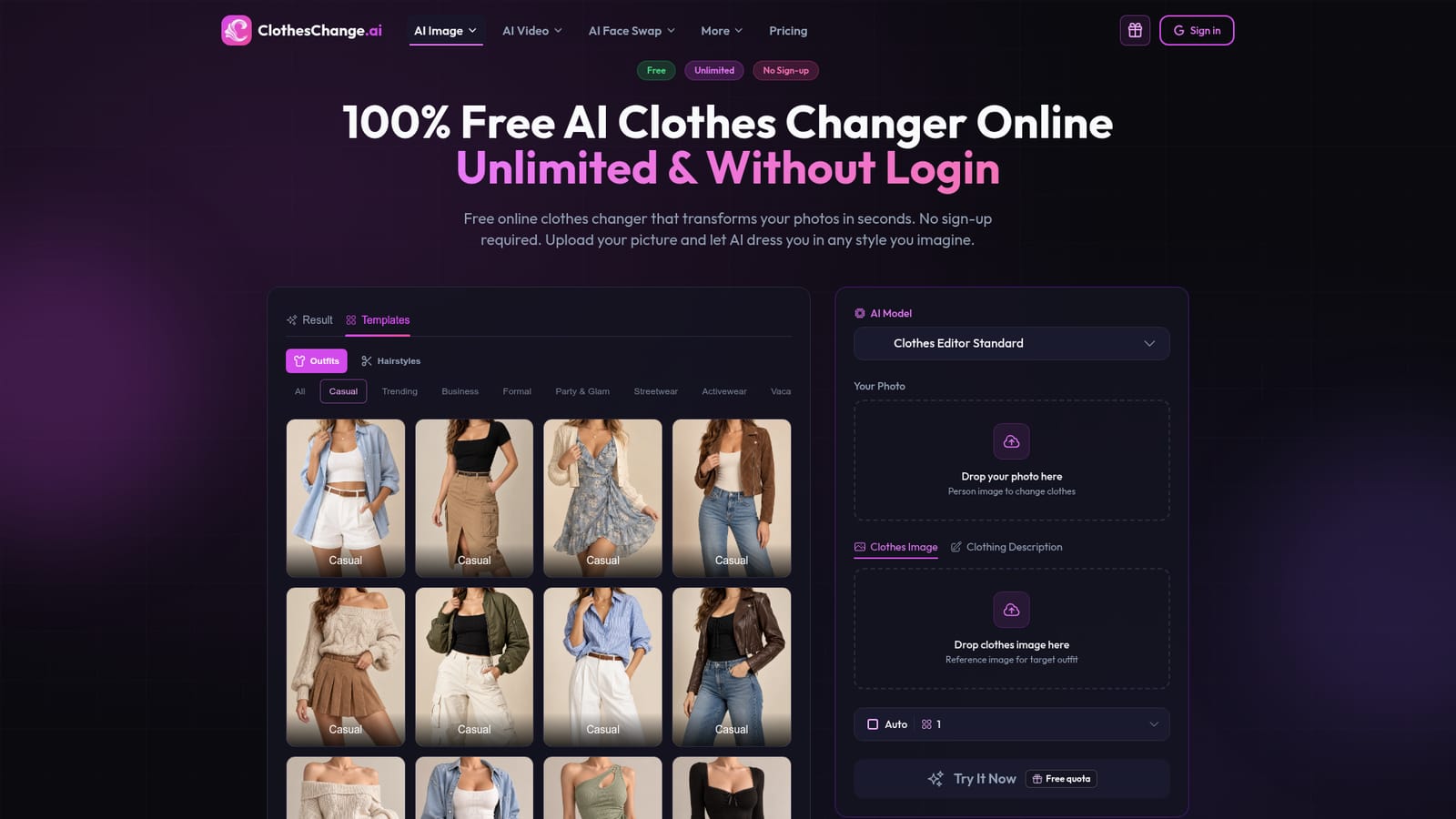
How do you use ClothesChange.ai?

  1. 1Open the clothes changer
    Go to the homepage, where the editor sits at the top. No account or sign-up is required to begin.
    ClothesChange.ai — Open the clothes changer
  2. 2Upload your photo
    Drop a selfie, portrait or full-body picture into the Your Photo area. Casual phone photos are said to work.
  3. 3Pick the new outfit
    Upload a reference image of the clothes, type a description such as a navy business suit, or choose a template from categories like Casual, Formal or Streetwear.
  4. 4Choose a model and generate
    Select an AI model from the dropdown, then press the Try It Now button to render the result.
  5. 5Download or try another look
    Save the finished image, or swap in a different outfit and run it again to compare styles.

Pros and cons

Pros

  • No login or registration needed, so a first result is possible within seconds of landing on the pageAI
  • Accepts either a reference clothing image or a plain text description of the desired outfitAI
  • Large template gallery sorted by occasion and style, including a separate hairstyles tabAI
  • Downloads are described as watermark-free and unlimited, with no payment prompt on the homepageAI
  • Runs entirely in the browser, with a choice of several named underlying AI modelsAI

Cons

  • Single-purpose web utility with no stated mobile app, desktop client or batch editing workflow for outfitsAI
  • Claims about identity preservation and realistic fit are marketing statements, and quality on odd poses is unprovenAI
  • No API, integrations or team features are mentioned, which limits use in e-commerce pipelinesAI
  • The homepage gives no details on support, privacy handling or retention of uploaded personal photosAI
  • The free quota wording is ambiguous: the page says unlimited yet also mentions a free quota near the generate buttonAI

How much does ClothesChange.ai cost?

Pricing

The homepage presents the clothes changer as free, unlimited and usable without login, with downloads said to be watermark-free. No paid plans or prices are listed.

Learn more

Features

Outfit swapping from a reference image or text prompt, a template library by occasion, a hairstyles tab, a selectable AI model, face preservation and body-aware fit claims, plus AI face swap and AI kiss video tools.

Frequently asked questions about ClothesChange.ai

  • How much does ClothesChange.ai cost?
    The homepage presents the clothes changer as free, unlimited and usable without login, with downloads said to be watermark-free. No paid plans or prices are listed.
  • How do you use ClothesChange.ai?
    The walkthrough on this page covers 5 steps: 1. Open the clothes changer 2. Upload your photo 3. Pick the new outfit 4. Choose a model and generate 5. Download or try another look.
  • What platforms does ClothesChange.ai support?
    ClothesChange.ai is available on Web App.
  • What are the limitations of ClothesChange.ai?
    Single-purpose web utility with no stated mobile app, desktop client or batch editing workflow for outfits. Claims about identity preservation and realistic fit are marketing statements, and quality on odd poses is unproven. No API, integrations or team features are mentioned, which limits use in e-commerce pipelines.

Status

StatusActive
Views0
Outbound clicks0
Added10/18/2026

Platforms

Web App

Pricing

Free