
Composer Trade

Describe a trading idea in plain English, backtest it, then let the brokerage run it.

Intermediate
Screenshot of Composer Trade, Describe a trading idea in plain English, backtest it, then let the brokerage run it

What is Composer Trade?

Composer Trade is a stocks tool. Composer by SoFi is a brokerage plus no-code strategy builder: describe a trading idea, let AI draft the rules, backtest against benchmarks, then automate execution with automatic rebalancing. Pre-built and community strategies can be copied or remixed, and one subscription covers all accounts including IRAs.

Composer is a brokerage and strategy builder in one product. Users describe an investment idea in natural language, and an AI-assisted editor turns that prompt into a working trading strategy, which Composer calls a symphony. Each symphony is assembled from ordinary building blocks: a pool of assets, weighting rules (custom weights, inverse volatility, market cap or equal balance), filters that sort and select candidates, and if/then conditionals that decide what gets bought. The same logic can be assembled by hand in a no-code visual editor, so a prompt is a starting point rather than a locked black box. Before any money moves, the backtester replays the strategy against historical data and compares results with a benchmark such as SPY. Users see cumulative and annualized return, trailing three month return, Sharpe ratio, a historical allocation graph showing how holdings shifted, and modeled fees, slippage and final value. Because every strategy is fully editable, the usual loop is to test, adjust a parameter or a rule, and test again. Pre-built strategies are available across categories like Long Term, Technology Focus and Diversification, and a community section lets users publish their own and remix other people's work. Composer is the broker itself, not a layer on top of one. Accounts are created and funded inside the app, trades are executed and portfolios rebalanced automatically, and commissions and management fees are stated as zero, with a separate fee schedule for other charges. Plans named Starter, Advanced and Pro all include automated trading at different scales, and a single subscription covers every account a user opens, including Traditional and Roth IRAs; the company also says it will cover transfer fees within limits. The pitch lands for self-directed investors who want rules-based, emotion-free execution without writing code or hiring a quant team. It is not a robo-advisor with a fixed menu of portfolios, and it is not a discretionary managed account. Relative to spreadsheet-driven or code-heavy quant tools, Composer's advantage is the visual editor and the AI prompt entry point. Relative to mainstream brokerages, its advantage is automated conditional logic. The trade-off is that users still carry full responsibility for the logic they build.

How do you use Composer Trade?

  1. 1Open an account and fund it
    Register through the app to create a Composer brokerage account, then fund it before any strategy can trade. Account types include taxable and IRA options.
    Composer Trade — Open an account and fund it
  2. 2Draft a strategy with the AI editor
    Describe goals, the strategy idea and risk concerns in ordinary language. The AI-assisted editor produces a symphony with concrete holdings and rules for you to review.
  3. 3Edit the logic in the visual builder
    Adjust asset weights, add filters that sort and pick from a candidate pool, and insert if/then conditionals to control what is held in different market conditions.
  4. 4Backtest against a benchmark
    Run the backtester to compare returns, Sharpe ratio and drawdowns with a benchmark, and check modeled fees, slippage and final value before committing capital.
  5. 5Automate or borrow a strategy
    Either let Composer execute and rebalance the symphony automatically, or browse pre-built and community strategies, invest directly, or remix one into your own version.
  6. 6Pick a plan and review costs
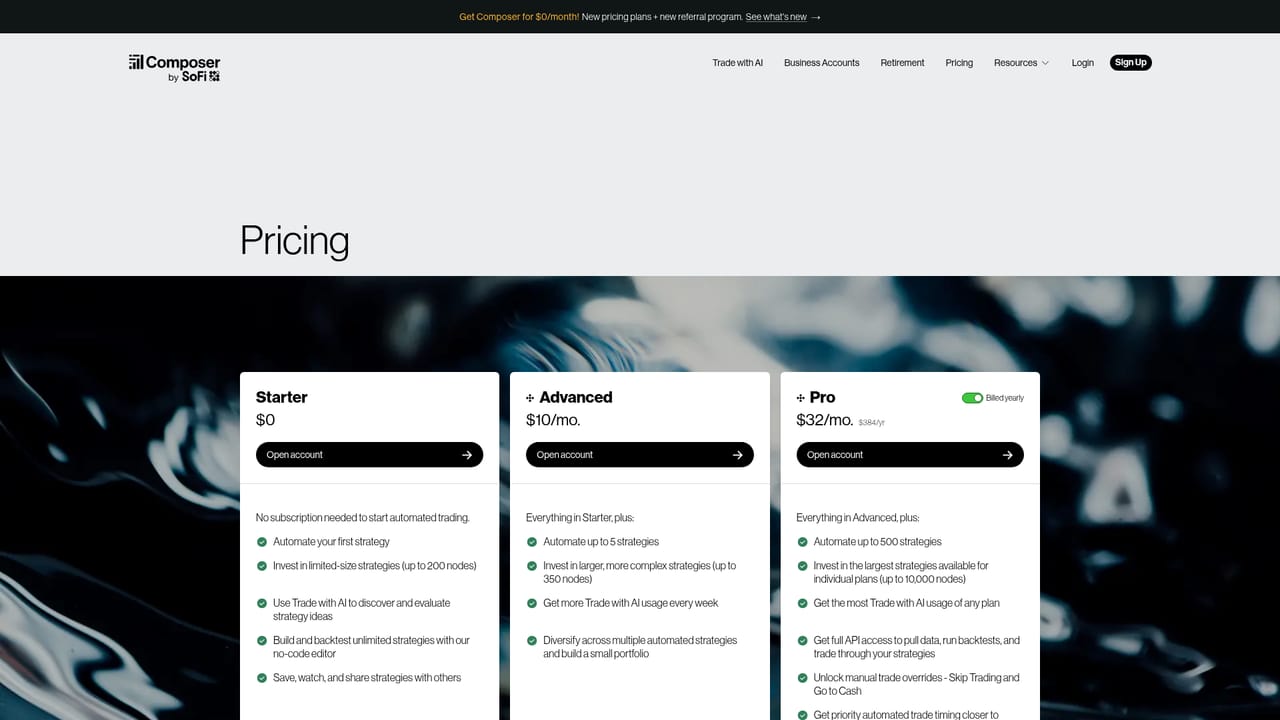
    Compare Starter, Advanced and Pro to see how many automated strategies each allows, and read the full fee schedule for charges outside commissions.
    Composer Trade — Pick a plan and review costs

Pros and cons

Pros

  • Natural language prompt to strategy, with the generated logic exposed and editable rather than hiddenAI
  • Backtester reports Sharpe ratio, returns, allocation history and modeled fees and slippageAI
  • No-code visual editor covers weights, filters and conditionals without programmingAI
  • Composer acts as the broker, so creation, funding and automated execution sit in one appAI
  • A single plan is stated to cover every account opened, including Traditional and Roth IRAsAI

Cons

  • Backtested results reflect past data only, and the tool gives no guarantee that a strategy keeps workingAI
  • Building conditional logic still requires understanding of indicators, moving averages and rebalancing, so beginners can ship a flawed strategy confidentlyAI
  • No commission and no management fee claims sit alongside a separate fee schedule, so total cost needs reading beyond the headlineAI
  • Homepage gives no detail on market coverage, asset classes or execution venues, which matters for niche strategiesAI
  • Strategy quality depends heavily on the prompt and rules the user writes, and weak inputs produce weak automationsAI

How much does Composer Trade cost?

Pricing

Plans are named Starter, Advanced and Pro, and all three include automated trading at different scales. The homepage advertises getting Composer for $0 per month and states no subscription is needed to start. Commissions and management fees are listed as zero, with other fees possible under a separate fee schedule, and one plan is said to cover every account including IRAs.

Learn more

Features

AI-assisted strategy creation from a natural language prompt, a no-code visual editor with custom, inverse volatility, market cap and equal weighting, filters for sorting and selecting assets, if/then conditionals, a backtester with benchmark comparison and Sharpe ratio, a historical allocation graph, modeled fees and slippage, pre-built and community strategies with remixing, automated execution with rebalancing, and IRA support.

Frequently asked questions about Composer Trade

  • How much does Composer Trade cost?
    Plans are named Starter, Advanced and Pro, and all three include automated trading at different scales. The homepage advertises getting Composer for $0 per month and states no subscription is needed to start. Commissions and management fees are listed as zero, with other fees possible under a separate fee schedule, and one plan is said to cover every account including IRAs.
  • How do you use Composer Trade?
    The walkthrough on this page covers 6 steps: 1. Open an account and fund it 2. Draft a strategy with the AI editor 3. Edit the logic in the visual builder 4. Backtest against a benchmark 5. Automate or borrow a strategy 6. Pick a plan and review costs.
  • What platforms does Composer Trade support?
    Composer Trade is available on Web App.
  • What are the limitations of Composer Trade?
    Backtested results reflect past data only, and the tool gives no guarantee that a strategy keeps working. Building conditional logic still requires understanding of indicators, moving averages and rebalancing, so beginners can ship a flawed strategy confidently. No commission and no management fee claims sit alongside a separate fee schedule, so total cost needs reading beyond the headline.

Status

StatusActive
Views0
Outbound clicks0
Added10/21/2026

Platforms

Web App

Pricing

FreemiumSubscription