Dreamflow

Visual AI builder that turns prompts into shipped mobile apps

Intermediate
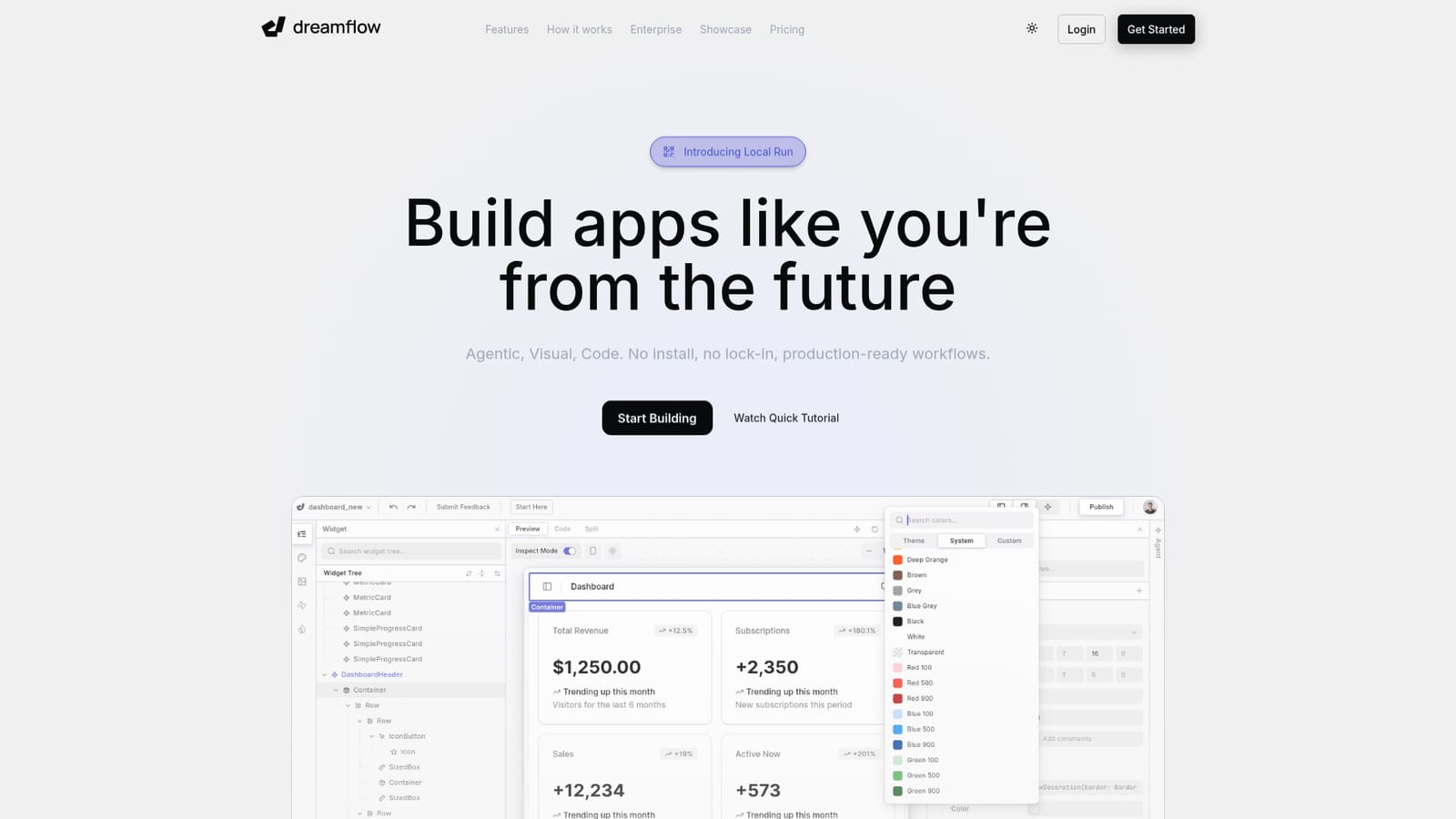
Screenshot of Dreamflow, Visual AI builder that turns prompts into shipped mobile apps

What is Dreamflow?

Dreamflow is an app creation tool. Dreamflow pairs an AI agent with a synced visual canvas and Dart code editor to build responsive Flutter apps. It deploys to web, the Play Store and App Store, exports full code, and connects to Firebase or Supabase.

Dreamflow is a browser based app builder that combines an AI agent, a visual canvas and a Flutter code editor inside one project. It comes from the team behind FlutterFlow and is aimed at builders who want AI generation speed without giving up the ability to inspect and edit what the machine produces. The core idea is a three way sync: you describe a feature in natural language, adjust the result by dragging widgets on the canvas, or open the code and work in Dart. Changes made in any of the three surfaces stay consistent with the others, so the agent is never editing a parallel copy of your project. In practice the workflow is short. A prompt, a template or an uploaded file starts a project, and the agent scaffolds screens, widgets and data logic with what Dreamflow describes as context aware generation. From there you refine: right click a widget to send it to the agent, ask a quick prompt against a single component, or drop into code when you need precise control. Responsive layouts are built on Flutter, so one project targets phones, tablets, desktop web and the app stores. Firebase and Supabase connections are available out of the box, which makes full stack apps of the kind a dashboard or booking product needs realistic rather than demo only. Shipping is handled inside the same tool. Web deployment is a click, and publishing to the Play Store and App Store is part of the paid workflow. A full code export and local runs on simulators or physical devices exist on the Hobby tier and above, which matters to anyone worried about lock in. The competition is split between prompt to app services that generate a prototype and low code platforms that require manual assembly. Dreamflow sits between them, closer to a professional development environment than a toy. Try it if you want AI assistance on a real Flutter codebase and are prepared to pay a monthly subscription once the starter credits run out.

How do you use Dreamflow?

  1. 1Open the builder and sign in
    Go to the Dreamflow site and choose Start Building. Signing in creates your account and lands you in the project workspace in the browser, with no install step.
    Dreamflow — Open the builder and sign in
  2. 2Start a project from a prompt, template or file
    Choose New Project, Start from Template, or drop in a prompt with an optional uploaded file. The agent reads the description and generates the first set of screens and widgets.
  3. 3Review the generated app on the canvas
    Switch to the visual canvas to inspect the layout. Select a widget to open its context menu, where options include sending it to the agent, prompting an edit, wrapping it, or jumping to code.
  4. 4Iterate with the agent or edit Dart directly
    Use the quick prompt box to describe a change such as restyling a dashboard, or open the code surface and edit the Dart by hand. Both routes write back to the same project.
  5. 5Connect a backend and deploy
    Link a Firebase or Supabase project to add data and auth, then deploy. Web publishing is available on every tier; store deployment and code export require the Hobby plan or higher.
  6. 6Watch the walkthrough or read the docs
    The three minute tutorial video and the developer documentation cover the editor in more depth if you want a guided tour before building.
    Dreamflow — Watch the walkthrough or read the docs

Pros and cons

Pros

  • Agent, canvas and code stay in sync, so edits in one surface do not fork the projectAI
  • Real Flutter output with full code export and local runs on simulators from the Hobby tierAI
  • Firebase and Supabase connect out of the box, enabling full stack apps rather than static mockupsAI
  • One codebase targets iOS, Android and web with store deployment inside the toolAI
  • Free tier allows private projects with visual and code editing before you pay anythingAI

Cons

  • The free plan includes only 10 one time AI credits and web deployment, so any real AI usage requires a paid tierAI
  • Pro at $90 per month is a steep jump from Hobby for individuals testing the production workflowAI
  • Credit allowances (100 on Hobby, 500 on Pro) cap heavy agent use, and overage handling is not stated on the homepageAI
  • Built on Flutter and Dart, so teams from React Native or native iOS and Android backgrounds face a learning curveAI
  • The tool is quite new and its review base is small; most social proof comes from quotes rather than long term case studiesAI

How much does Dreamflow cost?

Pricing

Free tier at $0 with private projects, visual and code editing, Firebase and Supabase integrations, web deployment and 10 one time starter credits. Hobby is $20 per month with store deployment, full code export, local runs and 100 credits. Pro is $90 per month adding Git version control and priority model access with 500 credits. Enterprise is custom.

Learn more

Support

Enterprise tier includes dedicated support, an onboarding engagement, advanced access control and SLA guarantees. Contact is available through the site, and community discussion happens on the Dreamflow subreddit.

Learn more

Integrations

Firebase and Supabase are supported out of the box for backend, data and auth, with a connected project setup flow shown in the product. Git version control is part of the Pro plan.

Learn more

Features

Tri-surface editing keeps an AI agent, visual canvas and Dart code editor in sync. Context aware generation scaffolds features, one project builds responsive apps for iOS, Android, web and desktop via Flutter, Firebase and Supabase integrate out of the box, and deployment to web or the app stores plus full code export finish the workflow.

Frequently asked questions about Dreamflow

  • How much does Dreamflow cost?
    Free tier at $0 with private projects, visual and code editing, Firebase and Supabase integrations, web deployment and 10 one time starter credits. Hobby is $20 per month with store deployment, full code export, local runs and 100 credits. Pro is $90 per month adding Git version control and priority model access with 500 credits. Enterprise is custom.
  • How do you use Dreamflow?
    The walkthrough on this page covers 6 steps: 1. Open the builder and sign in 2. Start a project from a prompt, template or file 3. Review the generated app on the canvas 4. Iterate with the agent or edit Dart directly 5. Connect a backend and deploy 6. Watch the walkthrough or read the docs.
  • What platforms does Dreamflow support?
    Dreamflow is available on Web App.
  • What does Dreamflow integrate with?
    Firebase and Supabase are supported out of the box for backend, data and auth, with a connected project setup flow shown in the product. Git version control is part of the Pro plan.
  • What are the limitations of Dreamflow?
    The free plan includes only 10 one time AI credits and web deployment, so any real AI usage requires a paid tier. Pro at $90 per month is a steep jump from Hobby for individuals testing the production workflow. Credit allowances (100 on Hobby, 500 on Pro) cap heavy agent use, and overage handling is not stated on the homepage.

Status

StatusActive
Views0
Outbound clicks0
Added10/21/2026

Platforms

Web App

Pricing

FreeFreemiumSubscription