Epidemic Sound

Match a soundtrack to your footage in seconds, not hours of browsing

Beginner
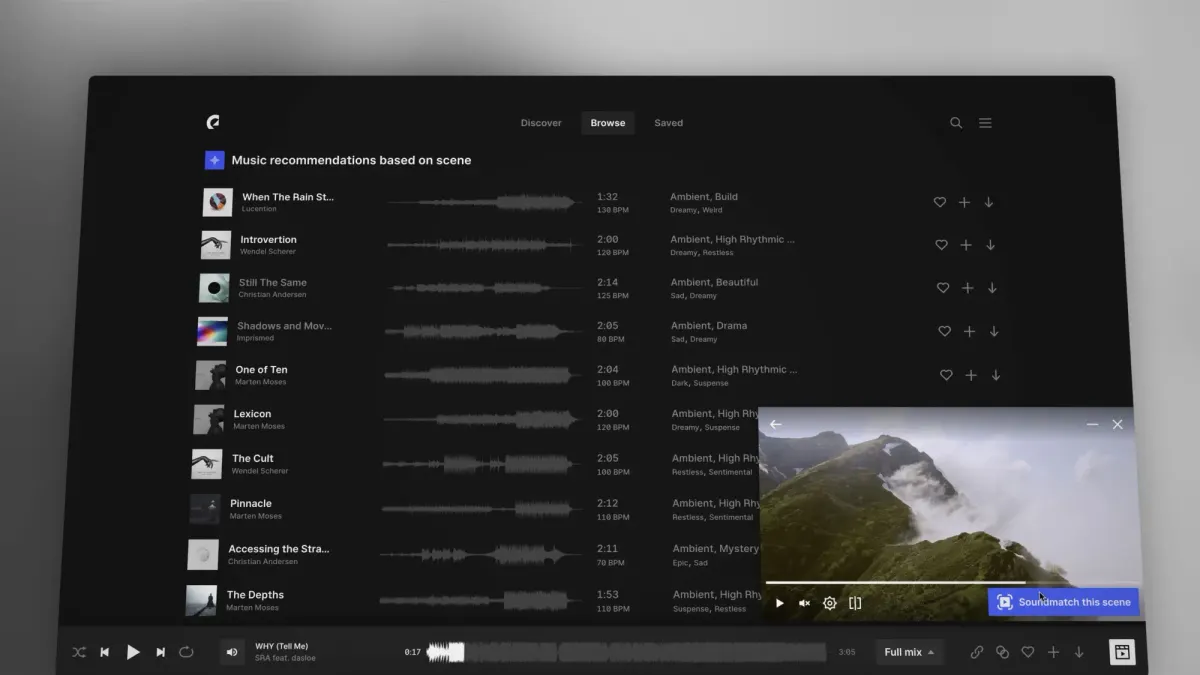
Screenshot of Epidemic Sound, Match a soundtrack to your footage in seconds, not hours of browsing

What is Epidemic Sound?

Epidemic Sound is a song recommendations tool. Soundmatch is an AI feature inside Epidemic Sound that reads your video footage, derives keywords from the shot, and recommends licensed tracks that fit the scene, drawing on usage data from YouTube videos that carry Epidemic Sound music.

Soundmatch is an AI soundtracking feature built into the Epidemic Sound library. Instead of scrolling through genre charts and mood tags hoping something fits, an editor loads a clip and lets the tool read the visuals, then receives a set of track recommendations aimed at that specific scene. It sits inside the existing Epidemic Sound workflow rather than acting as a standalone product, so the tracks it returns are licensed catalogue music you can drop straight into a project. The mechanics are unusual. Soundmatch analyses what a shot contains and converts that into descriptive keywords, which it then runs as a semantic search against the catalogue. To rank results it leans on usage data drawn from YouTube videos that carry Epidemic Sound music, reportedly over 2.5 billion daily views. In effect the tool is asking which tracks tend to accompany footage like yours, then surfacing those. That data angle is the real differentiator: recommendations reflect observed editorial pairings at scale rather than hand-written mood labels alone. The audience is practical. Video editors, social media producers, freelance content creators and small in-house teams who cut frequently and cannot justify a dedicated music supervisor are the obvious users. It also suits anyone working from an early idea or rough cut who wants a direction before committing to a final edit. Because it lives in the music tab and the player, it rewards people already paying for an Epidemic Sound subscription and offers little to those who are not. Among alternatives, Soundmatch is narrower than general AI music generators that compose original audio, and narrower than stock libraries that rely purely on manual browsing. It is a discovery layer on top of a licensed catalogue, which is both its strength and its boundary.

How do you use Epidemic Sound?

  1. 1Open the music tab
    Sign in to Epidemic Sound and go to the music section of the library. This is the starting point for both the search-bar route and the player route.
  2. 2Launch Soundmatch from the search bar
    Click the Soundmatch icon in the far right corner of the search bar to open the soundtracking view.
  3. 3Upload the video you want to score
    Choose the video file to play. A rough cut works as well as a finished edit, so you can experiment before the timeline is locked.
  4. 4Mark the section to soundtrack
    Place the marker on the part of the video you want matched. Narrowing the range gives the tool a cleaner read on the scene.
  5. 5Run Soundmatch and review the suggestions
    Hit the Soundmatch button and a set of matching recommendations appears immediately. Preview the tracks against the clip and keep the ones that land.
  6. 6Try the player route instead
    When playing a track in the Epidemic Sound Player, use the Sync to video button in the far right corner of the player bar to reach the same recommendations from the music side.

Pros and cons

Pros

  • Cuts soundtrack discovery down to seconds by recommending tracks for a specific shotAI
  • Recommendations are informed by how music is actually used across billions of daily YouTube viewsAI
  • Works on rough cuts and final edits, so it fits early ideation as well as finishingAI
  • Sits inside the existing Epidemic Sound player and music tab, so no separate tool to learnAI
  • Licensed catalogue tracks mean recommendations are usable in published workAI

Cons

  • Only useful with an active Epidemic Sound subscription, so it is not a standalone toolAI
  • Recommendations are limited to the Epidemic Sound catalogue rather than the wider music marketAI
  • The keyword and usage-data approach can bias results toward trends popular on YouTubeAI
  • Quality depends on how legible the footage is; abstract or low-detail shots may return loose matchesAI
  • Little transparency for users on how a specific recommendation was rankedAI

How much does Epidemic Sound cost?

Features

Soundmatch reads the visual content of a shot, generates keywords from it, and runs a semantic search across the Epidemic Sound catalogue. Ranking draws on usage insight from YouTube videos containing Epidemic Sound music. It can be launched from the search bar or from the player via Sync to video, and returns a set of track recommendations for the marked section of a clip.

Frequently asked questions about Epidemic Sound

  • How do you use Epidemic Sound?
    The walkthrough on this page covers 6 steps: 1. Open the music tab 2. Launch Soundmatch from the search bar 3. Upload the video you want to score 4. Mark the section to soundtrack 5. Run Soundmatch and review the suggestions 6. Try the player route instead.
  • What platforms does Epidemic Sound support?
    Epidemic Sound is available on Web App.
  • What are the limitations of Epidemic Sound?
    Only useful with an active Epidemic Sound subscription, so it is not a standalone tool. Recommendations are limited to the Epidemic Sound catalogue rather than the wider music market. The keyword and usage-data approach can bias results toward trends popular on YouTube.

Status

StatusActive
Views0
Outbound clicks0
Added10/21/2026

Platforms

Web App

Pricing

Subscription