

Framer

AI website builder that drafts editable pages on a real design canvas

Intermediate
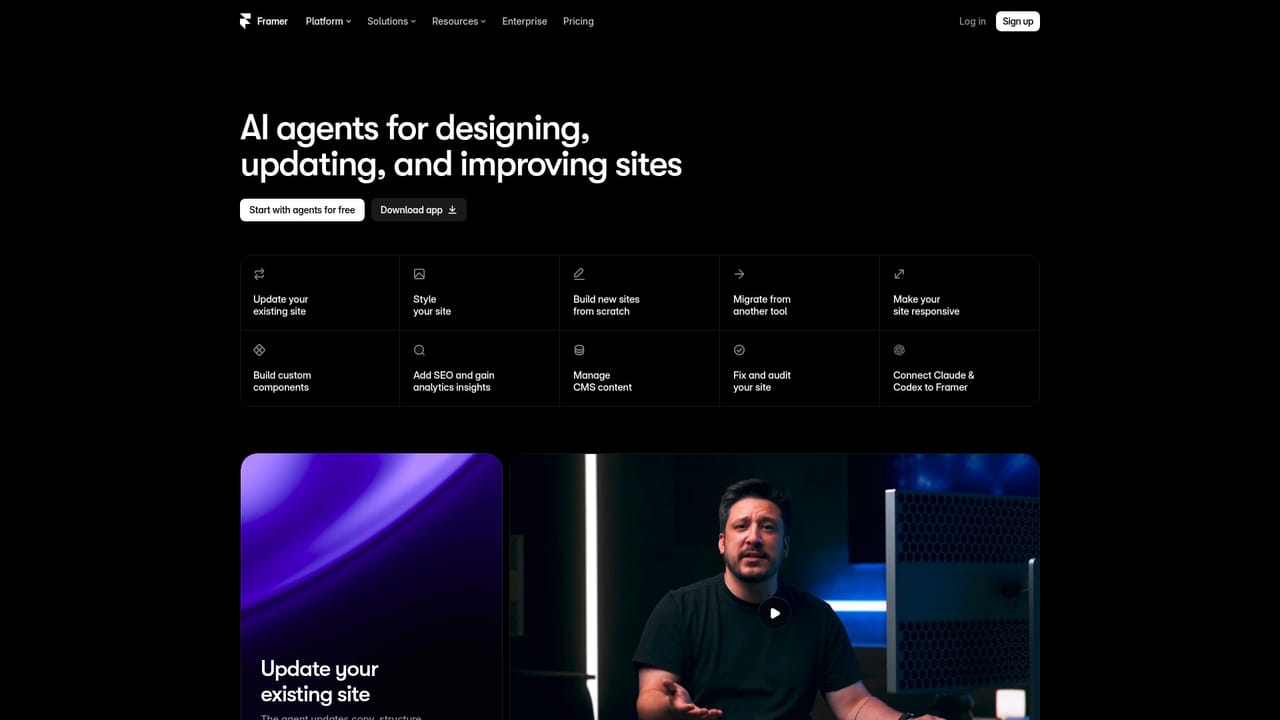
Screenshot of Framer, AI website builder that drafts editable pages on a real design canvas

What is Framer?

Framer is an app creation tool. Framer pairs an AI agent with a full design canvas: describe a page or update, get editable sections, copy, and visuals, then refine manually. CMS, code components, pre-publish audits, and traffic analysis are handled by the same agent.

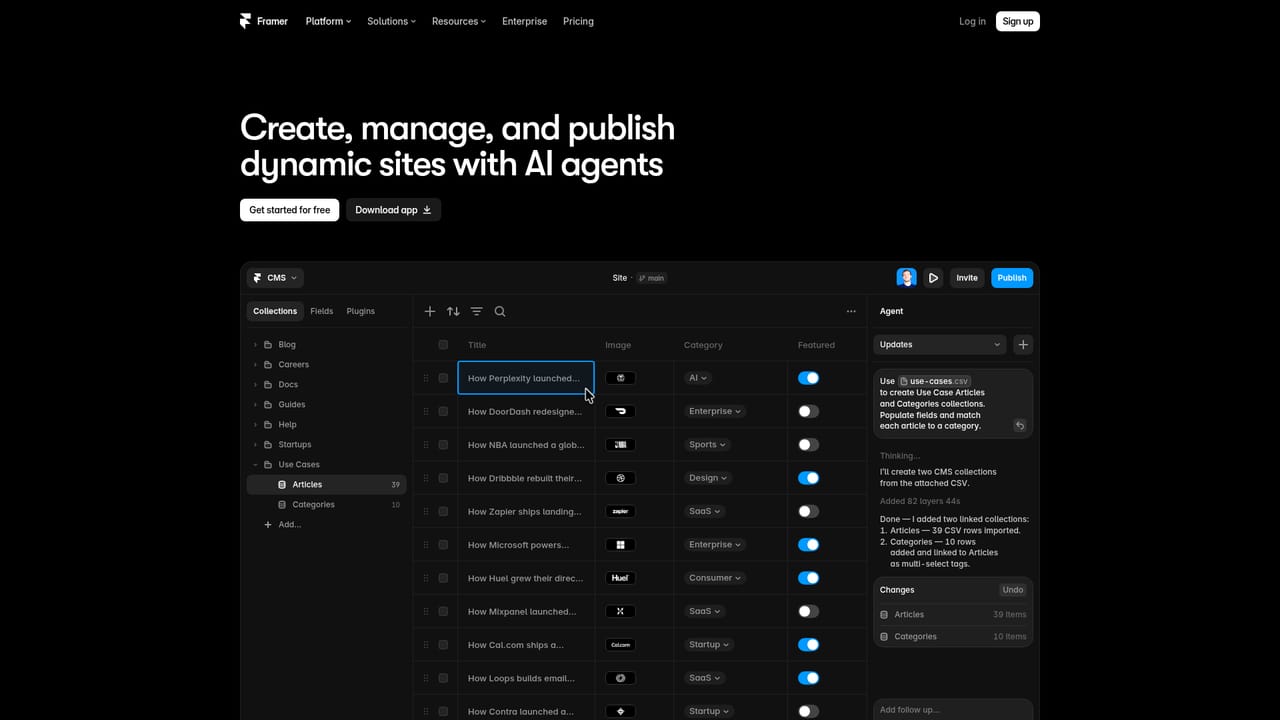
Framer is a website builder where an AI agent works inside the same project as your design canvas. You describe the site, page, or change you want in plain language, and the agent produces editable pages, sections, copy, and visuals rather than a locked template. From there you can keep going in the chat or take over manually, adjusting layout, typography, components, breakpoints, spacing, color, and effects. The point is that generation and fine control live in one place, so nothing has to be rebuilt after the first draft. The agent is not limited to laying out pages. It can create and populate CMS collections, write code components for interactions and live features, review a site before publishing for contrast problems, typos, missing alt text, SEO gaps, and inconsistent styles, and analyze traffic to surface top pages, drop-offs, search intent, and conversion gaps. Multiple models are selectable depending on the task, and Skills let you save repeatable instructions such as a design system rule or an SEO check so the agent applies them consistently. Context can be added by selecting layers on the canvas, mentioning pages, collections, styles, or assets, or uploading files and URLs as references. It suits designers who want a first draft without hand-building every section, small teams shipping marketing sites without a dedicated developer, and content operators who need CMS work done quickly. Publishing, hosting, SEO, and analytics are part of the same product, which removes the usual export step. Compared with pure prompt-to-site generators, Framer keeps a professional canvas underneath the AI, and compared with traditional builders, it front-loads the build. The tradeoff is that the strongest results assume some design literacy, and external coding agents connect through a separate setup flow rather than natively.

How do you use Framer?

  1. 1Create an account and open a project
    Sign up, then start a new project or open an existing one. The agent and the canvas share the same workspace, so you can switch between them at any time.
    Framer — Create an account and open a project
  2. 2Brief the agent on what to build
    Describe the website, page, or update you need, including tone, structure, and sections. Attach images, files, or URLs as references if you want a specific look.
    Framer — Brief the agent on what to build
  3. 3Add context and pick a model
    Select layers on the canvas to feed them to the chat, type @ to reference pages, CMS collections, styles, or assets, and choose a model suited to the task.
  4. 4Refine on the canvas
    Take over manually to adjust layouts, components, breakpoints, spacing, color, and effects. The agent keeps working from the same project when you return to chat.
    Framer — Refine on the canvas
  5. 5Connect content and custom code
    Have the agent create CMS collections and populate entries, or describe an interaction and let it build a code component that stays tied to your design system.
    Framer — Connect content and custom code
  6. 6Audit and publish
    Ask the agent to review the site for contrast issues, typos, missing alt text, and SEO gaps, fix what it flags, then publish with hosting and analytics attached.

Pros and cons

Pros

  • Generated output stays editable on a real canvas, including breakpoints, spacing, and typographyAI
  • The same agent covers CMS collections, code components, site audits, and traffic analysisAI
  • Skills save recurring instructions so the agent follows your design system consistentlyAI
  • Publishing, hosting, SEO, and analytics sit in the product, so no export step is neededAI

Cons

  • Pricing shown on the homepage describes solo builders up to organizations, but plan limits on AI usage are not statedAI
  • Results depend on how precisely you brief the agent, and vague prompts produce generic layoutsAI
  • Connecting external coding agents such as Claude Code or Codex requires a separate install and prompt setupAI
  • The canvas is powerful but assumes design vocabulary, so total beginners face a learning curveAI

How much does Framer cost?

Pricing

The homepage lists monthly tiers: Starter at $29 per month for solo builders, Professional at $49 per month for growing teams, and Enterprise at $119 per month for organizations. A monthly and yearly toggle appears above the plans, but the homepage does not state what each tier includes.

Learn more

Integrations

The agent can import from sources such as Notion, WordPress, or other APIs into the CMS, run scripts that refresh site content from live APIs, and pull local files. Claude Code and Codex can be connected to Framer through a separate install flow.

Learn more

Features

The AI agent generates editable pages, sections, copy, and visuals, then supports refinement on the canvas across breakpoints, typography, components, and effects. It also builds CMS collections and content, writes custom code components, audits a site before publishing for contrast, typos, alt text, and SEO gaps, and analyzes traffic for top pages, drop-offs, and conversion gaps. Skills store reusable instructions, and multiple models are available per task.

Learn more

Frequently asked questions about Framer

  • How much does Framer cost?
    The homepage lists monthly tiers: Starter at $29 per month for solo builders, Professional at $49 per month for growing teams, and Enterprise at $119 per month for organizations. A monthly and yearly toggle appears above the plans, but the homepage does not state what each tier includes.
  • How do you use Framer?
    The walkthrough on this page covers 6 steps: 1. Create an account and open a project 2. Brief the agent on what to build 3. Add context and pick a model 4. Refine on the canvas 5. Connect content and custom code 6. Audit and publish.
  • What platforms does Framer support?
    Framer is available on Web App.
  • What does Framer integrate with?
    The agent can import from sources such as Notion, WordPress, or other APIs into the CMS, run scripts that refresh site content from live APIs, and pull local files. Claude Code and Codex can be connected to Framer through a separate install flow.
  • What are the limitations of Framer?
    Pricing shown on the homepage describes solo builders up to organizations, but plan limits on AI usage are not stated. Results depend on how precisely you brief the agent, and vague prompts produce generic layouts. Connecting external coding agents such as Claude Code or Codex requires a separate install and prompt setup.

Status

StatusActive
Views0
Outbound clicks0
Added10/21/2026

Platforms

Web App

Pricing

PaidSubscription