Pricing
The listing states a free plan for the Mod, currently version 2.1.0. No paid tiers, usage caps beyond the 10,000 character review limit, or per seat pricing are published on the page.
Learn moreFlags robotic, repetitive writing patterns as an editorial signal.
Own Free AI Detector by ContentAtScale? Verify ownership to get a dofollow link

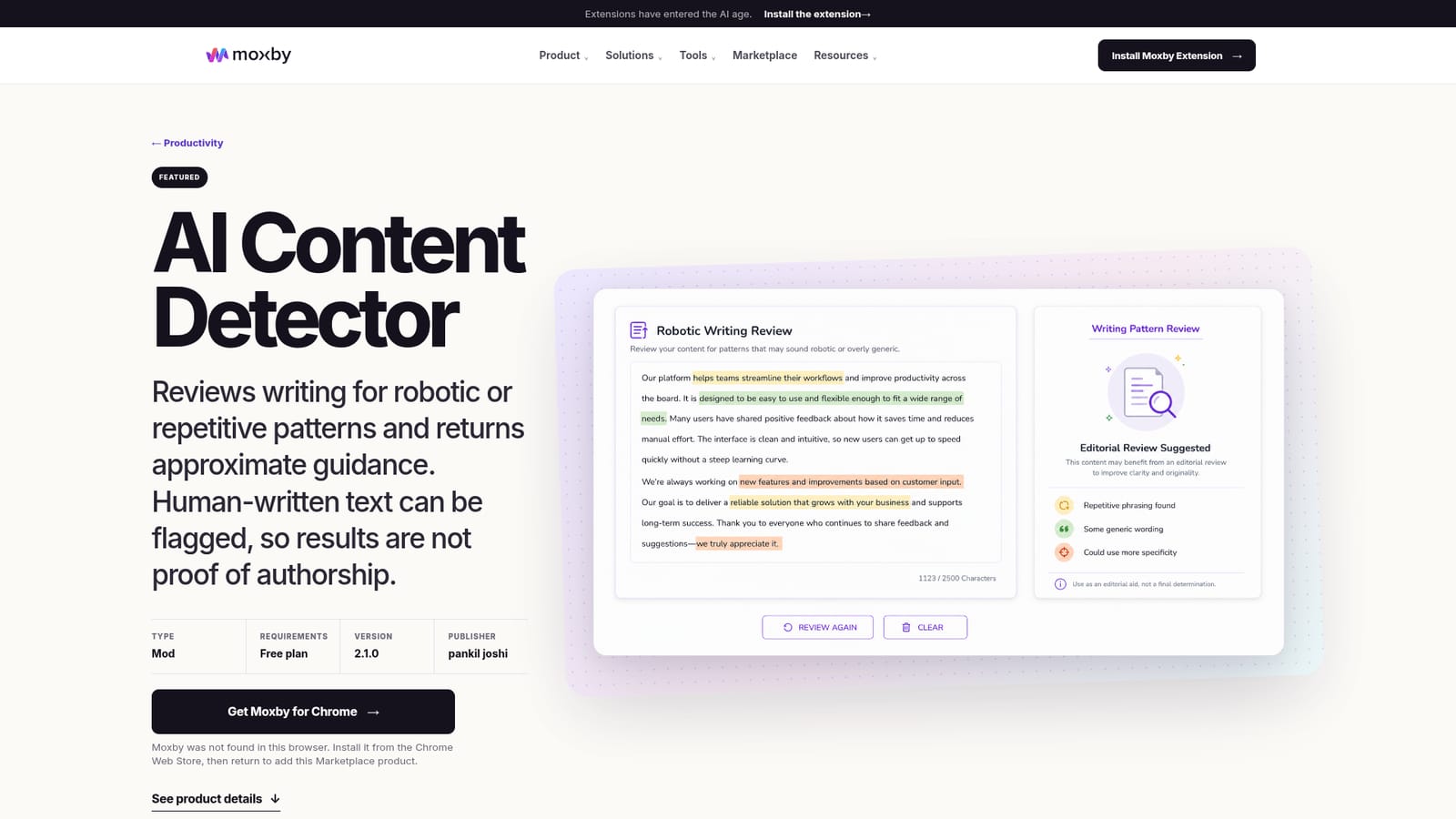
Free AI Detector by ContentAtScale is an AI checker tool. A Moxby Mod that reviews up to 10,000 characters of text for repetitive, formulaic or robotic writing patterns and returns an approximate guidance label with sentence level highlights. The publisher stresses it does not determine authorship, since human writing can be flagged and edited AI text may pass.
Free AI Detector by ContentAtScale is distributed as a Moxby Mod, a small browser utility that reviews text for repetitive, formulaic or robotic writing patterns. It returns an overall guidance label plus sentence level highlights, and it is explicit that the output is not an authorship verdict. The tool reviews up to 10,000 characters per pass, which covers most blog drafts, marketing copy and student essays without splitting them into chunks. The positioning is deliberately modest, and that is the most useful thing about it. Rather than selling a binary AI versus human verdict, the Mod points at passages that may benefit from more variation, specificity, clarity or voice. Highlights target repeated phrasing, similar sentence structures, predictable flow, generic language, thin explanations and weak transitions. In practice you run a draft, skim the flagged spans, then rewrite them with examples, context or a clearer argument. The stated goal is a better draft, not a passing score. It suits writers, editors, marketers, educators, students and content teams who want a second pair of eyes on draft quality before publishing or submitting. Anyone hoping to certify authorship should look elsewhere, because the publisher states plainly that human writing can be flagged (especially short, technical, templated or heavily edited text) and that edited AI assisted writing can read as natural. Results are approximate and can be wrong. Two practical caveats shape where it fits. Submitted text travels through the Moxby gateway to an analysis service, so confidential material should stay out unless your organization permits it. And the review uses strict pattern thresholds, which makes it a blunt instrument next to full AI detection suites: fewer configuration options, no long form reporting, and no integrations of its own beyond the Moxby ecosystem. For a quick editorial pass on everyday copy, that trade off is reasonable. For compliance or academic misconduct cases, it is not.
The listing states a free plan for the Mod, currently version 2.1.0. No paid tiers, usage caps beyond the 10,000 character review limit, or per seat pricing are published on the page.
Learn moreRuns inside the Moxby browser extension alongside Moxby Chat, Missions and other Marketplace Mods. No third party integrations are listed on the product page.
Learn moreReviews up to 10,000 characters for repetitive, uniform or robotic patterns and returns an overall guidance label. Highlights sentences that may need more variation, specificity, clarity or voice, including repeated phrasing, predictable flow, generic language, weak transitions and thin explanations. Results are explicitly approximate and not proof of authorship.
 AI Angels400+ customizable AI girlfriends for NSFW chat, voice calls, and roleplay
 Candy AIExperience the future of companionship with AI friends who chat, role-play, and connect with you on a human level.
 ourdream.aiA vast AI roleplay platform with millions of characters for chat, images, video and voiceAI Angels400+ customizable AI girlfriends for NSFW chat, voice calls, and roleplayCandy AIExperience the future of companionship with AI friends who chat, role-play, and connect with you on a human level.ourdream.aiA vast AI roleplay platform with millions of characters for chat, images, video and voice


