IndieGTM

Turn a URL or topic into a promo video and a 28-day posting plan.

Beginner
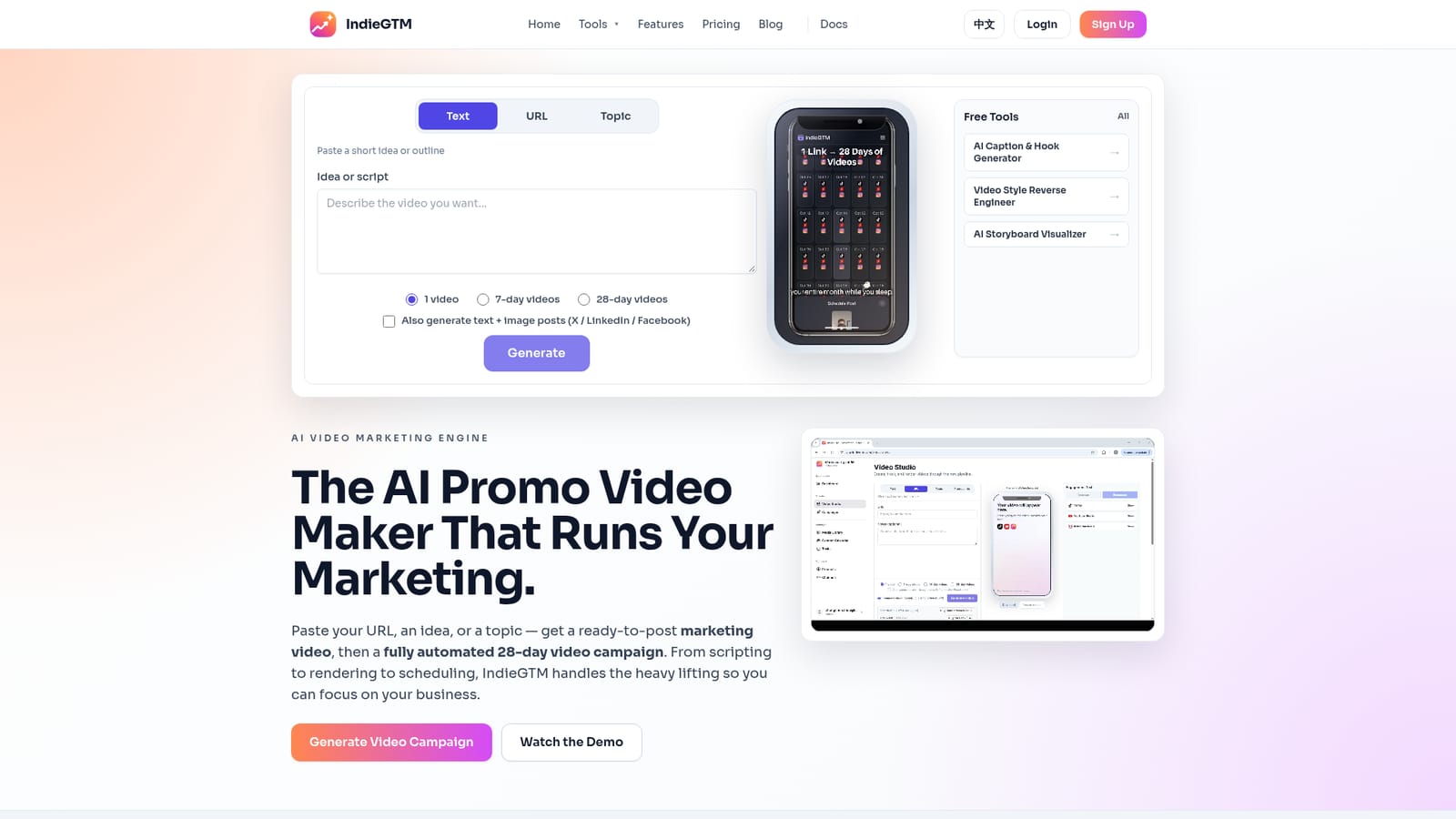
Screenshot of IndieGTM, Turn a URL or topic into a promo video and a 28-day posting plan

What is IndieGTM?

IndieGTM is a make reels AI tool that turns a URL or topic into a promo video and a 28-day posting plan. IndieGTM turns a URL, idea or topic into a scripted promo video and a multi-day posting plan for TikTok, Reels, Shorts, LinkedIn and X, with rolling-buffer rendering and 1080p MP4 exports.

IndieGTM is a marketing video engine built around a simple input: a URL, a short idea, or a topic. Feed it one of those and the tool writes a campaign outline, drafts daily engagement text with optional images, and renders short promo videos for TikTok, YouTube Shorts, Instagram Reels, LinkedIn and X. The output is aimed at small teams that need steady social presence without a video editor or a copywriter on call. The workflow is deliberately staged. You pick an input, a campaign length (1, 7, 14 or 28 days) and the platforms you publish to. IndieGTM then produces a day-by-day plan covering hooks, problem framing, proof points and a closing call to action, along with ready-to-paste captions, hashtags and first comments. Video rendering runs on a rolling buffer: only the next two days of assets are produced up front, while later days sit as outlines until they enter the buffer. That keeps credit use predictable instead of firing off 28 renders on day one, and it lets you adjust direction before the bulk of the work is committed. Each video is versioned. Regenerating a day produces v2 or v3 with a different hook or angle rather than overwriting the original, and finished assets export at 1080p as MP4. A publishing checklist combines scheduled posts with manual steps and reminders for channels that cannot be automated. IndieGTM suits solo founders, indie hackers and small agencies who treat content as a weekly habit rather than a campaign burst. It competes less with full timeline editors like Premiere or CapCut and more with the combination of a scriptwriter, a template-based video tool and a scheduler. Buyers should note the pricing tiers are defined by active campaign count, scheduling window and video volume, not by seats, and that scheduling coverage differs by tier.

How do you use IndieGTM?

  1. 1Choose your input type
    On the homepage pick Text, URL or Topic, then paste your idea, link or subject. This single field drives the whole campaign.
    IndieGTM — Choose your input type
  2. 2Set campaign length and platforms
    Select a 1, 7, 14 or 28-day plan and tick the channels for posts and short videos. You can also enable text plus image posts for X, LinkedIn and Facebook.
  3. 3Generate the campaign outline
    Run the generator to receive a day-by-day plan with hooks, angles and daily engagement copy. Later days stay as outlines until they reach the render buffer.
  4. 4Render and review videos in Video Studio
    Open the studio to preview storyboards and export MP4 at 1080p. Regenerate any day to produce a new version with a different hook or style.
  5. 5Work the publishing checklist
    Follow the combined calendar, publishing auto-scheduled items and completing manual steps and reminders for the rest.
  6. 6Try the free utilities first
    Use the caption and hook generator, the video style reverse engineer or the storyboard visualizer to sanity-check tone before committing to a plan.
    IndieGTM — Try the free utilities first

Pros and cons

Pros

  • Accepts a plain URL or one-line topic as the starting point, so no brief or script is needed to beginAI
  • Rolling two-day render buffer keeps credit spend predictable instead of generating a full month at onceAI
  • Versioned output (v1, v2, v3) lets you regenerate a single day with a new hook without losing earlier takesAI
  • Captions, hashtags and first comments are generated alongside each video, which removes a separate copywriting stepAI
  • Publishing checklist mixes scheduled posts with manual reminders for channels that resist automationAI

Cons

  • Nothing on the homepage confirms direct posting into social accounts, so scheduling claims should be verified before buyingAI
  • Video volume is capped per tier, and the Starter plan's 15 standard videos only cover every other dayAI
  • The lowest tier holds a single active campaign and a 7-day planning window, which limits testing several angles at onceAI
  • Output quality depends heavily on the source URL or topic, so thin landing pages may produce generic scriptsAI
  • No public free tier or trial is described, so evaluating render quality means committing to a paid planAI

How much does IndieGTM cost?

Pricing

Three monthly subscription tiers. Starter at $39 per month covers 1 active campaign, a 7-day window, 15 standard videos and 1 pro video. Growth at $89 adds 3 campaigns, a 14-day window, 30 standard and 4 pro videos. Studio at $199 covers 10 campaigns, a 28-day window, 60 standard and 8 pro videos with priority rendering.

Learn more

Support

Support runs through a contact page and a growth@indiegtm.com address. The team also offers to set up a workspace, channels and a first campaign on request.

Learn more

Features

Campaign generation from text, URL or topic, with outlines spanning 1 to 28 days. Daily engagement text and optional images for X, LinkedIn and Facebook, plus captions, hashtags and first comments for TikTok, Reels and Shorts. Video Studio renders short videos on a two-day rolling buffer, supports versioned regeneration and exports 1080p MP4. A publishing checklist blends scheduled posts with manual reminders.

Frequently asked questions about IndieGTM

  • How much does IndieGTM cost?
    Three monthly subscription tiers. Starter at $39 per month covers 1 active campaign, a 7-day window, 15 standard videos and 1 pro video. Growth at $89 adds 3 campaigns, a 14-day window, 30 standard and 4 pro videos. Studio at $199 covers 10 campaigns, a 28-day window, 60 standard and 8 pro videos with priority rendering.
  • How do you use IndieGTM?
    The walkthrough on this page covers 6 steps: 1. Choose your input type 2. Set campaign length and platforms 3. Generate the campaign outline 4. Render and review videos in Video Studio 5. Work the publishing checklist 6. Try the free utilities first.
  • What platforms does IndieGTM support?
    IndieGTM is available on Web App.
  • What are the limitations of IndieGTM?
    Nothing on the homepage confirms direct posting into social accounts, so scheduling claims should be verified before buying. Video volume is capped per tier, and the Starter plan's 15 standard videos only cover every other day. The lowest tier holds a single active campaign and a 7-day planning window, which limits testing several angles at once.

Status

StatusActive
Views0
Outbound clicks0
Added10/22/2026

Platforms

Web App

Pricing

SubscriptionPaid