InstaGraph

Turn text or URLs into visual knowledge graphs.

Beginner
Screenshot of InstaGraph, Turn text or URLs into visual knowledge graphs

What is InstaGraph?

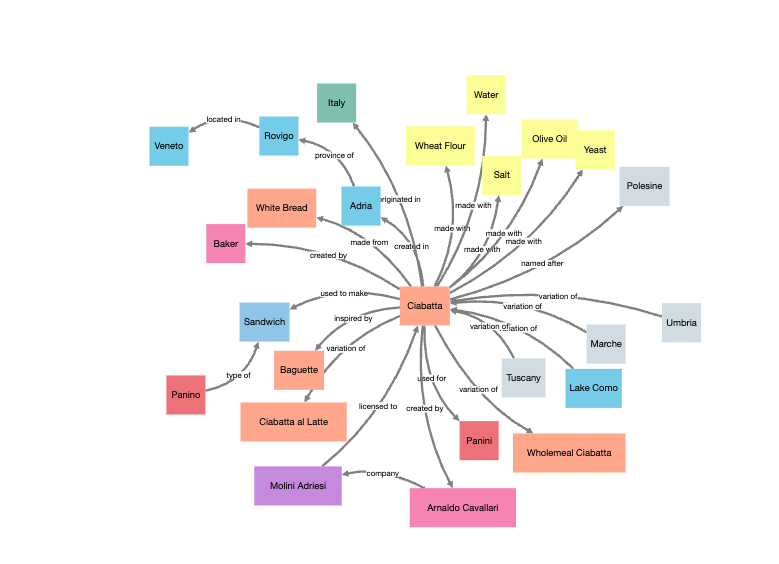
InstaGraph is an economics graph maker tool that turns text or URLs into visual knowledge graphs. InstaGraph converts natural language prompts, text, or URLs into visualized knowledge graphs. It is a focused text to graph tool for exploring entity relationships, with Google sign in and a public gallery of shared graphs.

InstaGraph is a web application that transforms natural language prompts, text, or URLs into visualized knowledge graphs. The core idea is text to graph: you supply a body of text, and the tool maps out the entities it contains and the relationships between them, returning a graph you can explore. The homepage frames the product around a simple question: curious about how entities in a complex topic connect? InstaGraph aims to answer that visually rather than through a wall of prose. The tool is built for people who need to see structure rather than read it linearly. That includes researchers mapping a dense subject area, analysts checking how names, organizations and concepts link up, students trying to get a grip on a tangled topic, and writers who want a quick map of what a source actually contains before they work with it. Because the input can be a URL, it also suits anyone who wants to digest a long article or document without reading every line first. In practice the workflow is short. Access is through a Google account sign in, which keeps setup to a minimum. From there you feed in a natural language prompt or a URL, and InstaGraph returns a visualized knowledge graph. A public gallery at the /list page lets you browse graphs other users have shared, which is useful for judging output quality before committing your own material. The about page carries the product context, and the sign in entry point sits directly on the homepage. Among alternatives, InstaGraph is deliberately narrow. It does not try to be a general research assistant or a document chatbot. Its proposition is graph extraction and rendering from text, and that focus is both its appeal and its limit. If the job is to see relationships between entities, it is a direct route. If the job is summarization, note taking, or question answering over a corpus, other categories of tool fit better. Treat it as a visualization layer on top of text, not as an analysis suite.

How do you use InstaGraph?

  1. 1Open the InstaGraph homepage
    Go to instagraph.ai. The homepage introduces the text to graph concept and hosts the sign in entry point.
  2. 2Sign in with your Google account
    Use the Google sign in button shown on the homepage. No separate username or password registration is described.
  3. 3Review the public graph gallery
    Browse the public graphs list to see examples of what InstaGraph produces before you run your own input through it.
  4. 4Read the about page
    The about page gives background on the product and its text to graph approach, useful for setting expectations.
  5. 5Submit a prompt or URL
    Once signed in, feed in a natural language prompt or a URL. InstaGraph returns a visualized knowledge graph of the entities and relationships it finds.

Pros and cons

Pros

  • Turns raw text or a URL into a visual entity relationship map without manual diagrammingAI
  • Google sign in keeps onboarding to a single stepAI
  • Public graph gallery lets you inspect output quality before using it yourselfAI
  • Narrow, single purpose design means little time spent learning the interfaceAI

Cons

  • No pricing information is published on the site, so cost is unclear before signing inAI
  • Google account is the only listed sign in method, which rules out other login preferencesAI
  • No documentation, export options, or API details are described on the homepageAI
  • Graph quality depends entirely on the input text, with no stated controls for tuning extractionAI

How much does InstaGraph cost?

Features

Converts natural language prompts into a visualized knowledge graph (text to graph). Accepts text or URLs as input and maps entities and their relationships. Includes a public gallery where shared graphs can be browsed, plus an about page describing the product. Sign in is handled through a Google account.

Frequently asked questions about InstaGraph

  • How do you use InstaGraph?
    The walkthrough on this page covers 5 steps: 1. Open the InstaGraph homepage 2. Sign in with your Google account 3. Review the public graph gallery 4. Read the about page 5. Submit a prompt or URL.
  • What platforms does InstaGraph support?
    InstaGraph is available on Web App.
  • What are the limitations of InstaGraph?
    No pricing information is published on the site, so cost is unclear before signing in. Google account is the only listed sign in method, which rules out other login preferences. No documentation, export options, or API details are described on the homepage.